

Most people who search for a CompTIA Tech+ practice test have already decided to sit the exam. Smart move.
But here’s the thing: if you’re grinding random free dumps from sketchy websites, you’re studying the wrong way. A lot of those questions are outdated, pulled from the old ITF+ exam (FC0-U61), or just flat-out wrong. The Tech+ exam (FC0-U71) has its own format and its own question style, and those differences matter.
You’ve probably heard IT certification exams are mostly memorization. That’s not quite right. Tech+ tests your ability to apply concepts, not just define them. So practice questions that only ask you to regurgitate definitions won’t prepare you for the real thing.
This guide gives you 20+ real-format practice questions across all six exam domains, detailed explanations for each answer, and study tips that actually move the needle. By the end, you’ll know exactly what to expect on exam day and how to prepare for it.
Skip the guesswork. Learn it live.
Tech+ is your entry point. The natural next step is Network+, and our Network+ course is free (live, instructor-led, real labs). Start there, then build toward CCNA.Tech+ is your entry point. The natural next step is Network+, and our Network+ course is free (live, instructor-led, real labs). Start there, then build toward CCNA. This sits inside how to become a network engineer, if you want the full route.
What Is the CompTIA Tech+ Exam?
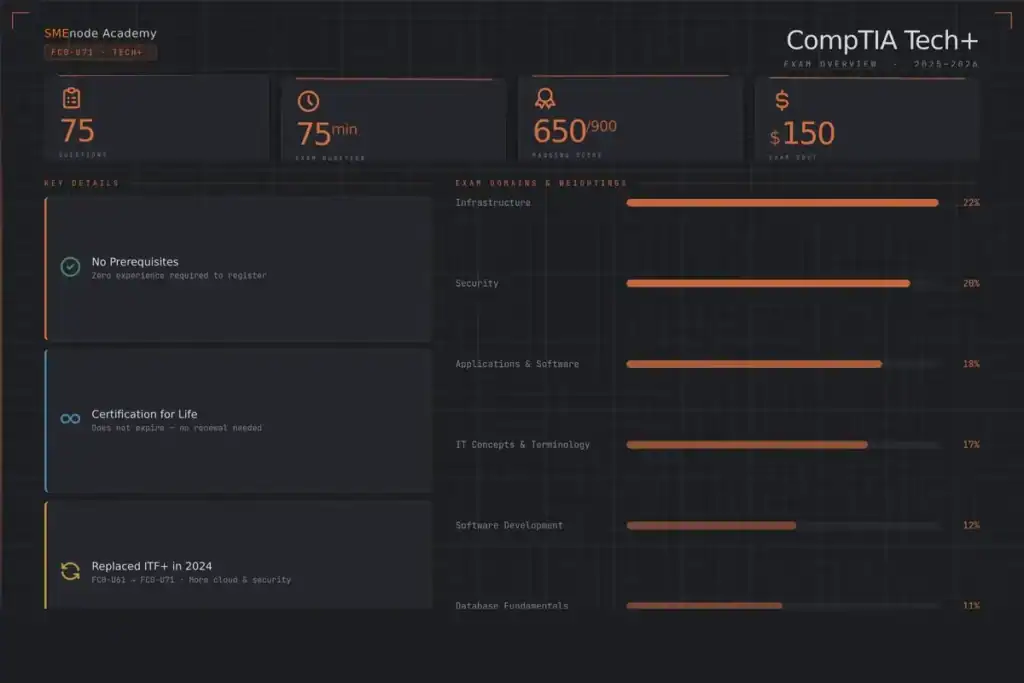
CompTIA Tech+ is an entry-level certification that proves you understand core IT concepts, from hardware and networking to security and basic coding. It’s the starting line for an IT career.
The exam code is FC0-U71. It replaced ITF+ in July 2024, and it’s a step up in difficulty. Here’s the honest version: Tech+ tests whether you can apply concepts, not just define them.
Quick facts, per CompTIA’s official exam page:
| Detail | CompTIA Tech+ (FC0-U71) |
|---|---|
| Questions | Maximum 70 |
| Question types | Multiple choice + performance-based |
| Time limit | 60 minutes |
| Passing score | 650 (scale of 100-900) |
| Cost | Around $150 USD (voucher price varies by region) |
| Delivery | Testing centre or online proctored |
That’s a lot to cover in 60 minutes. Speed matters. So does knowing where the points are.
What Does the Tech+ Exam Actually Test?

Six domains. And they’re not weighted equally. Study by weight, not by chapter order.
| Domain | Weight |
|---|---|
| Infrastructure | 24% |
| Security | 19% |
| Applications and Software | 18% |
| Tech Concepts and Terminology | 13% |
| Software Development Concepts | 13% |
| Data and Database Fundamentals | 13% |
Source: CompTIA Tech+ exam objectives, FC0-U71 (V6).
Infrastructure and Security together make up 42% of the exam. If you’re short on time, those two are where you put the work in first. And if the Infrastructure domain sparks an interest in networking, our Network+ course picks up right where Tech+ leaves off.
CompTIA Tech+ Practice Questions (With Answers)
Here’s the part that matters. Try each question before you read the answer. No peeking. That’s how you find your gaps.
We built these to match the real exam’s style: concept application, not trivia.
Infrastructure
1. A user can reach websites by IP address but not by name. What’s the most likely cause?
A. Bad network cable
B. DNS failure
C. Firewall blocking port 443
D. Wrong subnet mask
Answer: B. DNS turns names into IP addresses. If IPs work but names don’t, name resolution is the problem. Not the cable, since traffic still flows.
2. Which port does HTTPS use by default?
A. 80
B. 25
C. 443
D. 22
Answer: C. HTTPS uses port 443. HTTP uses 80. Memorize the common ones (80, 443, 22, 25, 53, 3389). They show up a lot.
3. What does a network switch use to forward frames to the right device?
A. IP address
B. MAC address
C. Hostname
D. Port number
Answer: B. A switch forwards based on MAC addresses. Routers use IP addresses. That difference is a classic exam trap. If you want the deeper version, our guide on VLAN vs subnet shows how these pieces fit together.
4. Which of these is a private IP address?
A. 8.8.8.8
B. 192.168.1.10
C. 172.15.0.1
D. 100.1.1.1
Answer: B. The private ranges are 10.x.x.x, 172.16-31.x.x, and 192.168.x.x. Note that 172.15 is outside the private range. Small detail, easy points.
Security
5. A login requires a password and a code from your phone. What is this?
A. Single sign-on
B. Multi-factor authentication
C. Encryption
D. Least privilege
Answer: B. Two different factors (something you know + something you have) means MFA. It’s one of the highest-value security concepts on the exam.
6. An email claims your account is locked and links to a fake login page. What attack is this?
A. Phishing
B. Spyware
C. Brute force
D. DDoS
Answer: A. Phishing tricks you into handing over info through a fake but familiar-looking message.
7. A junior tech is given only the access needed for their job, nothing more. What principle is this?
A. Zero trust
B. Principle of least privilege
C. Defence in depth
D. Separation of duties
Answer: B. Least privilege means the minimum access required. Curious how passing scores work across security certs? See what the Security cert passing score really is.
Applications, Software, and Development
8. Which type of memory loses its data when the computer powers off?
A. SSD
B. Hard drive
C. RAM
D. ROM
Answer: C. RAM is volatile. Power off, data gone. Storage (SSD, HDD) keeps data.
9. Which data type stores only true or false?
A. Integer
B. String
C. Boolean
D. Float
Answer: C. Boolean = true/false. Integers are whole numbers, strings are text.
10. What is the purpose of an operating system?
A. Browse the web
B. Manage hardware and run software
C. Store passwords
D. Send email
Answer: B. The OS is the middle layer between hardware and your apps.
Data and Database Fundamentals
11. In a database table, what does a primary key do?
A. Encrypts the row
B. Uniquely identifies each record
C. Sorts the table
D. Backs up the data
Answer: B. A primary key is a unique identifier for each row. No duplicates allowed.
12. Which language is used to query a relational database?
A. HTML
B. SQL
C. Python
D. CSS
Answer: B. SQL (Structured Query Language) reads and manages data in relational databases.
Want a tougher set once you clear Tech+? Our CCNA practice test with 200+ questions is the next rung up. We break down 50 subnetting problems with worked solutions separately.
Practice Tip: How’d you do? If you missed more than three from any single domain, that domain needs more time. Don’t just move on. Go back to the explanations, find a gap in your knowledge, and fix it.
Want more practice questions and a guided study path? The SMEnode Tech+ Workbook from SMEnode Labs covers all six domains with hundreds of practice questions and detailed breakdowns.
Get the Full CompTIA Tech+ Practice Test, Free
This article has 20 questions. The complete pack has 100+ questions across all six domains, a printable answer sheet, and a domain-by-domain score tracker so you know exactly where to focus.
Drop your email below and we’ll send it to you right away. No spam. Just the PDF.
Get the Free PDF
Enter your email to download instantly.
How to Study for CompTIA Tech+ (Tips That Work)
Most people study wrong. They read cover to cover, feel prepared, then freeze on performance-based questions. Here’s a better way.
- Download the official objectives first. Grab the CompTIA Tech+ objectives PDF and treat it as your checklist. If it’s not on the list, it’s not on the exam.
- Study by domain weight. Start with Infrastructure (24%) and Security (19%). That’s 43% of your score.
- Do questions before theory. Practice questions show you what you don’t know in minutes. Then read to fill the gap.
- Memorize the common ports. 80, 443, 22, 25, 53, 3389. Free points.
- Practice performance-based questions. These aren’t multiple choice. You’ll do a task. Get comfortable clicking, dragging, and matching.
- Use short focused sessions. 45 minutes, one domain, no phone. Beats a three-hour cram.
One more thing. In our live classes, students learn on real lab setups, not slides. You ask a question, you get an answer on the spot. That’s the difference between recognizing an answer and actually knowing it.
How Long Does It Take to Prepare?
Most people need 4 to 8 weeks. Here’s what changes that number:
- Some IT background? 3 to 4 weeks is realistic.
- Starting from zero? Give yourself 8 weeks, maybe 10.
- Studying part-time around a job? Add a couple of weeks and don’t rush it.
Consistency beats intensity. An hour a day for six weeks works better than a panicked weekend.
What Comes After Tech+?

Tech+ opens the door. It doesn’t get you the corner office. Think of it as your foundation, then build up.
Here are the common paths:
- Networking: Tech+ → Network+ → CCNA → CCNP
- Security: Tech+ → Security+ → CySA+
- Cloud: Tech+ → AWS Cloud Practitioner → AWS Solutions Architect
On pay: entry help-desk roles often start around $45K-$55K. Get to CCNA level and you’re looking at $80K and up. Cloud and security specialists climb higher from there.
Two next steps worth bookmarking:
- Our free Network+ course is the natural follow-on. Same domains as Tech+, one level deeper.
- Planning a cloud path? Check real fees first in our AWS certification cost guide for 2026.
For extra hands-on drills, SMEnode Labs makes certification workbooks and lab kits you can pair with any course.
Ready to Take the Next Step?
You don’t have to study alone. SMEnode Academy runs live, instructor-led IT training with real lab environments and instructors who work in the field. Not pre-recorded videos you watch once and forget.
Start free: our Network+ course costs nothing and picks up right where Tech+ leaves off.
→ Enrol in the free Network+ course or talk to an advisor about your path.
Bottom Line
CompTIA Tech+ is a real entry point into IT, and practice questions are the fastest way to get ready. Focus on Infrastructure and Security, drill sample questions before theory, and memorize your ports. Then keep moving. Network+ and CCNA are where the career (and the salary) really opens up. Worth reading next: 200+ N10-009 practice questions.
Try the questions above again tomorrow. If you nail them cold, you’re ready to book the exam.
Bottom Line
The CompTIA Tech+ (FC0-U71) is a solid entry point into IT. It covers six domains: IT Concepts, Infrastructure, Applications, Software Development, Databases, and Security. Infrastructure and Security together make up nearly half the exam.
To pass it:
- Download the official exam objectives and study from them
- Practise questions before reading theory
- Memorise the common port numbers
- Don’t skip performance-based question practice
- Study in focused sessions, not marathon reading sessions
The practice questions in this guide are a starting point. Work through every single answer explanation, not just the ones you got wrong. Understanding why a wrong answer is wrong is just as useful as knowing the right one.
You’ve got this. Study smart, not just hard.
Want the Full 100-Question Practice Test as a PDF?
We put together a printable Tech+ practice pack with 100+ questions, full answer explanations, and a score tracker by domain. It’s free.
Enter your email and we’ll send it straight to your inbox.
Get the Free PDF
Enter your email to download instantly.
No credit card. No course pitch. Just the study material.
Frequently Asked Questions
Is the CompTIA Tech+ hard?
It’s designed to be manageable for people new to IT, but you still need to study. Most people who fail underestimate the Security and Infrastructure domains. Plan four to eight weeks of consistent preparation.
How many questions are on the CompTIA Tech+ exam?
Maximum 75 questions. The time limit is 75 minutes. That gives you about a minute per question, which is plenty as long as you’re not second-guessing yourself on every answer.
Can I take the Tech+ exam online?
Yes. CompTIA offers online proctored exams through Pearson VUE. You can sit it from home as long as your setup meets the testing requirements.
Is Tech+ worth it in 2026?
Yes, especially if you have no other IT credentials. Employers use it as a baseline filter for entry-level roles. It’s also a requirement for some government and defence contractor positions in North America.
What’s the difference between CompTIA Tech+ and A+?
Tech+ (FC0-U71) is a single exam covering IT fundamentals broadly. A+ (Core 1 and Core 2) is two exams with much more depth in hardware, operating systems, and troubleshooting. A+ is the better choice if you’re targeting a help desk or technician role. Tech+ is better if you’re just starting out and want to confirm IT is the right path.