Priya walked out of her Network+ exam 12 points short. She knew the OSI model cold. She could explain DHCP to her manager without notes. What killed her was four performance-based questions that each needed a subnet calculated by hand, and she burned nine minutes on the first one before guessing.
That’s the pattern we see over and over. Subnetting isn’t the hardest topic on either exam. It’s the one that eats your clock.
Here’s the fix, and it’s the whole article in one line: stop dividing, start counting blocks. Every subnetting question on the planet is answerable in under 30 seconds once you know the block size for a given mask and can count in that block until you pass your host address. No long division. No binary conversion. No calculator.
Below you’ll find 50 subnetting practice questions grouped into six sets, easy to hard. Every single one comes with the worked solution, so you see the steps rather than a bare letter answer. Miss a question? You’ll know exactly which step broke.
Let’s cover the method first. It takes four minutes to learn and it powers all 50 answers.
The Block Size Method (Learn This First)
Two tables. That’s the entire method.
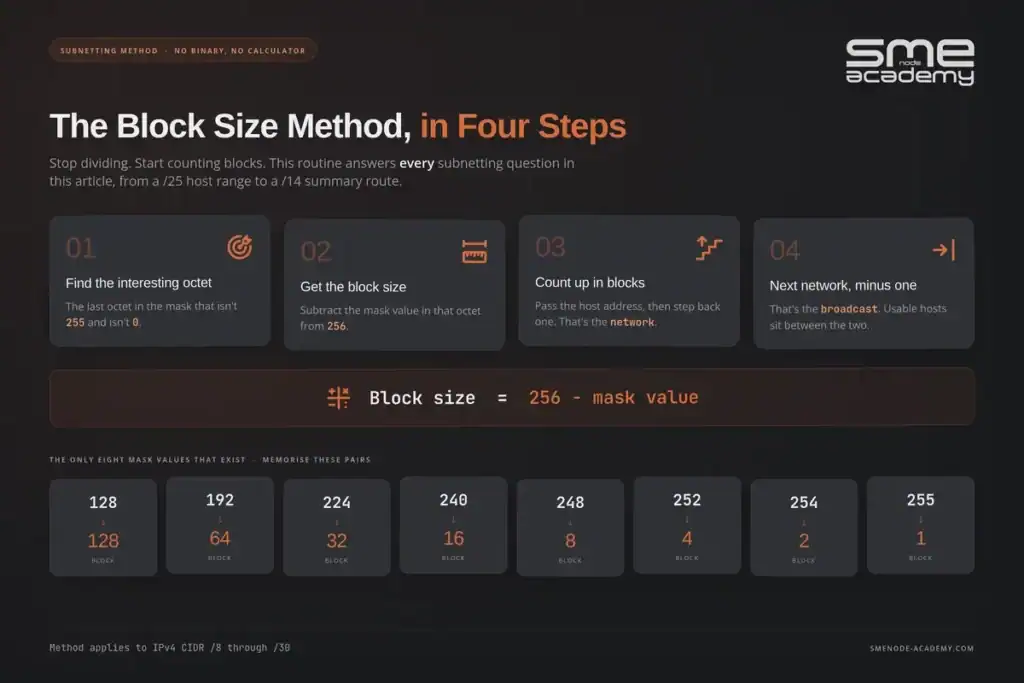
Table one: the mask values. Subnet masks in any octet can only ever be one of these eight numbers. Memorise the pairing between the mask value and its block size.
| Mask value | Block size | Prefix bits added |
|---|---|---|
| 128 | 128 | /1 in that octet |
| 192 | 64 | /2 |
| 224 | 32 | /3 |
| 240 | 16 | /4 |
| 248 | 8 | /5 |
| 252 | 4 | /6 |
| 254 | 2 | /7 |
| 255 | 1 | /8 |
Block size is simply 256 minus the mask value. A mask of 224 gives you 256 – 224 = 32. Subnets in that octet then start at 0, 32, 64, 96, 128, 160, 192, 224. That’s it.
Table two: prefix to mask. You need to read a /26 and instantly see 255.255.255.192.
| Prefix | Mask | Usable hosts |
|---|---|---|
| /24 | 255.255.255.0 | 254 |
| /25 | 255.255.255.128 | 126 |
| /26 | 255.255.255.192 | 62 |
| /27 | 255.255.255.224 | 30 |
| /28 | 255.255.255.240 | 14 |
| /29 | 255.255.255.248 | 6 |
| /30 | 255.255.255.252 | 2 |
| /23 | 255.255.254.0 | 510 |
| /22 | 255.255.252.0 | 1,022 |
| /21 | 255.255.248.0 | 2,046 |
| /20 | 255.255.240.0 | 4,094 |
The usable host count is always 2^(host bits) – 2. You subtract 2 because the first address in the block is the network address and the last is the broadcast address. Neither can go on a device.
The four-step routine
Every question in this article gets solved the same way:
- Find the interesting octet. That’s the last octet in the mask that isn’t 255 and isn’t 0.
- Get the block size. 256 minus the mask value in that octet.
- Count up in blocks until you pass the host address, then step back one. That’s your network address.
- Broadcast is the next network minus 1. Usable range sits between the two.
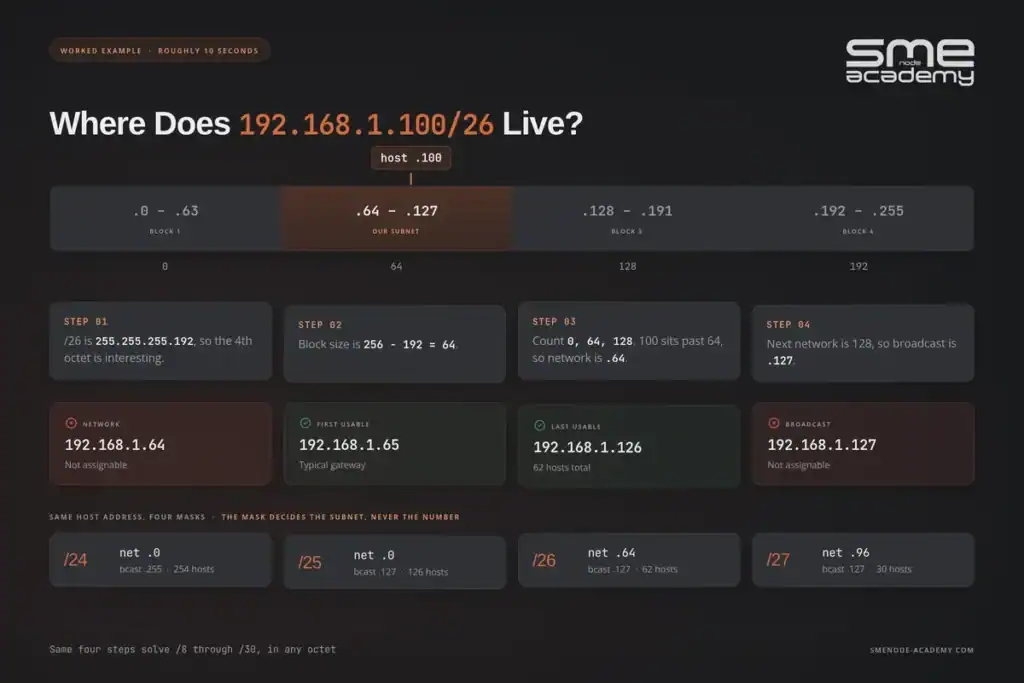
Work an example. Host 192.168.1.100 with mask /26.
- /26 is 255.255.255.192, so the fourth octet is interesting.
- Block size = 256 – 192 = 64.
- Count: 0, 64, 128. Our host is 100, which sits past 64 but before 128. Network is 192.168.1.64.
- Next network is 128, so broadcast is 192.168.1.127. Usable range is .65 to .126.
Four steps, roughly 10 seconds once it’s muscle memory. Now go break it on 50 problems.
New to networking and want this taught live rather than read? Our Network+ course is completely free, live instructor-led, and spends a full session drilling exactly this method with a room full of people getting it wrong at the same time as you. The companion piece covers single-mode vs multimode fibre.
Set 1: Masks and Host Counts (Q1 to Q10)
Warm-up. These test whether the two tables above are actually in your head.

Q1. How many usable host addresses are in a /26 subnet?
Worked solution: /26 leaves 32 – 26 = 6 host bits. 2^6 = 64 total addresses. Subtract the network and broadcast addresses. Answer: 62.
Q2. What is 255.255.255.240 in CIDR notation?
Worked solution: The first three octets are 255, giving 24 bits. In the fourth octet, 240 comes from 11110000, which is 4 more bits. 24 + 4 = 28. Answer: /28.
Q3. Write /19 in dotted decimal.
Worked solution: 19 bits means the first two octets are full (16 bits), leaving 3 bits in the third octet. Three bits set from the left is 128 + 64 + 32 = 224. Answer: 255.255.224.0.
Q4. How many usable hosts does a /30 give you?
Worked solution: 2 host bits, 2^2 = 4 addresses, minus network and broadcast. Answer: 2. This is why /30 is the classic router-to-router link mask.
Q5. A host has mask 255.255.255.128. What’s the prefix, and how many hosts fit?
Worked solution: 128 is one bit (10000000), so 24 + 1 = /25. Host bits = 7, so 2^7 = 128 total, minus 2. Answer: /25 with 126 usable hosts.
Q6. You need a subnet that holds 500 hosts. What’s the smallest mask that works?
Worked solution: /24 gives 254, too small. /23 gives 2^9 – 2 = 510. That clears 500. /22 would give 1,022, which works but wastes half the space. Answer: /23 (255.255.254.0).
Q7. Smallest mask for exactly 100 hosts?
Worked solution: /26 gives 62, not enough. /25 gives 126. Answer: /25 (255.255.255.128). Watch the trap here. Candidates see “100” and reach for /24 out of habit.
Q8. How many usable hosts in a /22?
Worked solution: 10 host bits, 2^10 = 1,024, minus 2. Answer: 1,022.
Q9. How many usable addresses does a /31 provide?
Worked solution: By the classic rule, 2^1 – 2 = 0, which would make /31 useless. RFC 3021 changed that for point-to-point links, where both addresses are usable and there’s no broadcast. Answer: 2 on a point-to-point link. Exam questions increasingly expect the RFC 3021 answer, so read the wording carefully.
Q10. An engineer used a /24 on a router-to-router link. How many addresses are wasted?
Worked solution: A /24 gives 254 usable. The link needs 2. 254 – 2 = 252. Answer: 252 wasted addresses. Multiply that across 40 WAN links and you’ve thrown away a /16.
Set 2: Finding the Network and Broadcast Address (Q11 to Q20)
This is the heart of it. Run the four-step routine on each one and time yourself.
Q11. What’s the network address of 192.168.1.100/26?
Worked solution: Block size 64. Count 0, 64, 128. 100 falls in the 64 block. Answer: 192.168.1.64.
Q12. What’s the broadcast address of 10.10.10.200/27?
Worked solution: /27 = 255.255.255.224, block size 32. Count: 0, 32, 64, 96, 128, 160, 192, 224. 200 sits in the 192 block. Next block starts at 224, so broadcast is 224 – 1. Answer: 10.10.10.223.
Q13. Network address of 172.16.45.77/20?
Worked solution: /20 = 255.255.240.0. The interesting octet is the third, not the fourth. Block size = 256 – 240 = 16. Count in the third octet: 0, 16, 32, 48. Our 45 falls in the 32 block. Answer: 172.16.32.0. This one catches people who only ever practise on /24 to /30.
Q14. Give the network and broadcast for 192.168.5.130/28.
Worked solution: Block size 16. Count: 112, 128, 144. 130 lands in 128. Broadcast is 144 – 1. Answer: network 192.168.5.128, broadcast 192.168.5.143.
Q15. What’s the broadcast address of 10.0.0.55/29?
Worked solution: Block size 8. Count: 40, 48, 56. 55 sits in the 48 block, so broadcast is 56 – 1 = 55. Answer: 10.0.0.55, which is the address given in the question. The host address you were handed is itself the broadcast. It can’t be assigned to a device. Nasty, and it shows up on exams.
Q16. Network address of 172.20.130.66/18?
Worked solution: /18 = 255.255.192.0. Third octet is interesting, block size 64. Count: 0, 64, 128, 192. 130 falls in 128. Answer: 172.20.128.0.
Q17. Network and broadcast for 192.168.100.17/30?
Worked solution: Block size 4. Count: 12, 16, 20. 17 lands in 16. Broadcast is 19. Answer: network 192.168.100.16, broadcast 192.168.100.19. Usable pair is .17 and .18.
Q18. Network and broadcast for 10.200.75.190/25?
Worked solution: Block size 128. Count: 0, 128. 190 falls in 128. Next block would be 256, so broadcast is 255. Answer: network 10.200.75.128, broadcast 10.200.75.255.
Q19. Network and broadcast for 172.31.99.99/22?
Worked solution: /22 = 255.255.252.0, third octet interesting, block size 4. Count: 92, 96, 100. Our 99 sits in the 96 block, which runs through 99. Answer: network 172.31.96.0, broadcast 172.31.99.255.
Q20. Network and broadcast for 192.168.14.62/27?
Worked solution: Block size 32. Count: 32, 64. 62 lands in 32. Broadcast is 63. Answer: network 192.168.14.32, broadcast 192.168.14.63. Note that .62 is the last usable address in this subnet.
Daniel, one of our live students last spring, could do every /26 and /27 in his sleep and then froze solid on Q13. His problem wasn’t the maths. He’d only ever worked the fourth octet, so a /20 looked like a different species.
We spent 20 minutes on third-octet blocks and he never missed one again. If you only take one thing from this set, take that: work the interesting octet, not the last octet.
Set 3: Host Ranges and Valid Addresses (Q21 to Q30)
Now the questions get sneaky. Several of these ask whether an address can be assigned at all.
Q21. First and last usable addresses in 192.168.1.64/26?
Worked solution: Network is .64, broadcast is .127. Usable sits between them. Answer: 192.168.1.65 to 192.168.1.126.
Q22. Can 10.1.1.63 be assigned to a PC on a /26 network?
Worked solution: Block size 64. 63 falls in the 0 block, which runs 0 to 63. So 63 is the broadcast address of 10.1.1.0/26. Answer: No. It’s a broadcast address.
Q23. Can 192.168.10.32 be assigned to a host with mask /27?
Worked solution: Block size 32. Count: 0, 32, 64. The address 32 is exactly a block boundary, so it’s the network address of 192.168.10.32/27. Answer: No. It’s a network address.
Q24. Is 10.10.10.10/30 a valid host address?
Worked solution: Block size 4. Count: 8, 12. 10 sits in the 8 block. Network .8, broadcast .11, usable .9 and .10. Answer: Yes. It’s the last usable address in 10.10.10.8/30. People reject this one because it “looks like” a boundary. Do the maths instead of eyeballing.
Q25. Can 172.16.16.0 be assigned to a server using a /20 mask?
Worked solution: Third octet block size is 16. Count: 0, 16, 32. The address 172.16.16.0 lands exactly on a boundary, making it the network address of 172.16.16.0/20. Answer: No. And the reverse trap exists too. An address ending in .0 is perfectly valid in a /20, say 172.16.17.0, because that’s just a host inside the block.
Q26. What’s the last usable address in 10.5.0.0/22?
Worked solution: Block size 4 in the third octet, so the range covers 10.5.0.0 through 10.5.3.255. Broadcast is 10.5.3.255. Answer: 10.5.3.254.
Q27. Give the usable range for 203.0.113.32/28.
Worked solution: Block size 16, network .32, next block .48, broadcast .47. Answer: 203.0.113.33 to 203.0.113.46.
Q28. Can 192.168.1.62/27 and 192.168.1.66/27 talk without a router?
Worked solution: Block size 32. .62 falls in the 32 block (32 to 63). .66 falls in the 64 block (64 to 95). Different subnets. Answer: No, they need a Layer 3 device. They’re only four addresses apart, which is exactly why this question works.
Q29. Are 192.168.20.14/28 and 192.168.20.17/28 on the same subnet?
Worked solution: Block size 16. .14 sits in the 0 block (0 to 15). .17 sits in the 16 block (16 to 31). Answer: No. Three addresses apart, different broadcast domains.
Q30. Can 192.168.1.200 be used as a host address with a /29 mask?
Worked solution: Block size 8. 200 divided by 8 is exactly 25, so 200 is a block boundary. Network address of 192.168.1.200/29. Answer: No.
If Q28 and Q29 tripped you, that’s the single most useful thing this article can tell you. Two addresses being numerically close says nothing about whether they’re on the same subnet. The mask decides, always. We break that idea down further in our guide on VLAN vs subnet, which explains why the Layer 2 and Layer 3 boundaries usually line up.
Halfway point, and this is where drilling beats reading. The CCNA 200-301 workbook from SMEnode Labs has 300 more of these with the same worked-solution format, plus the lab topologies to configure them on real gear.
Set 4: Subnet Counting and Design (Q31 to Q38)
Flip the question around. Instead of “which subnet is this host in”, you’re now asked to carve a block up.
Q31. How many /26 subnets fit inside a /24?
Worked solution: You borrowed 26 – 24 = 2 bits. 2^2 = 4. Answer: 4 subnets, each with 62 usable hosts.
Q32. How many /28 subnets fit inside a /24?
Worked solution: 28 – 24 = 4 borrowed bits. 2^4 = 16. Answer: 16 subnets, each with 14 usable hosts.
Q33. How many /24 subnets fit inside a /16?
Worked solution: 24 – 16 = 8 bits. 2^8 = 256. Answer: 256 subnets.
Q34. You need to split 192.168.1.0/24 into 8 equal subnets. What mask?
Worked solution: 8 subnets needs 3 borrowed bits, because 2^3 = 8. 24 + 3 = /27. Answer: /27 (255.255.255.224), giving 30 hosts each.
Q35. Same /24, but you only need 6 subnets. What mask?
Worked solution: Bits come in powers of 2, so there’s no mask that yields exactly 6. Two bits gives 4 (not enough), three bits gives 8. Answer: still /27. You get 8 subnets and leave 2 spare. Always round up to the next power of 2.
Q36. How many /22 subnets fit in a 10.0.0.0/16, and how many hosts does each hold?
Worked solution: 22 – 16 = 6 bits, 2^6 = 64. Each /22 holds 2^10 – 2 hosts. Answer: 64 subnets of 1,022 hosts each.
Q37. How many /30 point-to-point links can you pull out of a single /24?
Worked solution: 30 – 24 = 6 bits, 2^6 = 64. Answer: 64 links. One /24 covers a lot of WAN.
Q38. A campus needs one flat subnet for 4,000 devices. Smallest mask?
Worked solution: /21 gives 2,046, too small. /20 gives 2^12 – 2 = 4,094. Answer: /20 (255.255.240.0). In practice you’d never put 4,000 devices in one broadcast domain, but the exam asks the maths, not the design review.
Set 5: VLSM Subnetting Practice Questions (Q39 to Q44)
Variable Length Subnet Masking is where most candidates lose marks, because it’s the only set that requires you to hold state across six answers. One scenario, six questions, worked in order. Also useful here: a repeatable network troubleshooting order.
The scenario. You’ve been given 10.10.0.0/16 for a single site. Allocate subnets in this order, largest first, wasting as little as possible:
| Department | Hosts needed |
|---|---|
| Sales | 500 |
| Engineering | 250 |
| Support | 100 |
| Finance | 50 |
| HR | 25 |
| Guest Wi-Fi | 10 |
| WAN link 1 | 2 |
| WAN link 2 | 2 |
Q39. What mask does Sales need, and what’s their subnet?
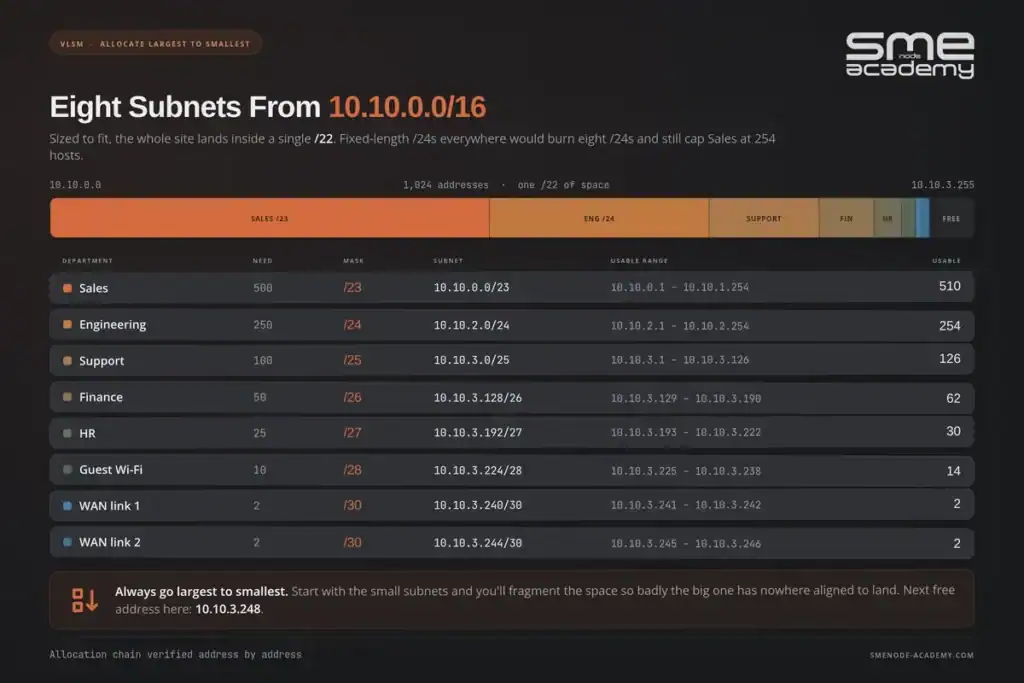
Worked solution: 500 hosts needs /23 (510 usable). Start at the beginning of the block. Answer: 10.10.0.0/23. Range 10.10.0.1 to 10.10.1.254, broadcast 10.10.1.255.
Q40. What subnet does Engineering get?
Worked solution: 250 hosts needs /24 (254 usable). Sales consumed through 10.10.1.255, so the next free boundary is 10.10.2.0. Answer: 10.10.2.0/24. Range 10.10.2.1 to 10.10.2.254, broadcast 10.10.2.255.
Q41. Support needs 100 hosts. Which subnet?
Worked solution: 100 needs /25 (126 usable). Next free address is 10.10.3.0. Answer: 10.10.3.0/25. Range 10.10.3.1 to 10.10.3.126, broadcast 10.10.3.127.
Q42. Finance needs 50 hosts. Which subnet?
Worked solution: 50 needs /26 (62 usable). Support ended at .127, so start at .128. Answer: 10.10.3.128/26. Range 10.10.3.129 to 10.10.3.190, broadcast 10.10.3.191.
Q43. Allocate HR (25 hosts) and Guest Wi-Fi (10 hosts).
Worked solution: HR needs /27 (30 usable), starting at .192. Guest needs /28 (14 usable), starting after HR’s broadcast at .223. Answer: HR gets 10.10.3.192/27 (range .193 to .222). Guest Wi-Fi gets 10.10.3.224/28 (range .225 to .238).
Q44. Allocate both WAN links, then state the next free address.
Worked solution: Each link needs /30. Guest ended at .239, so link 1 starts at .240 and link 2 at .244. Answer: WAN 1 is 10.10.3.240/30 (usable .241 and .242). WAN 2 is 10.10.3.244/30 (usable .245 and .246). Next free address is 10.10.3.248.
Look at what that gets you. Eight subnets sized to fit, and the whole site fits inside 10.10.0.0 to 10.10.3.247. You’ve used less than four /24s worth of space out of a /16. Do the same job with fixed-length /24s everywhere and you’d burn eight full /24s and still cap Sales at 254 hosts.
The rule that makes VLSM work is simple. Always allocate largest to smallest. Go smallest first and you’ll fragment the space so badly that the big subnet has nowhere aligned to land.
Set 6: Summarisation, Overlaps, and IPv6 (Q45 to Q50)
The last set covers what shows up in the routing and design portions of both exams.
Q45. Summarise 172.16.0.0/24, 172.16.1.0/24, 172.16.2.0/24, and 172.16.3.0/24 into one route.
Worked solution: Four consecutive /24s means you can shave 2 bits (2^2 = 4). 24 – 2 = 22. Check the boundary: the third octet values 0 to 3 all sit inside the block starting at 0 with size 4. Answer: 172.16.0.0/22.
Q46. Summarise 192.168.8.0/24 through 192.168.15.0/24.
Worked solution: That’s 8 consecutive /24s, so shave 3 bits. 24 – 3 = 21. Boundary check: block size for /21 in the third octet is 8, and blocks start at 0, 8, 16. Our range 8 to 15 fits the 8 block exactly. Answer: 192.168.8.0/21.
Q47. Summarise 10.4.0.0/16, 10.5.0.0/16, 10.6.0.0/16, and 10.7.0.0/16.
Worked solution: Four consecutive /16s, shave 2 bits, 16 – 2 = 14. Block size for /14 in the second octet is 4, so blocks start at 0, 4, 8. Our 4 to 7 fits. Answer: 10.4.0.0/14.
Q48. Does 10.1.0.0/22 overlap with 10.1.2.0/24?
Worked solution: 10.1.0.0/22 covers 10.1.0.0 to 10.1.3.255, which is the four /24s from 10.1.0.0 to 10.1.3.0. The subnet 10.1.2.0/24 sits inside that. Answer: Yes, they overlap. This is the single most common cause of “why can’t these two sites reach each other” tickets after a merger.
Q49. How many /64 subnets are inside an IPv6 /48?
Worked solution: 64 – 48 = 16 bits to play with. 2^16 = 65,536. Answer: 65,536 subnets. For reference, a /48 also holds 256 /56s, and each /56 holds 256 /64s.
Q50. What’s the subnet of 2001:db8:acad:15::1/64?
Worked solution: A /64 splits the address exactly in half at the fourth hextet. Everything after that is interface ID and gets zeroed out. Answer: 2001:db8:acad:15::/64. IPv6 subnetting is easier than IPv4 for one reason: you almost always use /64, and there’s no broadcast address to subtract.
How Many Subnetting Practice Questions Did You Get Right?
Score yourself honestly, because the number tells you what to do next.
| Score | What it means | Next step |
|---|---|---|
| 45 to 50 | Exam-ready on subnetting | Move to routing and switching. Time yourself at 30 seconds per question |
| 35 to 44 | Solid but slow | Redo Sets 2 and 3 daily for a week until the block sizes are automatic |
| 25 to 34 | The method hasn’t stuck | Reread the block size section. Redo Set 1 and Set 2 only |
| Under 25 | Start over, properly | Don’t grind more questions yet. Learn the two tables cold first |
The most common failure isn’t getting answers wrong. It’s getting them right slowly. On the CompTIA Network+ exam you get 90 minutes for up to 90 questions, and the performance-based items sit at the front where they can eat a third of your clock. Cisco’s CCNA 200-301 blueprint puts IP Connectivity at 25% of the exam, the heaviest single domain.
Tomas learned that the expensive way. He passed his CCNA, joined a managed services provider, and three weeks in he added a 10.1.0.0/22 static route to a customer edge router that already carried 10.1.2.0/24 from an IPsec tunnel. Half a warehouse dropped off the network for 40 minutes.
The maths in Q48 is the maths that would have caught it. Subnetting isn’t an exam ritual you discard afterward, it’s the thing you’ll be doing at 2am with someone watching.
Five Subnetting Mistakes That Cost the Most Marks
Working the last octet instead of the interesting octet. A /20 lives in the third octet. If you’re counting in the fourth, you’re solving a different problem.
Forgetting to subtract 2. A /27 has 32 addresses and 30 hosts. Exam distractors always include the total, waiting for you.
Assuming an address ending in .0 is a network address. In a /23 or wider, addresses ending in .0 are ordinary hosts. Check the mask.
Going smallest first in VLSM. Fragment the space early and the big subnet won’t fit anywhere aligned.
Converting to binary under time pressure. Binary is how you learn it. Block sizes are how you pass. Nobody who finishes on time is drawing out 32 bits.
Frequently Asked Questions
How long should subnetting take me to learn?
Around two weeks of 20 minutes a day for the method, then ongoing drilling to build speed. Most of our students get accurate in a few days and get fast in three weeks. Accuracy first, always.
Do I need to know binary conversion for the exam?
You need to understand it. You don’t need to perform it under exam conditions. The block size method gets you the same answer far quicker, and no exam asks you to show your work.
Is subnetting the same on Network+ and CCNA?
The maths is identical. The framing differs. Network+ leans toward performance-based questions where you calculate ranges, while CCNA wraps subnetting inside routing and troubleshooting scenarios.
Will subnetting still be tested on CCNA v2.0?
Yes. Cisco announced v2.0 on 2026-05-20, with the current v1.1 exam retiring on 2027-02-02 and v2.0 going live the next day. The refresh leans harder into troubleshooting and AI topics, but IP addressing stays foundational. If anything, a troubleshooting-heavy exam needs faster subnetting, not less.
What’s a realistic target speed?
Thirty seconds per question for anything in Sets 1 through 4. Ninety seconds for a full VLSM allocation. Hit that and subnetting stops being the thing that costs you the exam.
Are these questions enough on their own?
They’re enough to expose your gaps and fix your method. For exam volume you want a few hundred, which is what our CCNA practice test covers across all six domains. If that’s the part you’re stuck on, see a free Network+ practice test.
Bottom Line
Fifty questions, one method. Find the interesting octet, get the block size, count until you pass the host, step back one. That routine answers everything from a /25 host range to a /14 summary route.
Three things to do this week:
- Memorise the two tables at the top. Not “recognise” them, memorise them.
- Redo Sets 2 and 3 every morning until you’re under 30 seconds per question.
- Work the VLSM scenario in Set 5 from scratch, on paper, without scrolling back.
Then go break it on new numbers. Change the base address, change the host counts, and run the same routine. Subnetting rewards repetition more than any other topic on either exam, which is honestly good news. It’s the one part of your prep where effort converts to marks in a straight line.
Want this taught live, with an instructor watching you work? Our Network+ course is free, runs 16+ weeks with two live sessions a week, and includes free 1-on-1 mentorship and unlimited lab access. Going straight for Cisco instead? The live CCNA course covers subnetting in week two and doesn’t move on until the room can do it cold.
Not sure which track fits your career yet? Start with our roadmap on how to become a network engineer.