A team once ran 2km of multimode fibre between two buildings. The link never came up clean. They blamed the switches, the transceivers, even the weather. The real problem? Wrong fibre. Multimode dies long before 2km, and no amount of swapping optics fixes a physics limit.
That single mistake cost them a weekend and a re-trench. You can avoid it in about five minutes.
Here’s the short answer. Single mode fibre carries light far, multimode carries it cheap over short runs. If your link is under a few hundred metres and inside a building, multimode usually wins on cost. If you’re crossing campuses, cities, or planning for 400G and beyond, single mode is the safer bet.
| Single mode (OS2) | Multimode (OM3/OM4/OM5) | |
|---|---|---|
| Core | ~9 microns | 50 microns |
| Reach | 10km standard, 100km+ possible | 100m to 550m depending on speed |
| Wins when | Distance, future upgrades | Short runs, lots of links, tight budget |
| Costs more | Transceivers, termination | The cable itself |
That’s the whole decision. The rest of this guide shows you why, with real numbers on distance, cost, and optics, plus how to tell the two apart when you’re standing in front of a messy patch panel.
This stuff shows up on the CCNA exam and in every real network you’ll ever touch. Get it wrong on a job site and it’s expensive. Get it wrong on the exam and it’s a missed question. Let’s fix both.
What’s the actual difference between single mode and multimode fiber?

Both cables look identical. Same glass, same jacket, same connectors most of the time. The difference is invisible, and it lives in the core.
The core is the tiny glass centre where light travels. Single mode fibre has a core around 9 microns wide. Multimode fibre runs 50 microns (or 62.5 on the old OM1 stuff). For scale, a human hair is about 70 microns. So single mode is roughly eight times narrower than multimode.
Why does core width matter so much? Light.
In single mode, the core is so narrow that light travels in basically one straight path, one “mode.” No bouncing. The signal stays clean over huge distances. In multimode, the wider core lets light bounce around in many paths at once. Those paths arrive at slightly different times, which smears the signal. That smearing is called modal dispersion, and it’s the reason multimode can’t go far.
Think of it like a hallway. Single mode is one person walking a straight line down a narrow corridor. Multimode is a crowd in a wide hall, some walking straight, some zig-zagging off the walls. The crowd spreads out. The lone walker arrives crisp.
There’s a second difference: the light source. Single mode uses lasers at 1310nm and 1550nm wavelengths. Multimode uses cheaper VCSELs at 850nm. That laser-vs-VCSEL split is a big reason the cost story flips depending on what you’re buying, more on that below.
Quick correction on something you’ll read everywhere. Plenty of guides still say “multimode uses LEDs.” That was true in the 1990s on OM1. It isn’t true now. Every modern multimode link, OM3 and up, runs on VCSELs, which are lasers. If a source tells you multimode is the LED one, that source is about twenty years stale.
New to this layer of networking? Fibre fundamentals sit right next to switching basics like per-VLAN spanning tree (PVST) on the CCNA blueprint. And if you’re still weighing which cert to chase first, our CCNA vs CCNP breakdown is worth a read before you spend a dollar.
Single mode vs multimode fiber: the spec comparison
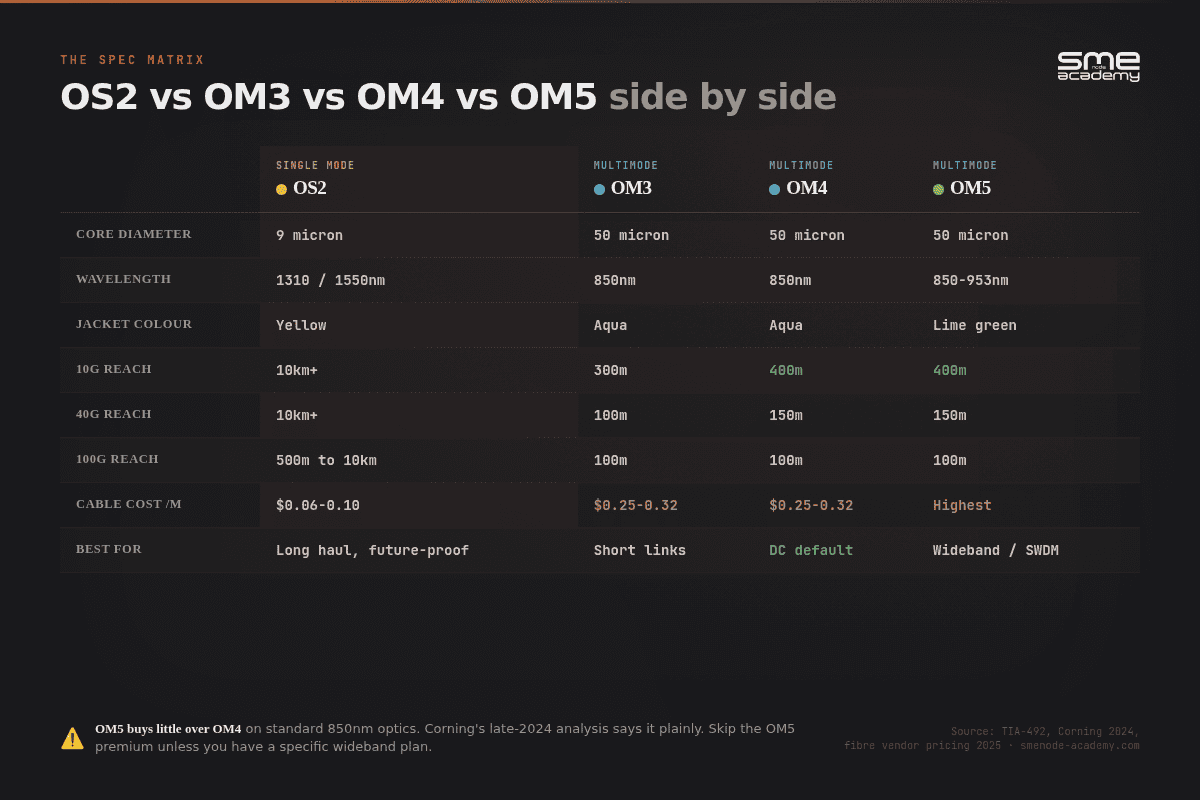
Here’s the side-by-side that matters. Print this one.
| Feature | Single Mode (OS2) | Multimode (OM3/OM4/OM5) |
|---|---|---|
| Core diameter | ~9 microns | 50 microns |
| Light source | Laser (1310 / 1550nm) | VCSEL (850nm) |
| Typical reach | 10km standard, 100km+ possible | Up to ~400-550m |
| Cable jacket colour | Yellow | Aqua (OM3/OM4), lime green (OM5) |
| Bandwidth ceiling | Effectively unlimited (optics-limited) | Capped by modal dispersion |
| Cable cost per metre | Lower ($0.06-$0.10) | Higher ($0.25-$0.32) |
| Transceiver cost | Higher (1.5x to 5x) | Lower |
| Termination difficulty | High (fusion splice, tight tolerance) | Moderate (field-terminable) |
| Best for | Long haul, ISP, future-proofing | Data centre, in-building, short reach |
A few things jump out.
First, single mode reach is in a different league. A single OS2 fibre plant can run from 1G all the way to 800G with nothing more than a transceiver swap. The glass doesn’t change. That’s huge for future-proofing.
Second, multimode is not one thing. It’s a family. And the family members matter a lot.
Multimode types: OM1 through OM5
Not all multimode is equal. The OM rating tells you how far and how fast. Here’s the whole family, including the legacy stuff you’ll still find in old buildings.
| Type | Core | Colour | 10G reach | 40G reach | 100G reach |
|---|---|---|---|---|---|
| OM1 | 62.5 micron | Orange | up to 33m | not supported | not supported |
| OM2 | 50 micron | Orange | up to 82m | not supported | not supported |
| OM3 | 50 micron | Aqua | up to 300m | 100m | 100m |
| OM4 | 50 micron | Aqua | up to 400m | 150m | 100m |
| OM5 | 50 micron | Lime green | up to 400m | 150m | 100m |
OM1 and OM2 are legacy. If you find orange fibre in a riser, treat it as a 1G link that might limp to 10G across a very short run. Don’t plan new speed on it.
OM4 has more than double the modal bandwidth of OM3 (4700 MHz·km versus 2000). That’s why it stretches further at every speed.
OM5 is the newest, released back in 2016. It adds “wideband” support so several wavelengths can share one fibre using SWDM. Sounds great. Here’s the catch. For standard 850nm optics, OM5 buys you nothing over OM4. Same reach, same speed, higher price.
So when is OM5 worth it? One case, really. If you’re deploying SWDM transceivers, four wavelengths on one duplex pair, OM5 cuts your strand count sharply. That matters in hyperscale and AI build-outs where fibre density is the constraint, not distance. For a normal enterprise backbone running SR4 optics? Skip it.
Bottom line on multimode: OM4 is the sensible default for most new short-reach runs today.
How to tell single mode from multimode fiber in the field
You’re at a patch panel. Nobody labelled anything. How do you tell? Three checks, in order of reliability.
1. Read the jacket print. This is the one that actually settles it. Fibre cable is printed with its core and cladding size in microns. 9/125 means single mode. 50/125 means modern multimode (OM2 through OM5). 62.5/125 means OM1 legacy multimode. The print runs along the cable every metre or so, so find a clean stretch and read it.
2. Check the colour. Yellow means single mode. Aqua means OM3 or OM4. Lime green means OM5. Orange means OM1 or OM2. It’s a convention, not a law, and cheap patch leads break it all the time. Use colour for a fast first guess, then confirm with the print.
3. Look at the transceiver, not the cable. If the link is live, the SFP tells you what the fibre has to be. More on decoding those part numbers in a minute.
One thing that does not tell you anything: the connector. LC and SC connectors are used on both fibre types. A yellow boot on an LC connector is a hint, not proof. The glass decides, the connector doesn’t.
Field trick worth knowing. Single mode patch leads usually have a blue or yellow connector body, multimode usually black or beige. Again, convention. Verify before you cut anything.
Which fiber is cheaper? The cost trap nobody explains
This is where people lose money. The honest answer: it depends on what you’re counting and how far you’re going.
Most folks assume single mode is the expensive one. That’s half true.
The cable itself? Single mode is actually cheaper per metre now. OS2 runs about $0.06 to $0.10 a metre. OM4 multimode runs $0.25 to $0.32. So multimode glass costs 60-70% more.
But the transceivers flip the math. A 10G multimode SFP might run $100. The single mode equivalent? Around $200. Single mode optics run 1.5 to 5 times pricier depending on speed, because lasers cost more than VCSELs.
And there’s a third cost most guides skip entirely: termination. Splicing a 9 micron single mode core is unforgiving work. A 2 to 3 micron misalignment, invisible to the eye, adds 1 to 2 dB of loss per connection and eats your power budget. That means fusion splicing, and a decent fusion splicer runs $5K to $15K, plus a technician who knows how to use it. Multimode’s 50 micron core is far more forgiving, and it’s realistically field-terminable with cheaper kit.
So the total cost depends on distance, link count, and who’s doing the install.
Say you’re wiring a data centre. Marcus, a network engineer at a mid-size hosting company, needed 100G links between racks 50 metres apart, 48 of them. He priced both. The multimode path (optics plus cable) came to roughly $115 per link. Single mode? About $217 per link. Across 48 links, multimode saved him over $4,800. For 50-metre runs, that was an easy call.
Now flip the scenario. The same company needed one 100G link between two buildings, 800 metres apart. Multimode physically can’t do it. Modal dispersion kills the signal past ~150m at 100G. Single mode was the only option, and the higher transceiver cost was irrelevant because there was no alternative.
The crossover point for 100G runs sits around 200 to 250 metres. Under that, multimode usually wins on total cost. Over it, single mode takes the lead, often by being the only thing that works.
Speed and distance: how far can each fiber really go?
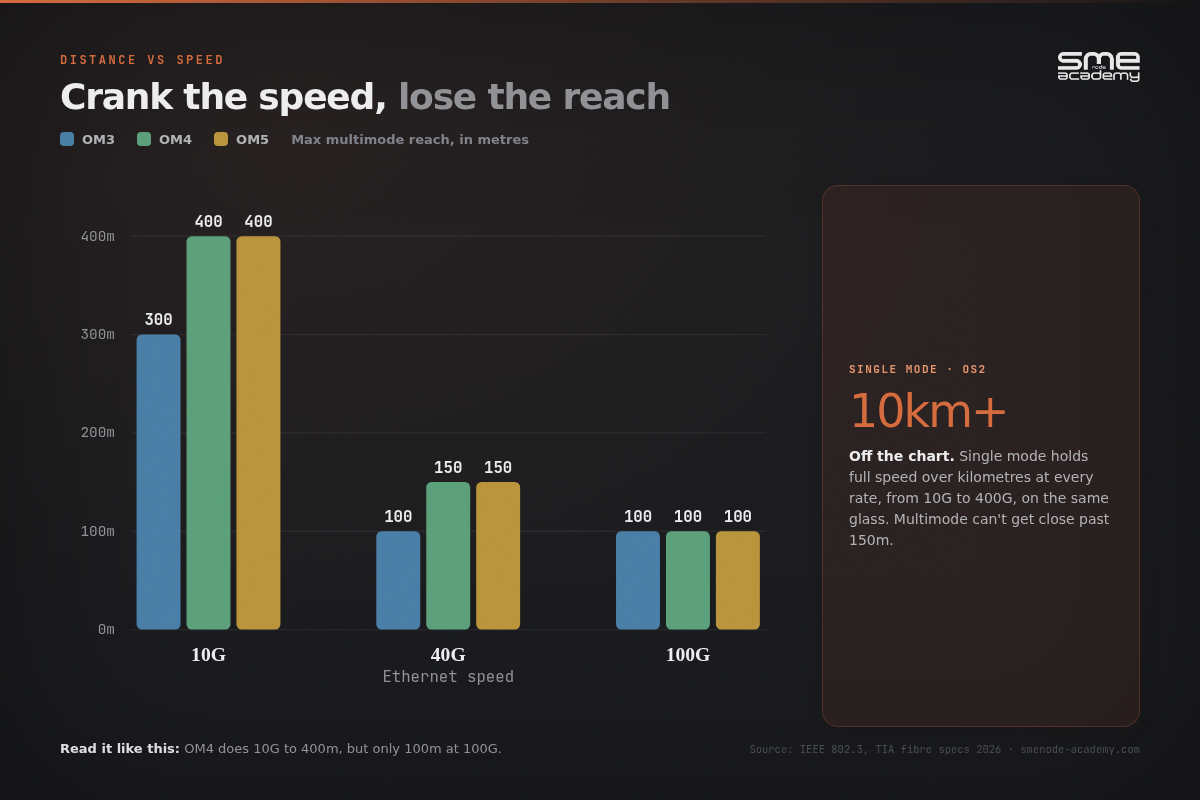
Let’s kill a myth. “Single mode is faster” is wrong. Both fibres hit the same data rates. 10G, 40G, 100G, 400G, all possible on either, at short range.
The difference is distance at speed.
Single mode holds its speed over kilometres. At 100G, standards like 400GBASE-DR4 push 500m on single mode, and longer-reach optics go far past that. Need 10km at 100G? Single mode does it. Multimode can’t get close.
Multimode trades distance for cost. The faster you go, the shorter your maximum run:
- At 10G, OM4 reaches up to 400m. Comfortable for most buildings.
- At 40G, that drops to 150m.
- At 100G, you’re down to about 100m.
See the pattern? Crank the speed, lose the reach. That’s modal dispersion doing its thing. The signal smears more at higher rates, so you have to keep runs shorter to stay clean.
This is why data centres love multimode for top-of-rack and server links. Those runs are short, often under 30 metres, and multimode keeps the optics cheap at high density. Cross that 100-150m line, though, and single mode becomes mandatory for 400G work whether you like the price or not.
What 800G and 1.6T change
This is the part that’s moved since most fibre guides were written, and it sharpens the whole decision.
The IEEE ratified 802.3df in 2024, defining 800G Ethernet on eight 100G lanes. Work on 802.3dj, which takes Ethernet to 1.6T on 200G lanes, is targeting completion in 2026. Optics vendors are already shipping into it.
Here’s what matters for your cabling choice. At 800G, the single mode option (DR8) reaches 500m. The multimode option (SR8) is a rack-and-row technology, tens of metres. Multimode didn’t stop being useful, it just got pushed into an even shorter lane. A 2020-era rule of thumb like “multimode is fine up to 300m” quietly stops being true the moment you upgrade past 100G.
So if you’re pulling glass today that has to survive an 800G upgrade at any distance beyond a row of racks, that’s a single mode decision. Cisco publishes reach figures per optic in its 800G transceiver documentation, and it’s worth checking the exact part before you commit to a cable plan.
One more thing engineers forget. Distance specs assume clean connectors and quality splices. Dirty LC connectors will tank your link budget on either fibre. A contaminated endface is the number-one cause of “the cable should work but doesn’t” tickets. Clean your connectors. Every time.
Which SFP goes with which fiber?
The transceiver part number tells you the fibre type, once you know the code. This trips up more junior engineers than anything else on this page.
| Optic code | Fibre type | Wavelength | Typical reach |
|---|---|---|---|
| SX | Multimode | 850nm | up to 550m at 1G |
| SR | Multimode | 850nm | 300m at 10G, less at higher speeds |
| LX / LR | Single mode | 1310nm | 10km |
| ER | Single mode | 1550nm | 40km |
| ZR / ZX | Single mode | 1550nm | 80km |
The shortcut: S is short and multimode, everything else is single mode. SX and SR are your multimode optics. LX, LR, ER, ZR are single mode.
A physical tell helps too. Multimode SFP pull tabs are usually black. Single mode tabs are usually blue or yellow. Vendor-dependent, so treat it as a hint.
Get this pairing wrong and one of two things happens. Either the link never comes up, or it comes up dirty and drops packets under load, which is the worse outcome because it looks like a software problem for three days.
The honest downsides of each fiber type
Every comparison guide sells you the upside. Here’s the other half.
Where single mode hurts:
- Optics cost 1.5x to 5x more than the multimode equivalent
- Termination needs fusion splicing and a trained tech, so labour goes up
- The tolerance is brutal, 2-3 microns of misalignment costs you 1-2 dB
- Field repairs are slower and need better gear on the truck
- Overkill for a 30m rack link, and you’ll pay for reach you never use
Where multimode hurts:
- Reach collapses as speed rises, 400m at 10G becomes 100m at 100G
- Cable costs more per metre than single mode
- You may re-cable during a future speed upgrade, and re-trenching is expensive
- OM1 and OM2 legacy plant is effectively a dead end above 10G
- OM5’s wideband premium is wasted money unless you’re actually deploying SWDM
Neither list makes one fibre “bad.” They just tell you where the pain lands. Single mode front-loads cost. Multimode defers cost and risks paying it again later at a worse time.
Can you connect single mode to multimode fiber?
Short answer: not directly. The core sizes don’t match, 9 microns against 50, so joining them dumps a huge amount of light at the junction. You’ll see the link fail or run so lossy it’s useless.
But “not directly” isn’t “never.” There are two real-world workarounds, and they solve different problems.
Mode conditioning patch cords. These are for putting a single mode transceiver onto existing multimode plant. The cord has a short piece of single mode fibre spliced to multimode at a deliberate offset, which cancels the differential mode delay that would otherwise scramble the signal. Classic use case is 1000BASE-LX/LH over legacy OM1 or OM2 cabling in a building you can’t re-cable. Cisco documents exactly which optics need one and on which fibre grades, so check before you order. If that’s the part you’re stuck on, see which Ethernet cable category you actually need.
Media converters or transponders. These do the real conversion, terminating the optical signal on one side and re-transmitting on the other. This is what you need to actually go multimode to single mode. It’s an active device, so it needs power, rack space, and it becomes another thing that can fail at 3am.
One caveat worth remembering: a mode conditioning cord only works in one direction, single mode optic onto multimode fibre. Going the other way needs the media converter. People mix this up constantly.
Best answer is still the boring one. Same fibre type end to end, matched optics, no adapters in the path.
When should you choose single mode vs multimode?

Here’s the decision flow. Honest and practical.
Choose multimode (OM4) when:
- Your runs are short, under ~300m at 10G or under 100-150m at 40/100G
- You’re inside a single building or data centre
- You have lots of links and want to keep transceiver costs down
- You’re doing top-of-rack, server-to-switch, or short backbone runs
Choose single mode (OS2) when:
- You’re crossing buildings, campuses, or cities
- Runs exceed a few hundred metres
- You want one fibre plant that survives every speed upgrade for the next decade
- You’re an ISP, carrier, or planning serious 400G/800G growth
- You’re not sure how far the link will need to scale later
That last point is the quiet winner for single mode. Sarah, a systems engineer at a growing school district, ran single mode between campus buildings in 2019 even though they only needed 1G then. Six years later they jumped to 40G. Zero re-cabling. Same glass, new optics, done in an afternoon. The “expensive” choice up front saved them a full re-trench later.
Most real networks use both. Single mode for the long backbone between sites. Multimode for the cheap, dense, short stuff inside the racks. That’s not a compromise, it’s just good design.
Still deciding between cabling and a broader networking path? Our guide on how to become a network engineer in 2026 maps out where physical-layer skills fit in the bigger picture. And if you’re working through routing decisions too, BGP vs OSPF: when to use which protocol uses the same “right tool for the job” thinking applied to routing.
Quick field tips that save real headaches
Connectors. LC is the small, modern connector you’ll see most, used on both single mode and multimode in data centres. SC is the older, larger square connector, more common in legacy installs. The connector type doesn’t change whether a fibre is single or multimode, the glass does.
Match your optics to your fibre. A single mode transceiver needs single mode fibre. A multimode transceiver needs multimode. Mismatch them and either the link fails or you cook the optics over time. Cisco’s transceiver compatibility documentation at cisco.com lists exactly which optic pairs with which fibre and reach, worth bookmarking for any real deployment.
Label as you pull. Sounds obvious. Almost nobody does it. Every “is this single or multimode?” ticket exists because someone skipped a label five years ago.
For the fundamentals behind all of this, CompTIA’s Network+ objectives cover fibre types as core knowledge, and they’re a solid baseline before you go deeper into vendor-specific tracks.
Bottom line: pick the fiber that fits the run
So where does this leave you?
Six takeaways to remember:
- Single mode goes far, multimode goes cheap (short). That’s the core trade-off.
- Core size is the real difference. 9 microns versus 50. Everything else flows from that.
- Cost flips with distance, and termination counts. Multimode wins under ~200-250m at 100G. Single mode wins past it, or when it’s the only option that works.
- OM4 is the smart multimode default. Skip OM5 unless you’re actually deploying SWDM.
- Read the jacket print, not the colour. 9/125 is single mode, 50/125 is multimode. Colour is a convention, print is a fact.
- 800G tightened the rules. Multimode reach at 800G is a row, not a building. Plan glass for the speed you’ll want, not the speed you have.
Match the fibre to the run and you’ll never repeat that 2km multimode mistake from the start of this article.
Want to actually understand this stuff cold, not just memorise a table? SMEnode Academy runs live, instructor-led networking training where you build real links, ask real questions, and get free mentorship the whole way through. Start with the CCNA course to lock in the fundamentals, and pair it with the CCNA Workbook from SMEnode Labs for hands-on practice between sessions. Book a free demo class and see how it works before you commit.
Frequently asked questions
Is single mode or multimode fiber better?
Neither is better overall. Single mode is better for long distances and future-proofing. Multimode is better for short, dense, cost-sensitive runs inside a building or data centre. The right choice depends on your distance and budget.
How do I know if I need single mode or multimode fiber?
Start with distance and speed. Under 100m at 40G or 100G, or under 300m at 10G, multimode is usually cheaper. Beyond that, or if the link crosses buildings, go single mode. If you’re unsure how far the link will need to scale later, single mode is the safer default.
How can you tell if fiber is single mode or multimode?
Read the print on the jacket. 9/125 is single mode, 50/125 is modern multimode, 62.5/125 is legacy OM1. Jacket colour gives you a fast guess (yellow for single mode, aqua for OM3/OM4, lime green for OM5, orange for OM1/OM2), but colour is only a convention, so confirm with the print.
Can I connect single mode fiber to multimode fiber?
Not directly. The core sizes don’t match (9 microns versus 50), so joining them causes heavy signal loss. A mode conditioning patch cord lets a single mode optic run over existing multimode plant, and a media converter handles true multimode to single mode conversion. Matching fibre end to end is still the better answer.
How far can multimode fiber go?
It depends on speed and OM rating. OM4 reaches up to 400m at 10G, about 150m at 40G, and roughly 100m at 100G. At 800G, multimode is a within-the-row technology only. Higher speeds mean shorter maximum distances because of modal dispersion.
Which SFP works with single mode fiber?
LX, LR, ER, and ZR optics are single mode. SX and SR optics are multimode. The quick rule: an S-prefix short-reach code means multimode, everything else means single mode.
What are the disadvantages of single mode fiber?
Higher transceiver cost (1.5x to 5x multimode), harder termination that needs fusion splicing and a trained technician, and very tight alignment tolerance where 2-3 microns of offset costs 1-2 dB of loss. For a 30m rack link, it’s usually overkill.
Is OM3 single mode or multimode?
OM3 is multimode. Every OM rating (OM1 through OM5) is a multimode grade. Single mode uses OS ratings instead, and OS2 is the modern standard.
Why are single mode transceivers more expensive?
Single mode uses precision lasers at 1310nm and 1550nm, which cost more to build than the VCSELs multimode uses at 850nm. The cable itself is actually cheaper, but the optics push the total cost up at short distances.
What colour is single mode fiber?
The common convention is a yellow jacket for single mode and aqua for OM3/OM4 multimode, with lime green for OM5. Always confirm, since colour is a convention, not a guarantee.
Which fiber type is on the CCNA exam?
Both. The CCNA covers single mode and multimode fibre as part of network fundamentals, including core sizes, typical distances, and use cases. Knowing the trade-offs cold is exam-relevant and job-relevant. For the bigger career picture, see our guide on how to become a network engineer in 2026