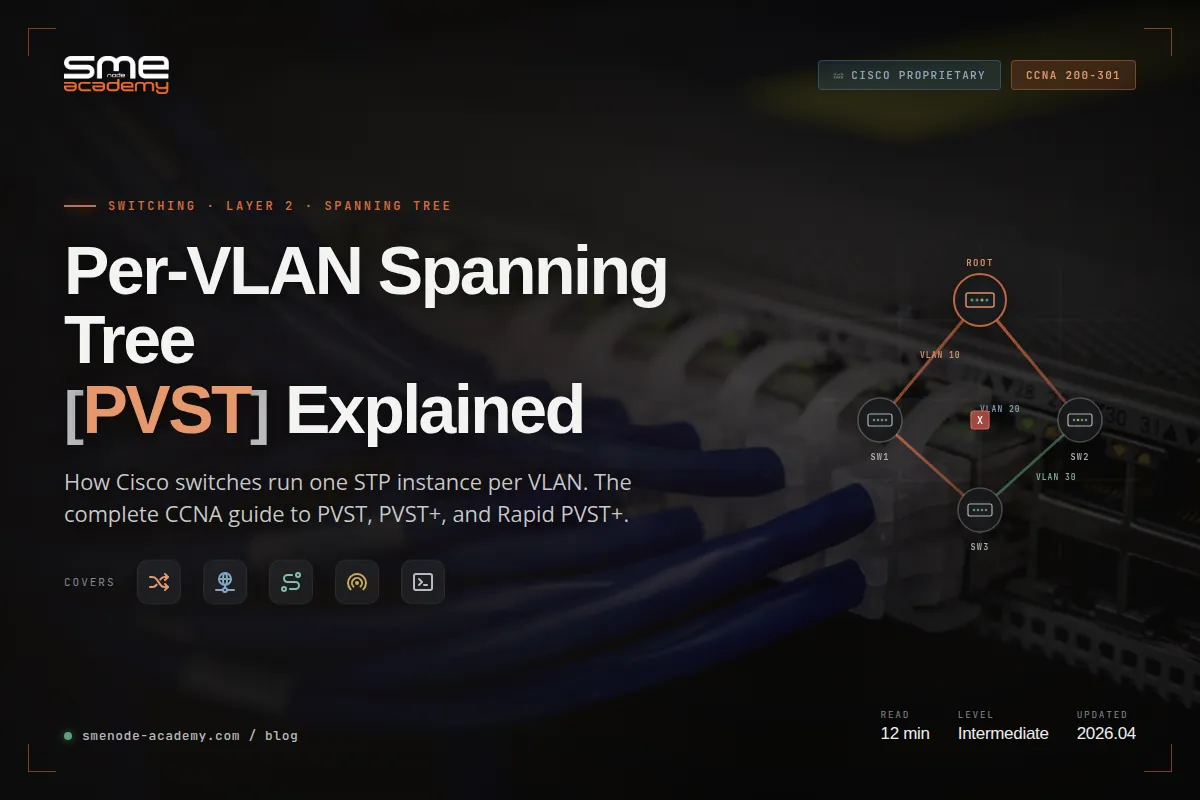
Per VLAN Spanning Tree (PVST) is a Cisco-proprietary protocol that runs a separate instance of the Spanning Tree Protocol for every VLAN on a switch. Each VLAN gets its own root bridge, its own loop-free topology, and its own set of blocked ports. That’s the whole idea, and it’s why Cisco switches ship with Rapid PVST+ as the default spanning tree mode right out of the box.
If you’re studying for the CCNA 200-301, this topic comes up in every switching module. And honestly? Most students memorise the commands without actually understanding why PVST exists or how it differs from standard 802.1D STP. So let’s fix that.
In our live CCNA sessions, students ask the same question within the first switching lab: “If STP already prevents loops, why do we need a separate version for every VLAN?” Here’s the honest answer. Because one spanning tree for a 30-VLAN network wastes half your bandwidth. And we’ll show you exactly why with real topology examples.
What Is Per VLAN Spanning Tree (PVST)?
Per VLAN Spanning Tree (PVST) is a Cisco-proprietary spanning tree protocol that calculates a separate loop-free topology for each VLAN configured on a switch. Instead of one spanning tree covering all VLANs, PVST runs one STP instance per VLAN. Each instance elects its own root bridge, picks its own root ports, and blocks its own redundant links.
Think of it like this. Standard STP gives the whole network one map. PVST gives every VLAN its own custom map.
The protocol comes in three flavours you need to know for CCNA:
- PVST – the original Cisco implementation, works only over ISL trunks (now legacy)
- PVST+ – the updated version that works over both ISL and 802.1Q trunks
- Rapid PVST+ – PVST+ with 802.1w Rapid Spanning Tree convergence, the default on every modern Cisco switch
When most people say “PVST” today, they actually mean Rapid PVST+. Same per-VLAN behaviour, just faster.
Why PVST Exists: The Common Spanning Tree Problem

To get why PVST matters, you need to see what it replaced. Standard 802.1D STP uses something called Common Spanning Tree (CST). One instance. All VLANs. No exceptions.
Here’s the deal. In a CST network with three switches in a triangle and two VLANs (say VLAN 10 for Sales and VLAN 20 for Engineering), the protocol picks one root bridge and blocks one link to break the loop. That blocked link stays blocked for every VLAN, even if it could have carried useful traffic.
The three big problems with CST:
- Wasted bandwidth. If you spent money on a redundant fibre link, CST throws half of it in the garbage. The link sits in blocking state doing nothing.
- Suboptimal paths. Voice traffic on VLAN 10 might need to detour through three hops when a direct link exists but is blocked.
- No load balancing. You can’t send VLAN 10 one way and VLAN 20 the other way. One tree, one path, one mess.
Worth noting. A network change on one VLAN triggers reconvergence for all VLANs under CST. Every user feels the outage, not just the ones affected.
So Cisco fixed it. They built PVST to give each VLAN its own independent spanning tree calculation. Different root bridge per VLAN means different blocked ports per VLAN. Suddenly that “wasted” redundant link carries VLAN 20 traffic while another link carries VLAN 10 traffic. Both links forward, both earn their keep.
How Does PVST Actually Work?
Here’s where it gets technical. And where most CCNA students get confused.
PVST works by running the same STP algorithm you already know (BPDU exchange, root election, port roles, port states) but it does the whole process independently for every VLAN. One VLAN, one instance, one set of BPDUs.
The Per-VLAN BPDU
A standard 802.1D BPDU is VLAN-unaware. PVST+ solves this by sending a separate BPDU for every VLAN. These BPDUs travel:
- Untagged over the native VLAN (VLAN 1 by default), using the standard IEEE 802.1D multicast MAC address
01:80:C2:00:00:00 - Tagged with the VLAN ID on all other VLANs, using Cisco’s Shared Spanning Tree (SSTP) multicast MAC
01:00:0C:CC:CC:CD
Each PVST+ BPDU also carries the VLAN ID inside the bridge ID field. That’s how switches know which spanning tree instance the BPDU belongs to.
The Extended Bridge ID
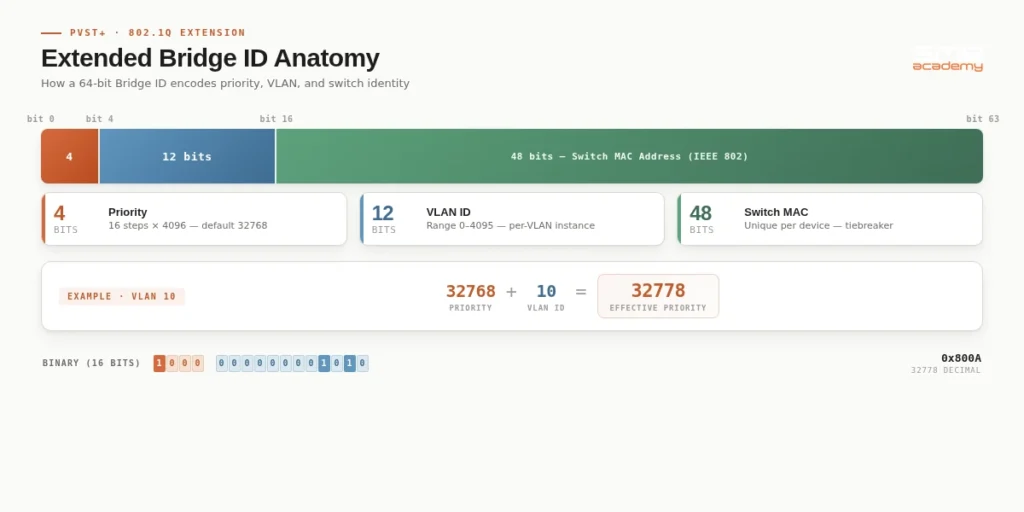
The classic 802.1D bridge ID is 8 bytes: 2 bytes of priority plus 6 bytes of MAC address. That doesn’t work for PVST because you’d need one MAC per VLAN. Cisco’s fix? The Extended System ID.
PVST+ splits the 2-byte priority field into two parts:
| Field | Size | Purpose |
|---|---|---|
| Priority (multiple of 4096) | 4 bits | Administrator-set value, 0 to 61440 |
| Extended System ID | 12 bits | VLAN ID embedded in the bridge ID |
| MAC Address | 48 bits | Switch base MAC (same for all VLANs) |
That’s why spanning-tree vlan 10 priority only accepts values in increments of 4096. The lower 12 bits aren’t available, they hold the VLAN ID. If you set priority 32768 for VLAN 10, the actual bridge priority becomes 32768 + 10 = 32778. Small detail, but CCNA exam loves this.
Root Bridge Election Per VLAN
Each VLAN runs its own election. Lowest bridge ID wins. This means:
- VLAN 10 can have SW1 as root
- VLAN 20 can have SW2 as root
- VLAN 30 can have SW3 as root
Same physical network, three different logical trees. Different ports block on different VLANs. That’s how load balancing works under PVST.
Port Roles Per VLAN
In a classic STP network, a port is either forwarding, blocking, or in transition. In PVST, a single physical port can be forwarding for VLAN 10 and blocking for VLAN 20 at the same time. The port is “trunk” at Layer 2, but internally each VLAN sees its own state.
Which means. One cable. Multiple independent spanning trees running over it. All tracked in the switch control plane.
PVST vs PVST+ vs Rapid PVST+: What’s the Difference?
Three names, easy to mix up. Here’s the clean comparison.
| Feature | PVST | PVST+ | Rapid PVST+ |
|---|---|---|---|
| Based on | 802.1D STP | 802.1D STP | 802.1w RSTP |
| Instance per VLAN | Yes | Yes | Yes |
| Trunking supported | ISL only | ISL and 802.1Q | ISL and 802.1Q |
| Convergence time | 30 to 50 seconds | 30 to 50 seconds | 1 to 6 seconds |
| Port roles | Root, Designated, Blocking | Root, Designated, Blocking | Root, Designated, Alternate, Backup |
| Port states | 5 (Disabled, Blocking, Listening, Learning, Forwarding) | 5 | 3 (Discarding, Learning, Forwarding) |
| Default on Cisco | No (legacy) | No | Yes (IOS 15.2(4)E and later) |
| CCNA 200-301 relevance | Historical | Medium | High |
The pattern is simple. PVST was ISL-only, so Cisco built PVST+ for 802.1Q trunks and multi-vendor compatibility. Then they ported the Rapid Spanning Tree algorithm (802.1w) on top, giving you Rapid PVST+.
If you’re configuring a modern Cisco switch today, you’re using Rapid PVST+. End of story.
Rapid PVST+: The Speed Upgrade You Actually Use
Classic PVST+ takes 30 to 50 seconds to converge after a link failure. That’s ages in network time. A VoIP call drops. A video stream freezes. Users get angry.
Rapid PVST+ cuts that to 1 to 6 seconds. Here’s how.
What RSTP Changed
The 802.1w algorithm introduces three things that classic STP doesn’t have:
- New port roles. Alternate and Backup ports are pre-calculated standby paths. When the root port goes down, the Alternate port takes over immediately without waiting for timers.
- Three port states instead of five. Discarding (combines Blocking, Listening, Disabled), Learning, and Forwarding. Fewer states means faster transitions.
- Proposal/agreement handshake. Instead of relying on timers, switches negotiate port transitions directly. A port can move to Forwarding in milliseconds when conditions are right.
And here’s the thing. Rapid PVST+ runs this faster algorithm per VLAN. So you still get load balancing, but convergence is fast enough that users barely notice failures.
Edge Ports and PortFast
Rapid PVST+ also brings the PortFast feature into the protocol itself. Access ports connected to end devices skip the Listening and Learning states and jump straight to Forwarding. No 30-second wait when a PC boots up.
Switch(config-if)# spanning-tree portfastOne command. Huge quality-of-life win.
PVST vs MSTP: When to Use Which?

This is the question that trips up most network engineers. Both give you VLAN-aware spanning trees. Both do load balancing. So which one wins?
| Factor | Rapid PVST+ | MSTP (802.1s) |
|---|---|---|
| Vendor | Cisco proprietary | IEEE open standard |
| Instances | One per VLAN | One per VLAN group (up to 16) |
| CPU/memory per switch | High (scales with VLAN count) | Low (fixed number of instances) |
| Scalability | Struggles past 100 VLANs | Handles thousands of VLANs |
| Configuration complexity | Simple | More complex (regions, instance mapping) |
| Multi-vendor interop | Limited | Excellent |
| Best fit | Small/medium Cisco networks | Large enterprise, mixed vendor |
Rule of thumb. Fewer than 50 VLANs on Cisco gear? Rapid PVST+ is fine. Hundreds of VLANs or a mixed-vendor core? MSTP every time.
MSTP’s trick is mapping multiple VLANs to the same instance. Instead of 500 spanning trees for 500 VLANs, you might run 4 instances covering all 500. Way less CPU overhead. But you lose per-VLAN granularity.
For the CCNA exam, you need to recognise both. For production? You’ll probably touch Rapid PVST+ first. MSTP shows up more in CCNP Enterprise and larger deployments.
Ready to go deeper? Our MSTP Explained guide covers region configuration, instance-to-VLAN mapping, and IOS commands from scratch.
Configuring Rapid PVST+ on Cisco Switches
Here’s the part you actually came for. Full configuration with the commands CCNA candidates must know.
Step 1: Set the Spanning Tree Mode
Every Cisco Catalyst switch supports three modes. Check what’s running first.
Switch# show spanning-tree summary
Switch is in rapid-pvst mode
If you’re not already on Rapid PVST+, change it:
Switch(config)# spanning-tree mode ?
  mst              Multiple spanning tree mode
  pvst             Per-Vlan spanning tree mode
  rapid-pvst       Per-Vlan rapid spanning tree mode

Switch(config)# spanning-tree mode rapid-pvst
This is global. Applies to every VLAN on the switch.
Step 2: Configure the Root Bridge
You’ve got two ways. The manual way (setting priority) and the macro way (using the root primary command).
Manual method:
Switch(config)# spanning-tree vlan 10 priority 4096
Switch(config)# spanning-tree vlan 20 priority 4096
Macro method:
Switch(config)# spanning-tree vlan 10 root primary
Switch(config)# spanning-tree vlan 20 root secondary
The macro looks at current priorities in the network and sets yours to one level lower (usually 24576 for primary, 28672 for secondary). Simple, and it avoids priority collisions.
Priority values must be multiples of 4096. Valid range is 0 to 61440. Default is 32768.
Step 3: Enable PortFast on Access Ports
For any port connecting to a PC, printer, or server, turn on PortFast:
Switch(config)# interface fastethernet 0/1
Switch(config-if)# spanning-tree portfast
%Warning: portfast should only be enabled on ports connected to a single
 host. Connecting hubs, concentrators, switches, bridges, etc... to this
 interface when portfast is enabled, can cause temporary bridging loops.
Or enable it globally on all access ports in one shot:
Switch(config)# spanning-tree portfast defaultThe warning matters. Never turn on PortFast on a port that could connect to another switch. You’ll create a loop before STP has time to detect it.
Step 4: Harden the Network with BPDU Guard
PortFast without BPDU Guard is a security hole. Anyone plugging a switch into a PortFast port creates an instant loop. Fix it:
Switch(config)# spanning-tree portfast bpduguard defaultNow if any PortFast-enabled port receives a BPDU, the switch puts the port in err-disabled state. Problem solved.
Full Example Configuration
Here’s a complete Rapid PVST+ setup on a distribution switch that’s the root for VLAN 10 and backup root for VLAN 20:
! Global spanning tree mode
spanning-tree mode rapid-pvst

! Set as root for VLAN 10, backup for VLAN 20
spanning-tree vlan 10 root primary
spanning-tree vlan 20 root secondary

! Enable PortFast and BPDU Guard on access ports
spanning-tree portfast default
spanning-tree portfast bpduguard default

! Access port example
interface GigabitEthernet 0/5
 switchport mode access
 switchport access vlan 10
 spanning-tree portfast
!
! Trunk port (STP runs here)
interface GigabitEthernet 0/24
 switchport mode trunk
 switchport trunk encapsulation dot1q
 switchport trunk allowed vlan 10,20,30
Copy, paste, adjust VLANs and interfaces to match your topology. That’s a production-ready baseline.
3-Switch Load Balancing: Full Lab Example
Here’s the complete picture. Three switches, two VLANs, full load balancing verified with show command output.
Topology:
- SW1 and SW2 are distribution-layer switches connected to each other
- SW3 is an access-layer switch with redundant uplinks to both
     [SW1]---Gi0/1---[SW2]
       |                |
     Gi0/2           Gi0/2
       |                |
     Gi0/1           Gi0/2
        \              /
           [SW3]
Goal: VLAN 10 traffic flows through SW1. VLAN 20 traffic flows through SW2. Both uplinks from SW3 stay active.
SW1 – Root for VLAN 10, secondary for VLAN 20:
spanning-tree mode rapid-pvst
spanning-tree vlan 10 root primary
spanning-tree vlan 20 root secondary
spanning-tree portfast bpduguard default

interface GigabitEthernet 0/1
 description LINK-TO-SW2
 switchport mode trunk
 switchport trunk encapsulation dot1q
 switchport trunk allowed vlan 10,20

interface GigabitEthernet 0/2
 description LINK-TO-SW3
 switchport mode trunk
 switchport trunk encapsulation dot1q
 switchport trunk allowed vlan 10,20
SW2 – Root for VLAN 20, secondary for VLAN 10:
spanning-tree mode rapid-pvst
spanning-tree vlan 10 root secondary
spanning-tree vlan 20 root primary
spanning-tree portfast bpduguard default

interface GigabitEthernet 0/1
 description LINK-TO-SW1
 switchport mode trunk
 switchport trunk encapsulation dot1q
 switchport trunk allowed vlan 10,20

interface GigabitEthernet 0/2
 description LINK-TO-SW3
 switchport mode trunk
 switchport trunk encapsulation dot1q
 switchport trunk allowed vlan 10,20
SW3 – Access layer, no root preference:
spanning-tree mode rapid-pvst
spanning-tree portfast default
spanning-tree portfast bpduguard default

interface GigabitEthernet 0/1
 description UPLINK-TO-SW1
 switchport mode trunk
 switchport trunk encapsulation dot1q
 switchport trunk allowed vlan 10,20

interface GigabitEthernet 0/2
 description UPLINK-TO-SW2
 switchport mode trunk
 switchport trunk encapsulation dot1q
 switchport trunk allowed vlan 10,20

interface GigabitEthernet 0/3
 description PC-VLAN10
 switchport mode access
 switchport access vlan 10
 spanning-tree portfast

interface GigabitEthernet 0/4
 description PC-VLAN20
 switchport mode access
 switchport access vlan 20
 spanning-tree portfast
Verifying the result on SW3:
SW3# show spanning-tree vlan 10

VLAN0010
  Spanning tree enabled protocol rstp
  Root ID    Priority    24586
             Address     0019.aa11.0001
             Cost        4
             Port        1 (GigabitEthernet0/1)

Interface           Role Sts Cost      Prio.Nbr Type
------------------- ---- --- --------- -------- ----
Gi0/1               Root FWD 4         128.1    P2p
Gi0/2               Altn BLK 4         128.2    P2p
SW3# show spanning-tree vlan 20
VLAN0020
Spanning tree enabled protocol rstp
Root ID Priority 24596
Address 0019.aa22.0002
Cost 4
Port 2 (GigabitEthernet0/2)
Interface Role Sts Cost Prio.Nbr Type
------------------- ---- --- --------- -------- ----
Gi0/1 Altn BLK 4 128.1 P2p
Gi0/2 Root FWD 4 128.2 P2pThat’s the proof. VLAN 10 forwards on Gi0/1 (to SW1) and blocks on Gi0/2. VLAN 20 does the opposite. Both cables carry traffic. Neither sits idle.
Notice the Root ID priority: 24586 = 24576 + 10 (VLAN 10), and 24596 = 24576 + 20 (VLAN 20). That’s the Extended System ID doing its job.
Load Balancing with PVST: The Real-World Payoff
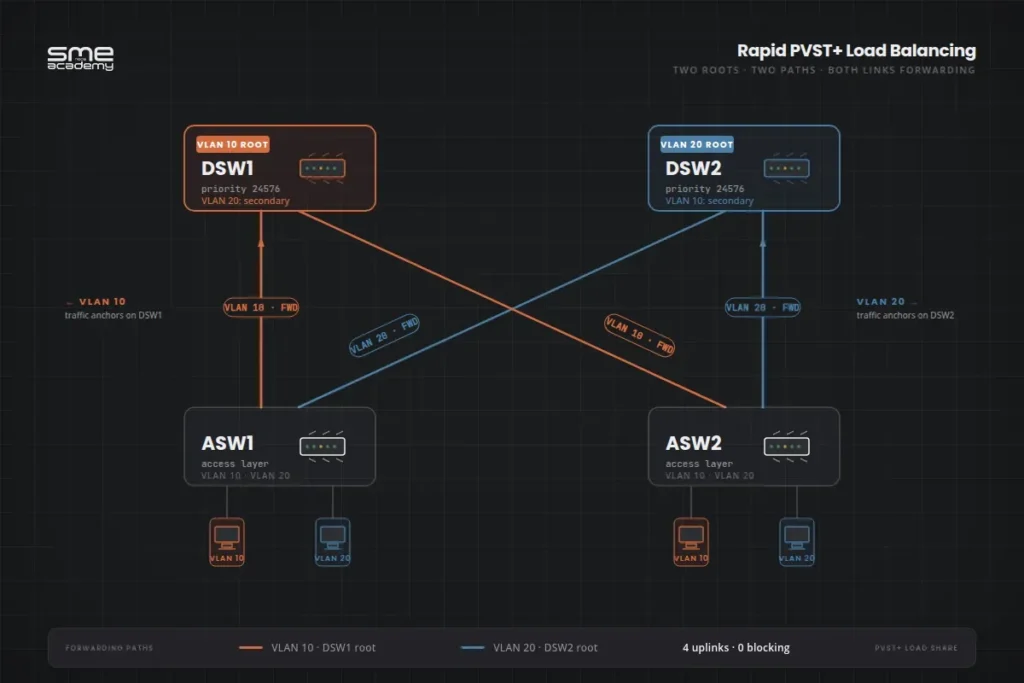
The whole point of PVST is load balancing. Let’s see it working.
Say you have two distribution switches (DSW1 and DSW2) and two access switches (ASW1 and ASW2). Each access switch has redundant uplinks to both distribution switches. VLANs 10 and 20 exist on both.
Without PVST (or with CST): One root bridge, say DSW1. Every VLAN uses DSW1. Half of the ASW-to-DSW2 links block. That redundant fibre you paid for? Useless until DSW1 fails.
With PVST:
- Make DSW1 the root for VLAN 10 (
spanning-tree vlan 10 root primaryon DSW1) - Make DSW2 the root for VLAN 20 (
spanning-tree vlan 20 root primaryon DSW2)
Now VLAN 10 traffic flows through DSW1. VLAN 20 traffic flows through DSW2. Both uplinks forward traffic. Both distribution switches share the load. Both redundant fibres earn their money.
If DSW1 dies, VLAN 10 reconverges to DSW2 in about 6 seconds under Rapid PVST+. Users see a blip. Nothing more.
That’s the business case for PVST. In one command per VLAN, you turned idle redundant hardware into working capacity.
How Do You Troubleshoot PVST?
Three commands you’ll use a thousand times in your CCNA labs and in production.
1. show spanning-tree
The single most important STP command. Shows every VLAN, every port role, every cost:
Switch# show spanning-tree vlan 10

VLAN0010
  Spanning tree enabled protocol rstp
  Root ID    Priority    24586
             Address     0019.aa11.2233
             Cost        4
             Port        24 (GigabitEthernet0/24)
             Hello Time   2 sec  Max Age 20 sec  Forward Delay 15 sec

  Bridge ID  Priority    32778  (priority 32768 sys-id-ext 10)
             Address     0019.aa55.6677
             Hello Time   2 sec  Max Age 20 sec  Forward Delay 15 sec
             Aging Time  300 sec

Interface           Role Sts Cost      Prio.Nbr Type
------------------- ---- --- --------- -------- ----
Gi0/23              Altn BLK 4         128.23   P2p
Gi0/24              Root FWD 4         128.24   P2p
Look at three things:
- Protocol: should say
rstpfor Rapid PVST+ - Root ID Priority: 24586 means priority 24576 + VLAN 10
- Role: Root, Altn (Alternate), Desg (Designated), or Back (Backup)
2. show spanning-tree summary
Quick health check across all VLANs:
Switch# show spanning-tree summary
Switch is in rapid-pvst mode
Root bridge for: VLAN0010, VLAN0030
Extended system ID           is enabled
Portfast Default             is disabled
PortFast BPDU Guard Default  is enabled
3. show spanning-tree interface
Per-port view when you suspect one link is the problem:
Switch# show spanning-tree interface gigabitethernet 0/24 detailThis shows BPDU counters, timers, and recent transitions. If a port is flapping, this is where you catch it.
The Common Troubleshooting Flow
When something breaks:
- Run
show spanning-tree summaryto confirm mode and find the root bridge - Run
show spanning-tree vlan Xon the affected VLAN to see port roles - Check if the wrong switch is root (bad priority config)
- Check for port flapping with
show interfaces status - Check BPDU Guard err-disabled status with
show interfaces status err-disabled
Ninety percent of PVST issues come from one of these: wrong root bridge, duplex mismatch on a trunk, or BPDU Guard tripping because someone plugged a switch into a PortFast port.
Common PVST Mistakes to Avoid
We see these in our live labs every cohort. Watch out.
Setting root bridge without accounting for the Extended System ID. You set priority 32768 thinking you’re back at default. Actual priority becomes 32768 + VLAN ID. Your “default” switch ends up winning the root election for higher-numbered VLANs. Always use the root primary macro or set priority explicitly to values like 4096, 8192, 24576.
Forgetting to enable BPDU Guard with PortFast. PortFast skips the listening/learning states. Fine for end hosts. Dangerous if someone plugs in a switch. BPDU Guard catches it.
Running PVST+ with 500 VLANs. Your switch CPU will hate you. Each VLAN runs a full STP instance. At 500 VLANs, you’re sending 500 BPDUs every 2 seconds across every trunk. Move to MSTP instead.
Mismatched spanning tree modes between switches. One switch on Rapid PVST+, another on MSTP. Interoperability exists but it’s messy. Standardise the mode across your network.
Ignoring the native VLAN on trunks. PVST+ sends VLAN 1 BPDUs untagged. If your trunk has a different native VLAN on each end, STP breaks silently. Always match native VLANs.
What CCNA Students Need to Know About PVST
The CCNA 200-301 exam blueprint covers spanning tree under domain 2.5 (switching technologies). Here’s what gets tested.
You must be able to:
- Identify the default spanning tree mode on Cisco switches (Rapid PVST+)
- Calculate the actual bridge priority when Extended System ID is in play (priority + VLAN)
- Explain why the priority has to be a multiple of 4096
- Read
show spanning-treeoutput and identify root/alternate/designated ports - Configure Rapid PVST+ mode and set root bridge per VLAN
- Enable PortFast and BPDU Guard
- Compare PVST, PVST+, Rapid PVST+, and MSTP at a high level
What’s NOT on the CCNA but you’ll see in real networks:
- Detailed MSTP region configuration (that’s CCNP Enterprise territory)
- RootGuard, LoopGuard, UDLD (CCNP)
- Custom path cost tuning with
spanning-tree costcommands - PVST simulation checks and BPDU filtering
For full exam-ready practice including STP lab scenarios, grab our CCNA 200-301 Workbook from SMEnode Labs. It pairs perfectly with the live course.
And if you’re still deciding between certifications, our CCNA vs CCNP comparison walks through which one fits your career stage.
Frequently Asked Questions
What is Per VLAN Spanning Tree (PVST) used for?
PVST is used to run a separate spanning tree instance for each VLAN on a Cisco switch. This allows network engineers to set different root bridges per VLAN, which enables load balancing across redundant links and avoids the wasted bandwidth problem of Common Spanning Tree. Every modern Cisco Catalyst switch runs Rapid PVST+ by default.
What’s the difference between PVST and PVST+?
PVST is the original Cisco implementation and only works over ISL trunks. PVST+ is the updated version that works over both ISL and 802.1Q (dot1q) trunks. PVST+ also uses the Extended System ID to embed the VLAN number inside the bridge priority field, making per-VLAN topology calculations possible without needing a unique MAC address per VLAN.
Is PVST still used today?
The original PVST is legacy and rarely seen. Rapid PVST+ (the 802.1w-based version) is very much alive and is the default spanning tree mode on all current Cisco Catalyst switches. If you’re working in a Cisco environment with fewer than 100 VLANs, Rapid PVST+ is almost certainly what’s running.
PVST vs RSTP, what’s the difference?
RSTP (802.1w) is the IEEE standard for rapid convergence and uses one spanning tree instance for the whole network, similar to classic STP but faster. Rapid PVST+ is Cisco’s version that combines RSTP’s speed with PVST’s per-VLAN instances. So Rapid PVST+ gives you both fast convergence AND per-VLAN load balancing, where standard RSTP only gives you fast convergence.
How many VLANs can PVST handle?
Technically, PVST+ supports up to 128 active instances on most Cisco Catalyst switches, but practical limits are lower due to CPU and memory overhead. Running Rapid PVST+ with more than 100 VLANs usually means it’s time to move to MSTP, which maps multiple VLANs to a smaller number of spanning tree instances.
Why does PVST priority have to be a multiple of 4096?
Because of the Extended System ID. The 16-bit priority field is split into 4 bits for the administrator-set priority and 12 bits for the VLAN ID. The 4 priority bits can only represent values in steps of 4096 (2^12). So valid priorities are 0, 4096, 8192, 12288, all the way to 61440. The default is 32768.
Can PVST+ interoperate with non-Cisco switches?
Yes, in a limited way. PVST+ maps the VLAN 1 spanning tree to the standard IEEE 802.1D CST instance, so non-Cisco switches running standard STP can participate in a single VLAN. For other VLANs, PVST+ BPDUs are tunneled transparently through non-Cisco switches but the per-VLAN calculations only run on Cisco devices. For true multi-vendor per-VLAN spanning tree, use MSTP instead.
What command verifies Rapid PVST+ is running?
Use show spanning-tree summary or show spanning-tree vlan <vlan-id>. The summary output shows the mode on the first line. The per-VLAN output shows Spanning tree enabled protocol rstp near the top when Rapid PVST+ is active.
Bottom Line
Per VLAN Spanning Tree solves a real problem. One spanning tree per network wastes bandwidth and blocks useful paths. One spanning tree per VLAN lets you load balance, optimise paths, and still prevent loops.
For CCNA, you need to know three things cold:
- Rapid PVST+ is Cisco’s default, based on 802.1w with one instance per VLAN
- Priority must be a multiple of 4096 because of the Extended System ID
spanning-tree mode rapid-pvst,spanning-tree vlan X root primary, andspanning-tree portfast bpduguard defaultare the three commands that set up 90 percent of real-world deployments
Get those down and you’re set for the exam and for your first day configuring a production switch.
Want hands-on lab practice with real Cisco gear, not just simulators? Our CCNA live training runs 16+ weeks with CCIE instructors, unlimited lab access, and free 1-on-1 mentorship.
Still mapping out your networking career? Check out our guide on how to become a network engineer in 2026 for the full roadmap.
Sources: