Your video call just froze. Again.
Here’s the frustrating part. You’ve got three WAN links right there. But your router keeps shoving all traffic down the same MPLS tunnel. It’s like a highway with two empty lanes next to a traffic jam.
That’s the problem application-aware routing solves.
Application-aware routing (AAR) is the SD-WAN feature that watches network conditions in real time. It measures latency, jitter, and packet loss. Then it steers each app’s traffic to the best path. Voice goes over the low-latency link. Bulk backups go over the cheaper broadband. And when a link degrades? Traffic moves before users even notice.
In this guide, you’ll learn how AAR works under the hood: BFD probes, SLA classes, failover, and Enhanced AAR. You’ll also get the exact vManage steps and the CLI commands to prove it’s working, plus how AI-driven analytics changed the game in 2026.
Quick answer: AAR matches each application to a WAN path that meets a service-level agreement (SLA) for latency, jitter, and loss. BFD probes measure every tunnel non-stop. When a path breaks the SLA, traffic reroutes on its own. Standard AAR reacts in roughly 30 minutes; Enhanced AAR reacts in seconds. On Cisco, you build it in vManage under a centralized policy, and it’s heavily tested on the 300-415 ENSDWI exam.
What Is Application-Aware Routing?
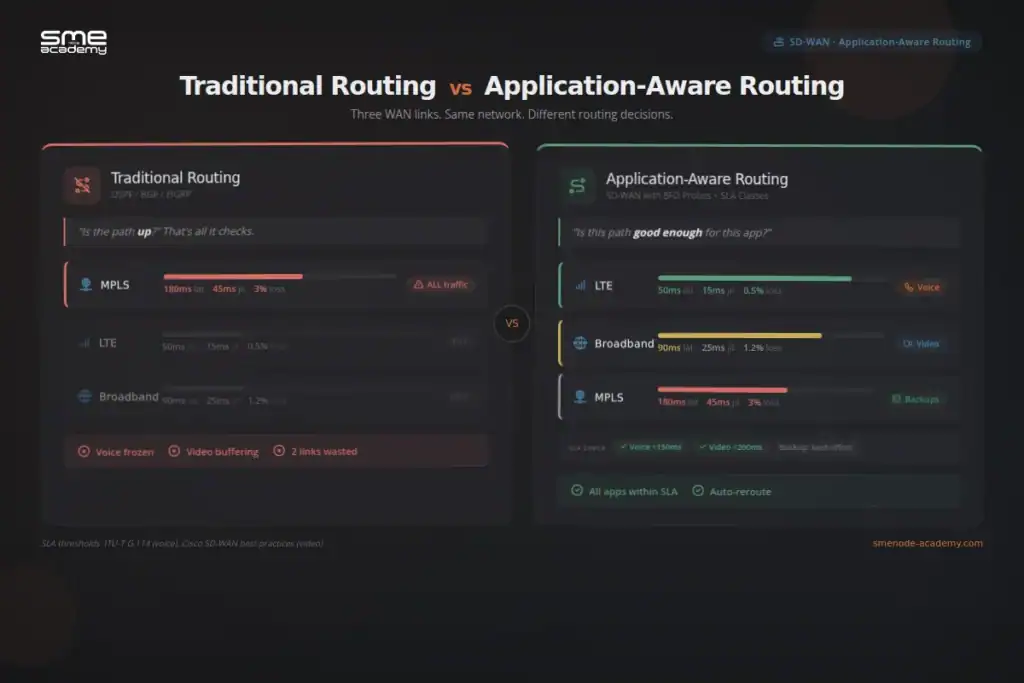
Application-aware routing is an SD-WAN policy that matches app traffic to WAN paths based on real-time metrics. Not static routing costs. Real, measured performance.
Traditional routing protocols (OSPF, BGP, EIGRP) pick paths based on cost, hop count, or bandwidth. They don’t care if a link has 200ms latency or 5% packet loss. Link is up? Good enough. Traffic keeps flowing through the same congested tunnel regardless of application sensitivity. If you want a refresher on how those protocols decide, our BGP vs OSPF guide breaks down cost-based path selection.
AAR flips that model. It measures path quality all the time. Then it makes routing choices based on what each app actually needs. A voice call needs less than 150ms latency and under 1% loss, per ITU-T G.114 standards. A file transfer doesn’t care about latency. But it needs zero packet loss. AAR knows the difference. And it acts on it.
Here’s the short version. Old routing asks “is this path up?” AAR asks “is this path good enough for this specific app?”
One quick naming note. Cisco now calls the platform Catalyst SD-WAN. Older docs and forums still say Viptela or vEdge. Same fabric, same AAR logic. The 26.x releases (current in 2026) kept the core behaviour and added the AI and Enhanced AAR pieces we’ll cover below.
How Does Application-Aware Routing Work in Cisco SD-WAN?
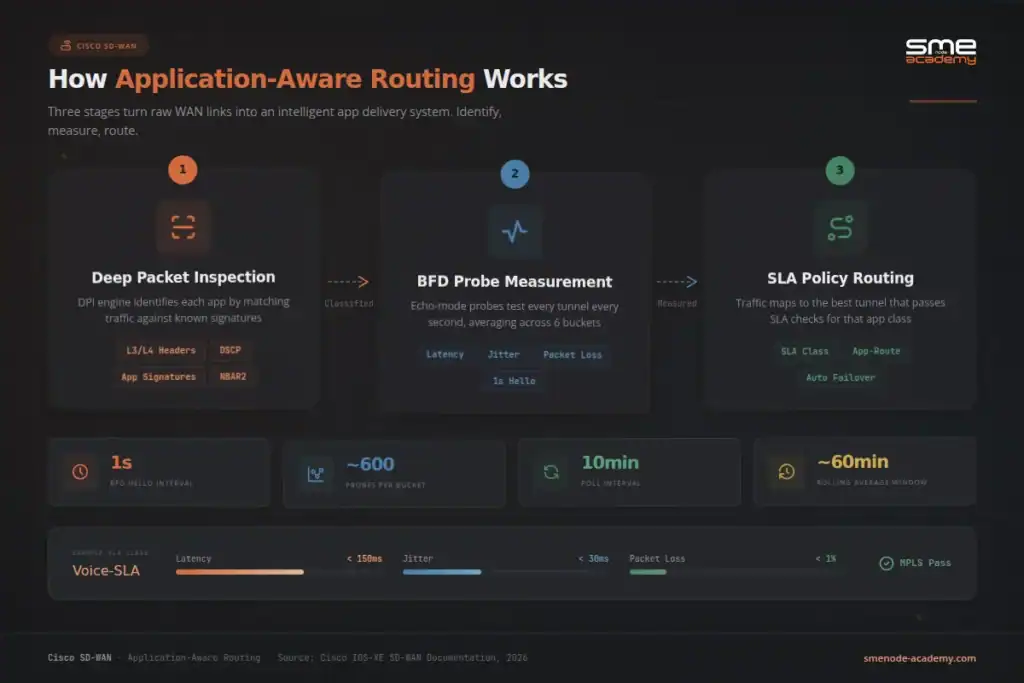
Cisco’s AAR works in three stages: identify, measure, and map. Let’s break each one down.
Stage 1: Identify the Application
First, the SD-WAN fabric needs to know what traffic it’s looking at. Cisco SD-WAN spots apps using deep packet inspection (DPI). It matches traffic against known app signatures.
You can also sort traffic by hand using Layer 3/Layer 4 headers:
- Source and destination IP prefixes
- Source and destination ports
- Protocol (TCP, UDP)
- DSCP markings
Want to target Microsoft Teams traffic? The DPI engine spots it on its own. Or you can match it by its known prefixes and ports. Either way, the system knows what’s running across your network.
Stage 2: Measure Path Quality with BFD Probes
This is where AAR gets smart. Once overlay tunnels come up between WAN edge routers, BFD (Bidirectional Forwarding Detection) sessions kick in on their own. You can’t turn them off. They run on every tunnel, all the time.
Here’s how it works:
| Parameter | Default Value | Purpose |
|---|---|---|
| BFD Hello interval | 1,000 ms (1 second) | How often probes are sent |
| Poll interval (bucket) | 10 minutes | How often averages are calculated |
| Number of buckets | 6 | How many intervals are averaged |
| Probes per bucket | ~600 | Gives statistically reliable data |
| Total averaging window | ~60 minutes | Rolling average across all buckets |
BFD probes run in echo mode. One router sends packets. The other bounces them back without processing. This gives precise measurements for three metrics:
- Latency – delay from end to end, in milliseconds
- Jitter – how much delay varies between packets
- Packet loss – what percentage of packets never arrive
Every 10 minutes (by default), the system calculates fresh averages across all active buckets. Rolling averages smooth out brief spikes. But they still catch real trends when a path degrades.
Stage 3: Map Traffic to the Best Path
Here’s where it all comes together. You set up SLA classes with max limits for latency, jitter, and loss. Then you build an app-route policy that ties each app to the right SLA class.
Say you create an SLA class called “Voice-SLA” with these limits:
- Maximum latency: 150 ms
- Maximum jitter: 30 ms
- Maximum loss: 1%
Your AAR policy says: “Match all voice traffic. Use any tunnel that meets Voice-SLA. Prefer MPLS first, then LTE, then broadband.”
Every 10 minutes, the system checks each tunnel against your SLA limits. MPLS tunnel has 180ms latency? It fails the Voice-SLA check. Traffic shifts to the next tunnel that still passes, say LTE.
No manual work. No ticket. No angry call from the CTO.
What Happens During a Brownout? The Failover Process
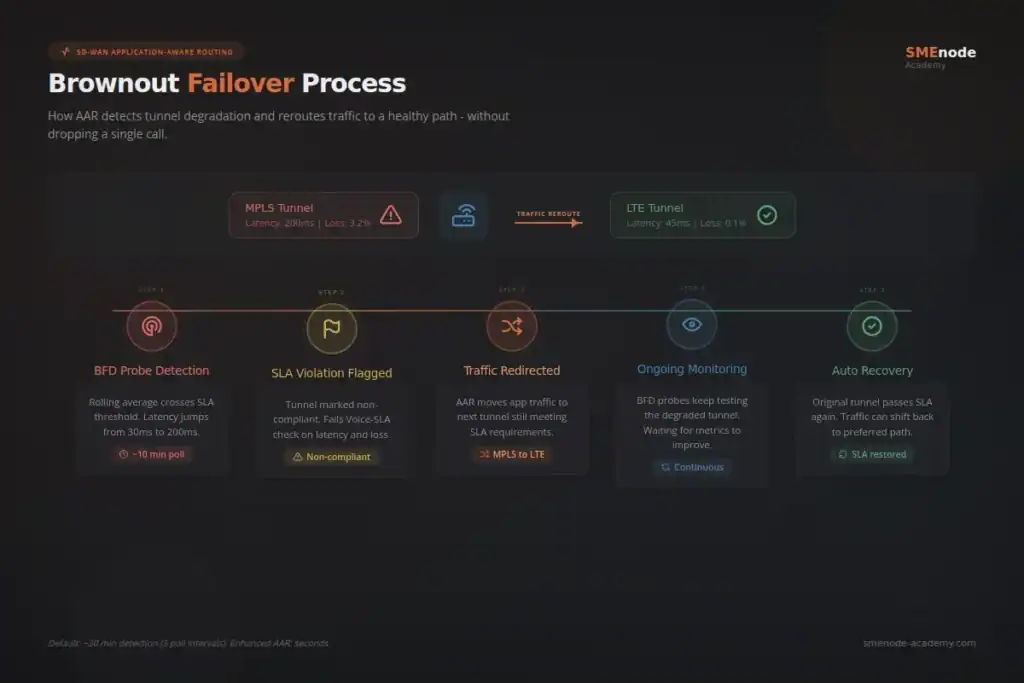
Blackouts are easy. Link goes down. BFD catches it in seconds. Traffic reroutes. Done.
Brownouts are the tricky part. The link is technically up, but it’s slow. Maybe latency jumped from 30ms to 200ms. Old routing doesn’t even notice.
Here’s how AAR handles it:
- BFD probes catch the drop – the rolling average shows latency past the SLA limit
- SLA violation logged – the tunnel gets flagged as non-compliant
- Traffic redirected – AAR moves that app’s traffic to the next tunnel that still meets the SLA
- Ongoing checks – BFD keeps testing the bad tunnel
- Auto recovery – when the tunnel gets better and passes SLA again, traffic can shift back
One key detail: with default settings, it takes about 3 poll intervals (roughly 30 minutes) before a path gets removed from AAR. That’s because the system averages across 6 buckets. Bad data takes time to outweigh the good.
Too slow for you? You can tune it. But be careful. Faster settings mean more path changes. And that can cause its own issues.
What Is Enhanced Application-Aware Routing?
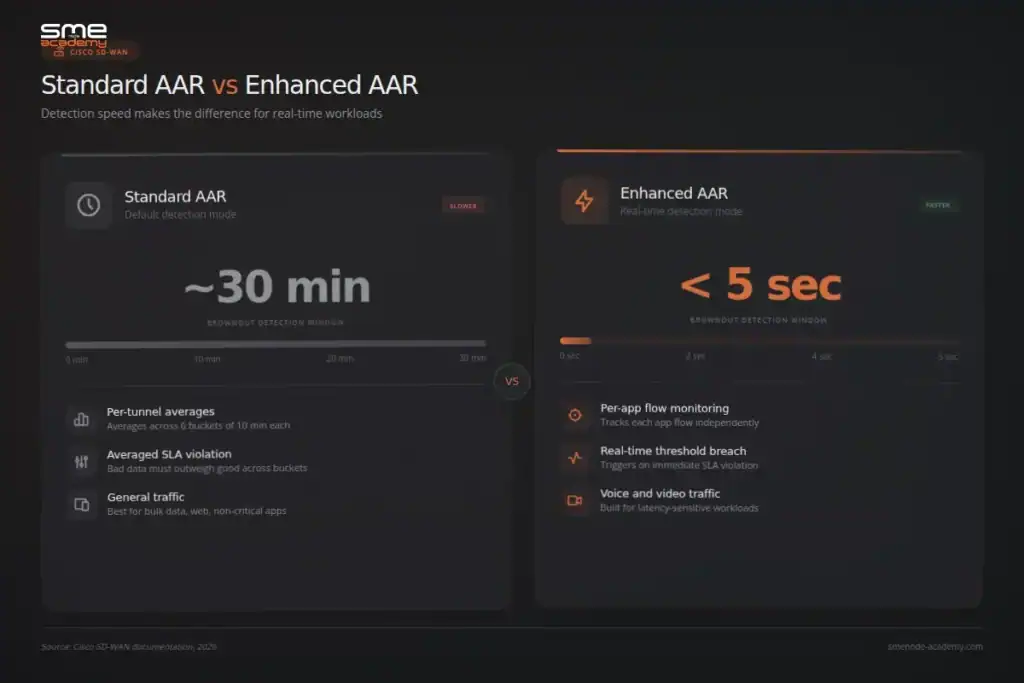
Standard AAR works well for most cases. But 30 minutes to spot a brownout? For voice and video, that’s way too long.
Enhanced AAR was built to fix this. It catches tunnel issues faster so traffic reroutes in seconds, not minutes.
Key differences:
| Feature | Standard AAR | Enhanced AAR |
|---|---|---|
| Detection speed | ~30 min (3 poll intervals) | Seconds to minutes |
| Monitoring granularity | Per-tunnel averages | Per-application flow monitoring |
| Failover trigger | Averaged SLA violation | Real-time threshold breach |
| Best for | General traffic | Latency-sensitive apps (voice, video) |
First, EAAR measures performance from the real packets your apps already send through the data plane. It isn’t waiting on separate BFD probes. More data, faster signal. Per Cisco’s Catalyst SD-WAN policies guide for releases 26.x and later, that’s the core difference.
Second, EAAR tracks each application flow on its own, not just the tunnel as a whole. So it spots degradation hitting a single app on a specific path, even when the aggregate tunnel stats still look healthy. It also adds a dampening mechanism to stop traffic from bouncing back and forth between transports when a link is borderline.
Running hundreds of remote offices? Enhanced AAR is what keeps your Webex calls from sounding like a submarine radio. Our SD-WAN lab course covers both standard and Enhanced AAR configuration in the lab environment.
How to Configure an Application-Aware Routing Policy
You do all of this through vManage, Cisco’s central dashboard. Here’s the process step by step.
Step 1: Define Your SLA Classes
Create SLA classes based on what your apps need. Common setups:
| SLA Class | Max Latency | Max Jitter | Max Loss | Use Case |
|---|---|---|---|---|
| Voice-SLA | 150 ms | 30 ms | 1% | VoIP, UC |
| Video-SLA | 200 ms | 50 ms | 2% | Video conferencing |
| Business-Critical | 300 ms | 100 ms | 3% | ERP, CRM, databases |
| Best-Effort | No limit | No limit | No limit | Web browsing, updates |
Step 2: Create the App-Route Policy
In vManage, go to Configuration > Policies > Centralized Policy. Build an app-route policy that:
- Matches traffic by app (DPI) or DSCP/prefix
- Assigns an SLA class
- Sets transport order (MPLS first, then LTE, then broadband)
- Defines what happens if no path meets the SLA
Step 3: Apply the Policy
Attach the policy to the right site lists in vManage. It pushes out to all WAN edge routers in those sites on its own.
Step 4: Verify and Monitor
Go to Monitor > Network > Application-Aware Routing in vManage. Check these:
- Tunnel metrics right now
- SLA status per tunnel
- Past trends and violations
- Which path each app is using
This whole workflow is covered hands-on in SMEnode Academy’s Cisco SD-WAN training course. You’ll set up AAR policies on live lab gear with real Cisco SD-WAN controllers.
How to Verify AAR Is Actually Working (CLI)
The GUI is fine for a quick look. But when a policy doesn’t behave, the CLI tells the truth faster. These are the commands I reach for first on a WAN edge router (IOS XE Catalyst SD-WAN):
show sdwan bfd sessions– confirms tunnels are up and BFD is running on each transportshow sdwan app-route stats– shows measured latency, jitter, and loss per tunnel, plus which SLA classes each path currently passesshow sdwan policy from-vsmart– proves the centralized policy actually reached this router from vSmartshow sdwan omp routes– checks the overlay routes and preferences the policy is acting on
Read them in that order. If BFD sessions aren’t up, nothing else matters. If the stats look healthy but traffic still takes the wrong path, the policy probably didn’t push from vSmart. That single check saves hours.
Want the numbers behind the mechanism? show sdwan app-route stats prints the per-bucket loss and latency. Line those up against your SLA class limits and you can see exactly why a path was marked non-compliant.
Common AAR Configuration Mistakes
A working lab config can still fail in production. Here are the traps worth knowing before you touch a live network:
- Timers too aggressive. Shrinking the poll interval feels smart until traffic flaps every few minutes. Enhanced AAR’s dampening exists for a reason. Use it instead of hand-tuning standard timers to extremes.
- No fallback action. If every transport fails the SLA and you didn’t set a fallback, the app can drop entirely. Always define what happens when no path qualifies.
- SLA limits copied from a blog. The 150ms voice target is a guideline, not gospel. Measure your own baseline first, then set limits with real headroom.
- Forgetting DPI needs first-packet learning. DPI can take a few packets to classify a new flow. For traffic you must pin from the very first packet, match on prefixes and ports too.
- Policy applied to the wrong site list. The policy looks perfect but nothing changes? Check the site list it’s attached to. This is the most common “it’s not working” ticket.
Application-Aware Routing vs QoS: What’s the Difference?
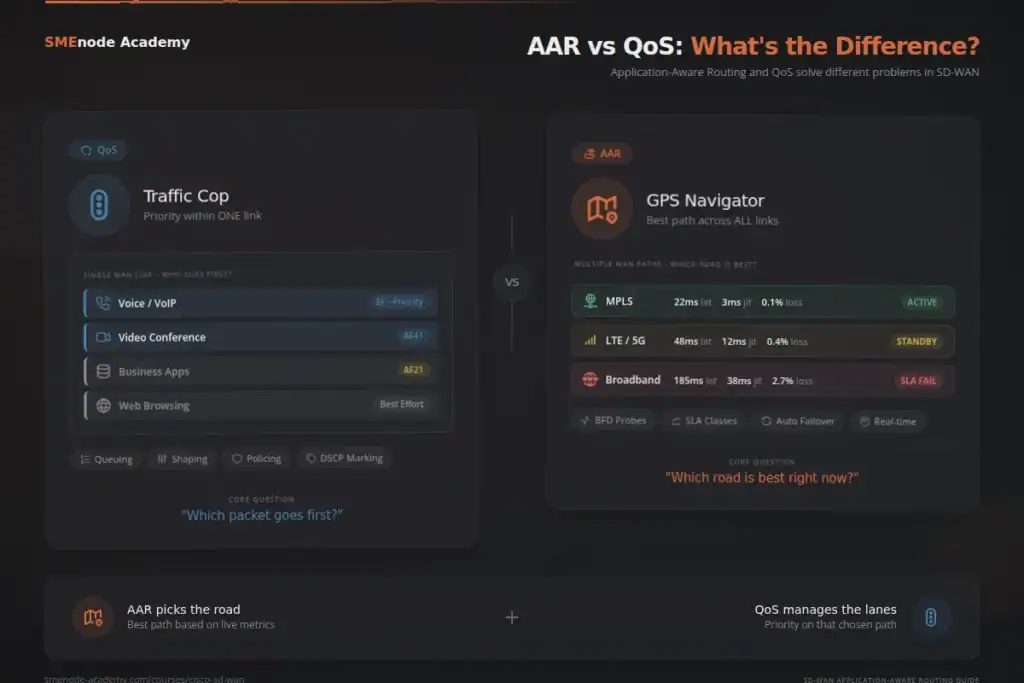
Engineers sometimes mix up AAR with QoS. They’re related. But different.
QoS controls traffic priority within a single link. It picks which packets go first when there’s congestion. QoS uses queuing, shaping, policing, and marking.
AAR picks which link to use in the first place. It chooses the best path across your WAN transports based on real-time data.
Think of it this way. QoS is the traffic cop at one intersection. AAR is the GPS that picks the best road for your trip.
In a good SD-WAN setup, you use both. AAR picks the path. QoS handles priority on that path. They work together.
If you’re weighing CCNA vs CCNP: which Cisco certification should you get, both AAR and QoS are tested on the 300-415 ENSDWI exam. They fall under the Policies domain (20%) and Security/QoS domain (15%).
Real-World Use Cases for Application-Aware Routing
AAR isn’t just exam material. Here’s how enterprises use it in production.
Healthcare: Protecting Telehealth Sessions
A hospital with 50 clinics runs telehealth video across MPLS and broadband. AAR routes video over MPLS when it meets latency limits. If MPLS degrades at peak hours, video shifts to broadband, but only if that link passes the Video-SLA check. EHR traffic gets its own SLA class with tighter loss limits.
Finance: Securing Trading Floor Communications
Trading platforms need sub-50ms latency. No exceptions. AAR with tight SLA limits and Enhanced AAR keeps trade traffic on the fastest path at all times. Jitter spikes on the primary link? Traffic shifts in seconds.
Retail: Managing POS and Cloud Apps
A retail chain with 500 stores runs POS systems, cloud inventory tools, and guest Wi-Fi. AAR splits these into SLA classes. POS gets strict loss limits. Cloud apps get moderate latency targets. Guest traffic? Best-effort, no SLA.
Education and Remote Work
Remote teams are the norm now. AAR keeps Zoom and Teams calls smooth across mixed WAN links. Video gets priority SLA treatment. Background file syncs use whatever bandwidth is left. For a deeper look at how SD-WAN fits into modern network design, start with our complete beginner’s guide to SD-WAN.
What’s New for Application-Aware Routing in 2026?
SD-WAN is still growing fast. The market sits around $9.5B in 2026 and is forecast to more than quadruple by 2033, per Business Research Insights. And Cisco’s own data shows SD-WAN traffic climbing far faster than legacy MPLS WAN. Here’s what’s pushing AAR forward this year.
AI-Driven Bandwidth Forecasting
Cisco Catalyst SD-WAN Analytics now uses AI/ML to track bandwidth across WAN circuits. It predicts needs weeks ahead. So you can tweak SLA classes and transport order before congestion hits. Not after. (Source: Cisco Community)
AgenticOps and Autonomous Networking
Cisco’s AgenticOps model pairs AI-assisted workflows with real-time data. For AAR, this means smarter policy suggestions based on past traffic patterns. The system can recommend SLA class changes and transport mappings with no manual tuning.
AAR for AI Inference Traffic
Cisco’s new Unified Edge platform brings AAR to AI inference workloads. GPU-to-GPU traffic between branch sites and cloud AI services now gets its own SLA class. Failover across WAN links is automatic.
SASE Integration
AAR is now a core part of SASE (Secure Access Service Edge) architectures. In 2026, the boundary between SD-WAN routing and cloud security is almost gone. AAR policies now factor in security inspection requirements alongside performance SLA targets. Sensitive traffic routes through cloud security stacks while latency stays within acceptable bounds.
How to Build Your SD-WAN Skills in 2026
AAR is one of the most tested topics on the Cisco 300-415 ENSDWI exam. That exam counts as a CCNP Enterprise concentration. The Policies domain alone is 20% of the test. And AAR is the biggest piece of it.
Here’s a study path that works:
- Start with the basics – you need solid CCNA-level skills from a CCNA training course covering routing (OSPF, BGP), IPsec, and WAN design before touching SD-WAN. Our end-to-end BGP guide is a good warm-up.
- Learn SD-WAN design – get to know vSmart (control), vManage (management), vBond (orchestration), and WAN edge routers (data plane).
- Get hands-on with AAR – set up SLA classes, build app-route policies, and test failover in a lab.
- Study Enhanced AAR – know the gaps between standard and enhanced, and when to use each.
- Drill the verification commands – the CLI checks above come up in troubleshooting questions and on the CCIE lab.
- Take a structured course – SMEnode Academy’s Cisco SD-WAN training covers all six exam domains with live classes and unlimited lab access.
Prepping for the CCIE Enterprise Infrastructure lab too? AAR config shows up often, and you’ll need to build and fix complex policies under time pressure. For the full expert-track roadmap, see our CCIE career path guide.
Want a self-study companion? The SMEnode Labs SD-WAN workbook gives you the lab scenarios and command drills to practise AAR on your own schedule.
Frequently Asked Questions
What is application-aware routing in SD-WAN?
AAR is an SD-WAN policy that routes traffic based on real-time path metrics. Not static routing costs. It uses BFD probes to measure latency, jitter, and packet loss on each WAN tunnel. Then it sends app traffic down the path that meets its SLA. If a path gets worse, AAR moves traffic to a better one. No manual work needed.
How does AAR differ from traditional routing?
Old routing protocols like OSPF and BGP pick paths by cost, hop count, or link speed. They don’t check real-time performance. AAR adds a live layer on top. It measures latency, jitter, and loss every 10 minutes (by default). When a path breaks its SLA, traffic reroutes. Old routing tells you a path exists. AAR tells you if it’s good enough for your app.
What are SLA classes in application-aware routing?
SLA classes set max limits for latency, jitter, and packet loss per app group. You build them in vManage and tie them to traffic types through an app-route policy. A voice SLA class might cap latency at 150ms, jitter at 30ms, and loss at 1%. Any tunnel past those limits fails the check. It stops getting that app’s traffic until it gets better.
Can application-aware routing work with multiple ISPs?
Yes. AAR is built for mixed transports. It works across MPLS, broadband, LTE/5G, and satellite at the same time. Each link is measured on its own. Traffic goes to whichever path meets the SLA for that app. This is one of the biggest wins of SD-WAN over old WAN setups. You get smart failover across totally different link types.
What is Enhanced Application-Aware Routing?
Enhanced AAR is a faster version of standard AAR. It spots tunnel issues in seconds, not 30 minutes. It tracks each app flow on its own instead of just the whole tunnel. So it catches problems for one app even when other traffic on that path looks fine. It’s built for real-time workloads like voice and video calls.
Which Cisco exam covers application-aware routing?
The 300-415 ENSDWI (Implementing Cisco SD-WAN Solutions) exam tests AAR in depth. Our Cisco SD-WAN course covers all of it. AAR falls under the Policies domain (20%) and the Security/QoS domain (15%). Pass this exam plus the ENCOR 350-401 core, and you earn the CCNP Enterprise cert. AAR also shows up on the CCIE Enterprise Infrastructure lab exam.
Bottom Line
AAR is what makes SD-WAN smart. Without it, you’ve got an overlay with fancy tunnels. With it, you’ve got a WAN that watches performance and picks the best path for every app. Big difference.
The tech keeps moving. AI analytics, faster failover with Enhanced AAR, and SASE are all pushing AAR from a “set and forget” policy into a system that tunes itself.
Whether you run a multi-site network or you’re studying for the Cisco SD-WAN cert through a structured SD-WAN training course, AAR is must-know material. It’s the feature that turns raw WAN links into a real app delivery platform.
Ready to get hands-on? Book a free demo class and set up application-aware routing on live Cisco SD-WAN gear with expert instructors.
Running VMware infrastructure alongside your Cisco SD-WAN? Our VMware NSX Training covers the east-west side of the network – micro-segmentation, Tier-0 BGP peering, and distributed firewalling inside the data centre. SD-WAN handles north-south. NSX handles the rest.