Last updated: 2026-08-20
You’ve probably heard you can manage hundreds of network devices with a simple hosts.ini file. And technically? You can. Until someone swaps an IP address and nobody updates the file.
That’s where NetBox Ansible comes in. By connecting Ansible’s automation engine to NetBox as a dynamic inventory source, your playbooks always pull fresh, accurate device data. No stale entries. No missing switches. No guessing.
Here’s the short version. A NetBox Ansible dynamic inventory gives you a single source of truth, pulled live from NetBox’s API every time you run a playbook. You install the netbox.netbox collection, set two environment variables, and write about 20 lines of YAML. That’s the whole job.
Below you’ll find the actual config file, not a description of it. Copy it, change the endpoint, run it.
One thing to get out of the way first, because it’s the reason most first attempts fail: in NetBox, an IP address has to be assigned to an interface before you can mark it as the device’s primary IP. Skip that and your devices either vanish from the inventory or show up with no address to connect to. No error message either way. More on that below.
What Is the NetBox Ansible Dynamic Inventory?
NetBox Ansible is the pairing of two tools. NetBox, an open-source infrastructure resource modeling platform, and Ansible, the most popular automation engine for IT infrastructure. When you connect them, you use the nb_inventory plugin to pull device data directly from NetBox’s API instead of maintaining static inventory files.
Think of it this way. NetBox holds the truth about your network, every device, IP address, interface, and VLAN. The inventory plugin lets your playbooks tap into that truth automatically, without anyone touching a flat file.
Pretty simple concept. But the impact is huge.
NetBox as Your Single Source of Truth

Illustration of network data query and inventory flow using NetBox and automation tools for accurate network management.
NetBox was originally built by DigitalOcean’s engineering team. It’s now maintained by NetBox Labs, and as of August 2026 the current release is NetBox 4.6.x, with 4.7 already in beta. The platform handles DCIM (racks, devices, cables), IPAM (IPs, VLANs, VRFs), and even multi-tenant configurations for MSP environments.
So why does this matter for this setup? Because NetBox stores everything your playbooks need, hostname, primary IP, platform type, device role, site location. And it stores device-specific variables through config contexts. That means your dynamic inventory doesn’t just pull the structure. It pulls the variables too.
No more scattered data across files, spreadsheets, and documentation. One place. One truth.
If you’re new to how Ansible inventories work in general, we’ve got a detailed breakdown in our Ansible inventory basics guide that covers static vs dynamic from the ground up.
Why the NetBox Ansible Plugin Beats Static Files
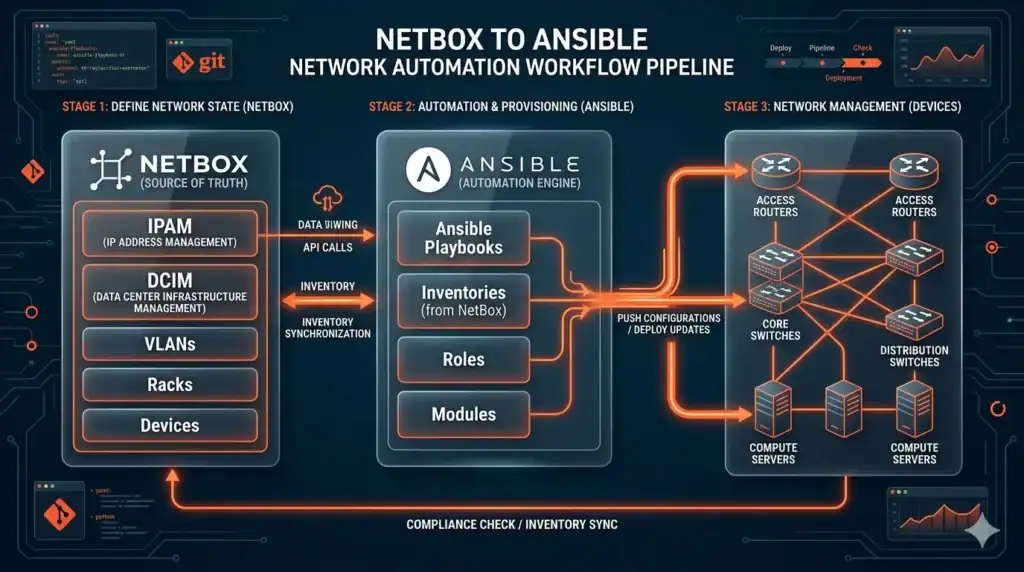
Visual overview of building a dynamic inventory with NetBox and Ansible for network automation.
Most engineers start with a hosts.ini file. Makes sense when you’ve got 10 or 20 devices. But here’s the thing, networks grow. And static files don’t grow with them. The companion piece covers 100 Python interview questions for network engineers.
We see this all the time in our live automation classes. Someone’s managing 200+ devices with a flat file that was “last updated” three months ago. Half the IPs are wrong. A dozen decommissioned devices are still listed. And 15 new switches added last quarter? Nowhere in the file.
That’s inventory drift. And it breaks your automation before you even run a playbook.
The dynamic inventory solves this by querying NetBox at runtime. Every single run gets fresh data. Here’s how static and dynamic compare:
| Criteria | Static Inventory | Dynamic (NetBox Ansible) |
|---|---|---|
| Data Source | Manual INI/YAML file | NetBox API (auto-generated) |
| Update Method | Human edits the file | Pulled at runtime from API |
| Accuracy | Degrades over time | Always reflects current state |
| Scalability | Practical for <50 devices | Scales to thousands |
| Audit Trail | Depends on version control | Inherited from NetBox |
| CI/CD Fit | Requires manual sync | Native fit for GitOps |
The decision rule is straightforward. If you’ve got 50+ devices, multiple engineers, or a CI/CD pipeline, moving to a dynamic inventory isn’t a nice-to-have. It’s a requirement.
And if you’re building network automation skills from scratch, our CCNA automation training covers Ansible fundamentals with hands-on labs where you’ll actually build and test dynamic inventories yourself. For the wider picture, we cover which DevOps skills employers can’t fill.
How to Set Up NetBox Ansible Step by Step
Setting up the integration takes about 15 minutes if you already have NetBox running. Three steps. That’s it.
Before You Start: Get Your NetBox Data Right
This is the part that trips up almost everyone, so it goes first.
The nb_inventory plugin can only return what NetBox actually holds. NetBox has a strict object chain, and each item needs the one before it to exist:
Site → Manufacturer → Device Type → Device Role → Platform → Device
Two details matter more than the rest:
The interface binding rule. An IP address in NetBox has to be assigned to an interface before you can set it as the device’s primary IP. Create the IP on its own and it just sits in IPAM, unattached. Your device then has no primary IP, so ansible_host comes back empty and Ansible has nothing to connect to. You get no warning about this.
Use underscores in your device role slug. A role slug of core-router becomes the Ansible group device_roles_core-router, and hyphens in group names are awkward to target. Make the slug core_router instead and you get device_roles_core_router. Small thing. Saves real annoyance later.
Set the Platform too, with a slug matching what Ansible expects (ios, nxos, eos). Step 3 shows why that one matters.
In our live network automation classes, this is the #1 config mistake students make. They set up NetBox Ansible correctly but forget to assign primary IPs in NetBox. The plugin silently skips those devices, and suddenly half your network is invisible to Ansible.
Step 1: Install the NetBox Ansible Collection
First, install the official netbox.netbox collection from Ansible Galaxy. This gives you the nb_inventory plugin along with a bunch of useful modules for interacting with NetBox.
ansible-galaxy collection install netbox.netboxYou also need the Python client the plugin depends on:
pip install pynetboxPin the version in your requirements.yml so your pipeline doesn’t drift:
---
collections:
  - name: netbox.netbox
    version: ">=3.23.0"
The current release is 3.23.0. It supports NetBox 3.x and 4.x, and it carries Red Hat certification for Ansible Automation Platform, so it’s production-grade. Also useful here: whether the Terraform certification still pays off.
Step 2: Configure API Access
Your NetBox Ansible setup needs an API token to talk to NetBox. The plugin reads two environment variables:
export NETBOX_API=https://netbox.example.com
export NETBOX_TOKEN=your_read_only_token_here
Always use read-only tokens for inventory queries. There’s no reason your automation needs write access just to pull device lists. In NetBox, scope the token to the Devices and IPAM endpoints and set an expiry.
Better still, keep it in Ansible Vault:
ansible-vault encrypt_string 'your_read_only_token_here' --name 'netbox_token'Never hardcode tokens in your inventory config files. And if you’re running this in AWX or Ansible Automation Platform, create a custom credential type that injects NETBOX_API and NETBOX_TOKEN as environment variables rather than putting them in the config at all.
Step 3: Build Your NetBox Ansible Inventory Config
Here’s the file. Create it as netbox_inventory.yml, and note the naming rule: the filename must end in nb_inventory.yaml, nb_inventory.yml, netbox_inventory.yaml, or netbox_inventory.yml, or Ansible won’t recognise it as a NetBox inventory source.
---
# netbox_inventory.yml
plugin: netbox.netbox.nb_inventory

# Reads NETBOX_API and NETBOX_TOKEN from the environment
api_endpoint: "{{ lookup('env', 'NETBOX_API') }}"
token: "{{ lookup('env', 'NETBOX_TOKEN') }}"
validate_certs: true

# Pull config context variables into host vars
config_context: true

# Only return devices that can actually be reached.
# has_primary_ip filters out patch panels and other passive gear.
device_query_filters:
  - has_primary_ip: 'true'
  - status: active

# Build Ansible groups from NetBox attributes
group_by:
  - device_roles
  - sites
  - platforms
  - tags

# Map NetBox data onto the variables Ansible modules expect.
# ansible_host is set for you from the primary IP, so it isn't listed here.
compose:
  ansible_network_os: platforms[0]

# Group on any direct attribute of the device object
keyed_groups:
  - prefix: status
    key: status.value
That’s about 25 lines replacing hundreds of lines of static inventory that someone has to maintain by hand.
Test it before you trust it:
ansible-inventory -i netbox_inventory.yml --graphYou should get something like this:
@all:
  |--@device_roles_core_router:
  |  |--rtr-tor-01
  |  |--rtr-tor-02
  |--@device_roles_access_switch:
  |  |--sw-tor-01
  |  |--sw-tor-02
  |--@sites_toronto:
  |  |--rtr-tor-01
  |  |--rtr-tor-02
  |  |--sw-tor-01
  |  |--sw-tor-02
  |--@platforms_ios:
  |  |--rtr-tor-01
  |--@status_active:
  |  |--rtr-tor-01
  |--@ungrouped:
Look at those group names. That’s what you target in a playbook’s hosts: line, and guessing it wrong is a common waste of an afternoon. Run --graph first, every time.
You don’t need to set ansible_host yourself, by the way. The plugin fills it in from the device’s primary IP, stripped of its mask, before your compose block even runs. If you’d rather connect by DNS name than by address, set ansible_host_dns_name: true instead of composing anything.
Want the full host vars for one device? Use --list and pipe it through jq:
ansible-inventory -i netbox_inventory.yml --list | jq '._meta.hostvars["rtr-tor-01"]'If you’re working toward expert-level automation, our CCIE automation program goes deep into advanced inventory patterns, keyed_groups, and multi-site configurations.
FREE DOWNLOAD: Production-Ready NetBox Ansible Configs
The config above is the one we’d hand a student on day one. If you want the multi-site variants, the AWX credential-injection walkthrough and a full parameter cheat sheet, grab the free slide deck.
Get the Free PDF
Enter your email to download instantly.
The plurals Gotcha Nobody Warns You About
See ansible_network_os: platforms[0] in that config? The array index isn’t a typo.
The plugin has an option called plurals, and it defaults to true. When it’s on, two things happen. Group names come out plural (sites_toronto, not site_toronto). And every host var gets wrapped in a single-element array for backwards compatibility with old plugin versions.
So the platform slug isn’t in platform.slug. It’s in platforms[0]. Copy an older tutorial that uses platform.slug and your ansible_network_os comes back undefined, and every network module fails with an unhelpful error.
Two ways out. Index into the array as shown above, or turn plurals off:
plurals: false
compose:
  ansible_network_os: platform
group_by:
  - role      # note: singular now
  - site
Turning it off changes your group names and the valid group_by values at the same time. Pick one approach and keep it consistent across your team. Mixing them is how you end up debugging a playbook that targets a group which no longer exists.
Real-World Network Automation Example with NetBox Ansible
Concepts are great. But what does this actually look like in production?
Here’s a common use case. You want to back up running configs from every router tagged backup_enabled in NetBox. Without dynamic inventory, you’d maintain a separate list of backup targets in a flat file. With the dynamic inventory, you just add a tag in NetBox and the device automatically shows up in your backup playbook. If that’s the part you’re stuck on, see 20 Ansible playbooks you can copy and run.
The config for that is one filter:
---
plugin: netbox.netbox.nb_inventory
api_endpoint: "{{ lookup('env', 'NETBOX_API') }}"
token: "{{ lookup('env', 'NETBOX_TOKEN') }}"
validate_certs: true

device_query_filters:
  - has_primary_ip: 'true'
  - tag: backup_enabled

group_by:
  - device_roles
  - sites

compose:
  ansible_network_os: platforms[0]
And the playbook:
---
- name: Back up running configs
  hosts: device_roles_core_router
  gather_facts: false
  connection: network_cli
  tasks:
    - name: Grab the running config
      cisco.ios.ios_command:
        commands: show running-config
      register: running

    - name: Write it to disk
      copy:
        content: "{{ running.stdout[0] }}"
        dest: "./backups/{{ inventory_hostname }}.cfg"
      delegate_to: localhost
Need to add a new router to the backup job? Tag it in NetBox. Done. No file edits. No pull requests to update the inventory. No chance of forgetting.
One warning on those filters. query_filters and device_query_filters combine as a logical OR, not AND. That surprises people. A filter list of tag: backup_enabled plus status: active returns devices matching either condition, so your inventory comes back much wider than you expected. To narrow rather than widen, use NetBox’s own query syntax, and remember you can add __n to negate a field:
device_query_filters:
  - tenant__n: internal    # everything EXCEPT tenant "internal"
Custom fields work here too. Prefix the field name with cf_:
device_query_filters:
  - cf_environment: production
And here’s something most people miss, you can use --limit flags to narrow execution even further. Run backups for just routers, just a specific site, or just devices matching a pattern. The dynamic inventory gives you the full picture, and --limit lets you slice it however you need.
ansible-playbook backup.yml -i netbox_inventory.yml --limit sites_torontoWant to build these kinds of automation workflows as a career? The automation engineer career track at SMEnode Academy covers real-world projects like this with live instruction and unlimited lab access.
group_by vs keyed_groups vs groups
Three options that look like they do the same thing. They don’t.
group_by takes a fixed list of NetBox attributes and builds groups from them automatically. Simplest option, and it covers most needs. Valid values include sites, tenants, racks, tags, device_roles, device_types, manufacturers, platforms, regions, cluster, status, is_virtual, time_zone, and utc_offset. Remember that the plurals setting changes which spellings are valid.
keyed_groups gives you control over the naming, with a prefix and a key:
keyed_groups:
  - prefix: status
    key: status.value
  - prefix: site_region
    key: regions[0]
Real limitation worth knowing: you can only key off direct items on the device or VM object. If the value lives one relationship away in NetBox, keyed_groups can’t reach it. Use compose to build the value first, then key off what you composed.
groups builds a group from a conditional expression:
groups:
  edge_devices: "'edge' in (tags | default([]))"
Start with group_by. Reach for keyed_groups when you need specific names, and groups when membership depends on logic rather than a single field.
Is NetBox Ansible Worth the Setup?
Short answer? If you’re past the hobby-project stage, yes.
This setup pays for itself the first time it prevents a failed automation run caused by stale inventory data. And honestly? That happens faster than most people expect.
Consider the math. Without caching, generating inventory for 1,000+ devices takes 10 to 30 seconds per playbook run. With inventory caching enabled, that drops to near-instant:
cache: true
cache_plugin: jsonfile
cache_connection: /tmp/netbox_inventory_cache
cache_timeout: 900
AWX and Ansible Automation Platform users should set cache timeout to around 900 seconds for a good balance between freshness and performance. The plugin’s own default is 3600, which is usually too stale for a network that changes daily.
The real value isn’t speed though. It’s trust. When every engineer on your team knows the inventory is accurate because it comes from one source of truth, you stop second-guessing your automation. You stop debugging phantom devices. You stop wasting hours on inventory drift.
That’s a big deal.
NetBox Ansible Best Practices for Production
After running this integration in production environments, here’s what actually matters:
Security first. Always use read-only API tokens. Always set validate_certs: true. Store tokens in environment variables or Ansible Vault, never in config files.
Filter aggressively. Use device_query_filters to scope your inventory. The most common filter? has_primary_ip: 'true'. Devices without a primary IP in NetBox will break your playbooks. Filter them out before they cause problems.
Standardise your data. Your setup is only as good as your NetBox data. Standardise platform slugs (ios, nxos, eos), require primary IPs on all managed devices, and use config contexts consistently.
Verify before you run. Always check your inventory with ansible-inventory --graph before running playbooks against production. Missing hosts? The #1 cause is IPs that were never bound to an interface. The #2 cause is query_filters that are too restrictive.
Troubleshooting NetBox Ansible Inventory Problems
Most failures here are silent. The plugin skips what it can’t use and returns a valid inventory anyway, so you get a clean exit code and a broken automation run. This table covers what we see most in class.
| Symptom | Likely cause | Fix |
|---|---|---|
| Device missing from inventory | No primary IP set, or the IP was never bound to an interface | Assign the IP to an interface in NetBox, then mark it primary |
| Device missing, has a primary IP | device_query_filters too restrictive | Comment out the filters and re-run --graph to confirm |
ansible_host is empty | No primary IP on the device, or the IP was never bound to an interface | Fix it in NetBox. The plugin sets ansible_host from the primary IP automatically |
ansible_network_os undefined | Used platform.slug while plurals: true | Use platforms[0], or set plurals: false |
| Playbook matches no hosts | Wrong group name in hosts: | Run --graph and copy the exact group name |
| Groups have unexpected plural names | plurals defaults to true | Either accept plural names or set plurals: false |
| Inventory much larger than expected | query_filters combine as OR, not AND | Use NetBox query syntax or __n negation instead |
| Slow runs, NetBox under load | Caching disabled | Set cache: true with the jsonfile plugin |
| 403 from the API | Token lacks read access to Devices or IPAM | Widen the token scope, check it hasn’t expired |
| SSL errors against internal NetBox | Self-signed certificate | Add the CA with ca_path. Don’t just disable validate_certs |
| Config context vars missing | config_context defaults to false | Set config_context: true |
That config_context default catches people out. The plugin ships with it off, so if you’ve built variables into config contexts in NetBox and they aren’t showing up in --list, that one line is usually why.
Frequently Asked Questions
What is NetBox Ansible?
NetBox Ansible refers to the integration between NetBox (an open-source infrastructure modeling platform) and Ansible (an automation engine). The nb_inventory plugin queries NetBox’s API at runtime to build an accurate, current inventory with all device data and variables, replacing static hosts files entirely.
Why are some devices missing from my NetBox Ansible inventory?
Almost always one of two reasons. Either the device has no primary IP set in NetBox, or the IP exists but was never assigned to an interface, which means it can’t be marked primary. The plugin skips those devices silently. The other cause is a device_query_filters entry that’s stricter than you meant. Comment out your filters, run ansible-inventory --graph, and add them back one at a time.
What’s the difference between group_by and keyed_groups?
group_by builds groups automatically from a fixed list of NetBox attributes like sites or device_roles. keyed_groups lets you define your own prefix and key, so you control the naming. The catch with keyed_groups is that you can only key off direct attributes of the device or VM object, not values one relationship away.
Can I group devices by a NetBox custom field?
Yes, and there are two ways. To filter on a custom field, prefix it with cf_ in your query filters, like cf_environment: production. To group by one, enable flatten_custom_fields so the fields land in host vars, then reference the field in keyed_groups.
Do I need NetBox Ansible for small networks?
For networks under 50 devices with a single engineer, static inventory files work fine. But once you add more engineers, CI/CD pipelines, or cross 50+ devices, NetBox Ansible becomes the smarter choice. Inventory drift is inevitable with flat files, regardless of network size. This connects directly to 50 AI prompts built for network engineers.
Which NetBox version works with the Ansible collection?
The netbox.netbox collection version 3.23.0 supports NetBox 3.x and 4.x. For the best NetBox Ansible experience, use the latest NetBox 4.6.x release. Check the Ansible Galaxy page for the current compatibility matrix.
How do I cache NetBox Ansible inventory queries?
Add cache settings to your inventory config. Set cache: true, use the jsonfile cache plugin, give it a path with cache_connection, and set cache_timeout between 300 and 3600 seconds depending on how often your network changes. For AWX and AAP environments, 900 seconds is the recommended sweet spot.
Can I use NetBox Ansible with AWX or Ansible Automation Platform?
Yes. NetBox Ansible works with both. The netbox.netbox collection has Red Hat certification, so it’s fully supported. Create a custom credential type that injects NETBOX_API and NETBOX_TOKEN as environment variables, and enable caching to reduce API load from frequent polling.
Bottom Line
Static inventory files had their time. But if you’re managing any real-world network with Ansible, NetBox Ansible is how you keep your automation accurate and your team sane.
Three things to take away. Bind your IPs to interfaces in NetBox before anything else, because that single step causes most failed setups. Watch the plurals default, since it decides whether you write platforms[0] or platform. And run ansible-inventory --graph before every playbook until the group names are muscle memory.
The setup takes 15 minutes. The impact lasts as long as your network does.
Ready to level up your infrastructure automation skills? SMEnode Academy offers live, instructor-led courses covering everything from Ansible basics to advanced network automation patterns. Unlike pre-recorded courses, our live sessions let you ask questions in real-time, and every student gets free 1-on-1 mentorship throughout the program.
Don’t Start from Scratch
Get the multi-site inventory patterns, the AWX credential setup, the full parameter cheat sheet and architecture diagrams in one slide deck, free download.
Get the Free PDF
Enter your email to download instantly.