
Most Ansible playbook articles hand you a file that installs nginx, then stop. You still can’t do your actual job.
So here’s the opposite. Below are 20 Ansible playbook examples that do real work: patching mixed Ubuntu and RHEL fleets, pushing a VLAN to 40 switches, backing up configs before you touch them, rolling a container update without dropping traffic.
Every one is complete. Every one has the command that runs it. And every one has a short “what breaks” note, because the thing that stops you isn’t the YAML, it’s the quoting bug at 5pm on a Friday.
Every file here targets ansible-core 2.21.3, released 2026-08-10, and uses fully qualified module names throughout.
Jump to what you need: beginner · Linux servers · security · Cisco and network gear · AWS · containers · how to run them · what breaks most
What an Ansible playbook actually is
An Ansible playbook is a YAML file that lists the work you want done and the hosts you want it done on. It holds one or more plays. Each play maps a group of hosts to an ordered list of tasks, and each task calls a module like apt or copy. Ansible runs the file top to bottom, over SSH, with nothing installed on the targets.
That last part is why people pick it. No agent to deploy, no daemon to babysit.
The difference between an Ansible playbook and an ad hoc command is repeatability. ansible all -m ping answers a question right now. A playbook is a file you commit, review, and run again in six months when the same box drifts.
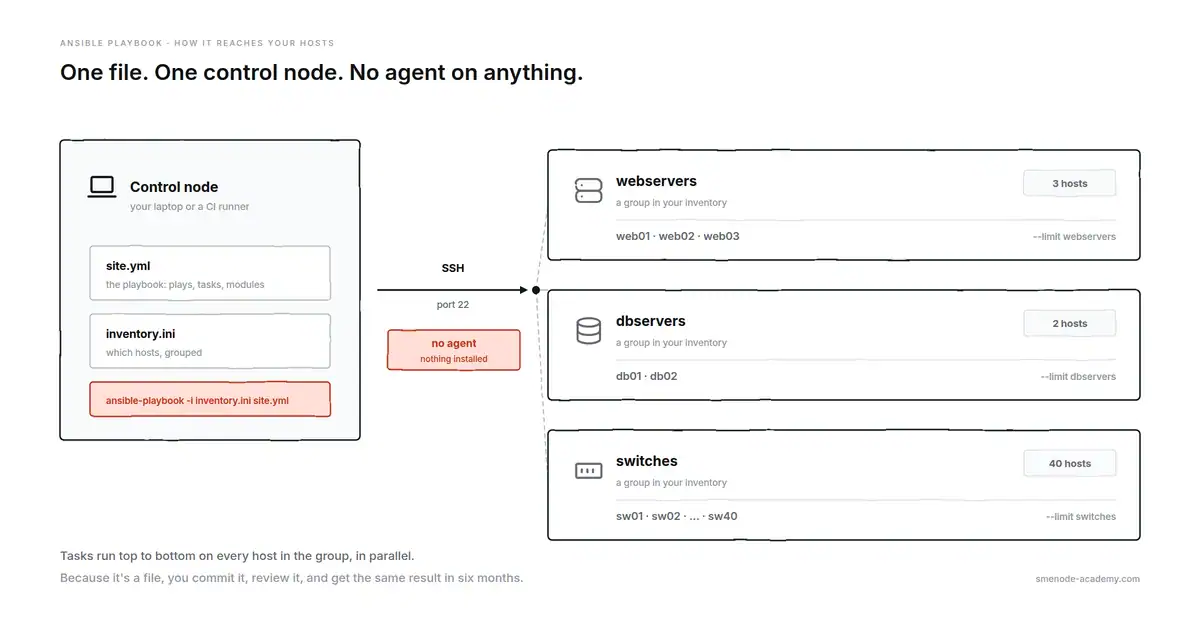
One control node, one file, and nothing installed on the targets.
The anatomy of every Ansible playbook
Every file you’ll write looks like this. The comments name the parts you’ll meet again in all 20 examples.
---                                   # YAML document start
- name: Configure web servers         # the play, and its label
  hosts: webservers                   # which inventory group to target
  become: true                        # escalate to root
  gather_facts: true                  # collect host facts first
  vars:                               # variables scoped to this play
    app_port: 8080

  tasks:                              # the ordered work
    - name: Install nginx             # a task, and its label
      ansible.builtin.apt:            # the module doing the work
        name: nginx
        state: present
      notify: Restart nginx           # fires a handler, but only on change

  handlers:                           # only run when notified
    - name: Restart nginx
      ansible.builtin.service:
        name: nginx
state: restarted| Key | What it does | Required |
|---|---|---|
name | Human label for the play or task | No, but always write it |
hosts | Which inventory group this play targets | Yes |
become | Escalate to root | No |
gather_facts | Collect host facts, set false to speed up | No |
vars | Variables scoped to this play | No |
tasks | The list of things to do | Yes |
handlers | Tasks that only run when notified | No |
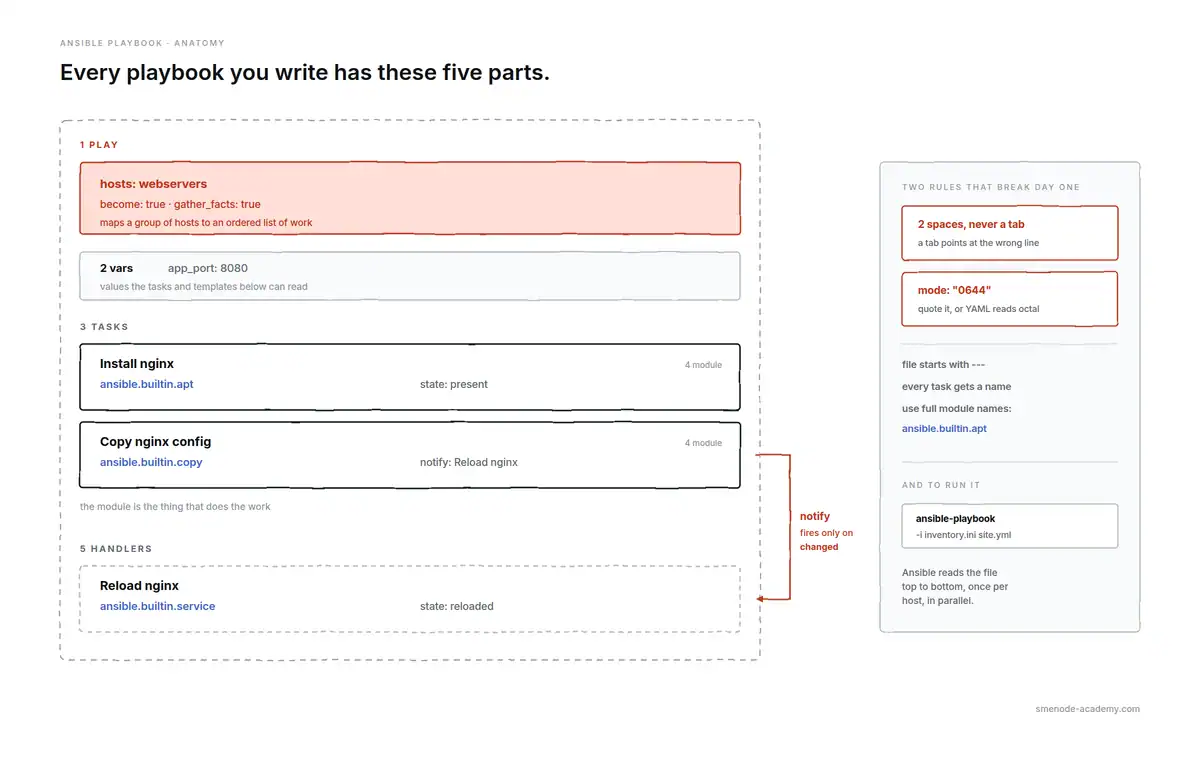
The five parts, and the two YAML rules that break most first attempts.
Two YAML rules cause most first-day failures. Indentation is two spaces, never a tab, and the file starts with ---. A tab produces an error that points at the wrong line, which is why it costs people an hour.
One more thing about the module names below. They’re written in full, like ansible.builtin.apt instead of apt. Both work, but the full name is what current ansible-core and the official docs use, and it saves you a guessing game when two collections ship a module with the same short name.
Every example assumes you have an inventory. If yours is still a hand-maintained text file, read static vs dynamic Ansible inventory first, because half the failures below are really inventory failures wearing a costume.
Before you run anything: the 4 commands that save you
Learn these before you learn another module. They’re the difference between a change and an incident.
ansible-playbook site.yml --syntax-check     # catches YAML errors, connects to nothing
ansible-playbook site.yml --list-hosts       # shows exactly who you're about to hit
ansible-playbook site.yml --check --diff     # dry run, prints what would change
ansible-playbook site.yml -vvv               # full connection debugging when it fails
--list-hosts is the one people skip and then regret. It answers “did my --limit actually work” before the run, not after.
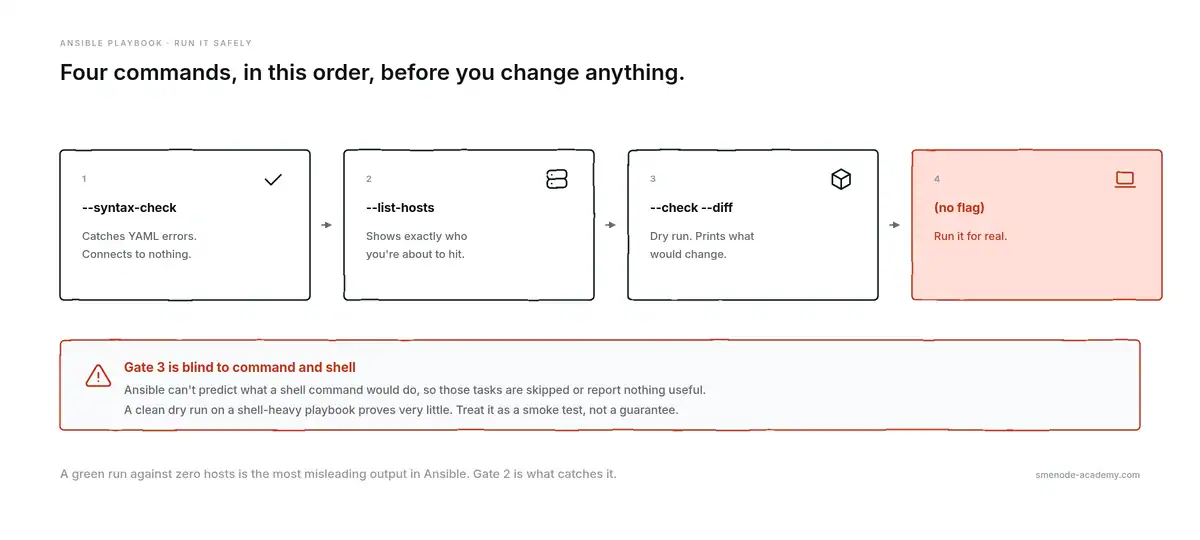
Run them in this order. Gate 2 is the one people skip and then regret.
An honest caveat about --check. A dry run only predicts what a module can predict. The moment a task uses ansible.builtin.command or ansible.builtin.shell, Ansible has no idea what that command would do, so it either skips the task or reports nothing useful, and any later task that depends on its result gets the wrong answer. A clean --check on a playbook full of shell tasks proves very little. Treat it as a smoke test, not a guarantee.
Beginner Ansible playbook examples
Four files. Together they cover the mechanics you’ll reuse in every Ansible playbook after them.
1. Ping every host and prove your inventory works
Run this before anything else on a new fleet. It tests SSH, sudo, and your inventory in one shot, and changes nothing.
---
- name: Verify connectivity to every host
  hosts: all
  gather_facts: false

  tasks:
    - name: Check Ansible can reach and authenticate
      ansible.builtin.ping:

    - name: Report who answered
      ansible.builtin.debug:
        msg: "{{ inventory_hostname }} responded"
ansible-playbook -i inventory.ini ping.ymlWhat breaks: ansible.builtin.ping isn’t ICMP. It’s a Python round trip, so a host that answers a normal ping in your terminal can still fail here when Python is missing or the SSH key isn’t trusted. If you get a host-key prompt, the run hangs forever instead of failing, so set host_key_checking = False in ansible.cfg for lab work only, never in production.
2. Install a package on every server
The one everyone writes first. Worth studying for one reason: it’s idempotent, and the reason it is matters.
---
- name: Install and start nginx
  hosts: webservers
  become: true

  tasks:
    - name: Install nginx
      ansible.builtin.apt:
        name: nginx
        state: present
        update_cache: true

    - name: Start nginx and enable it at boot
      ansible.builtin.service:
        name: nginx
        state: started
        enabled: true
ansible-playbook -i inventory.ini nginx.ymlWhat breaks: state: present installs if missing and does nothing if already there, so a second run reports ok rather than changed. That’s idempotency, and it’s the whole point. Swap in state: latest and you lose it: the task can upgrade the package on any run, which turns a config playbook into an unplanned patch window. Use present unless you specifically mean “upgrade now”.
3. Copy a file and restart a service with a handler
The pattern behind almost every real config change. Push a file, and restart the service only if the file actually changed.
---
- name: Deploy nginx config safely
  hosts: webservers
  become: true

  tasks:
    - name: Copy nginx config into place
      ansible.builtin.copy:
        src: files/nginx.conf
        dest: /etc/nginx/nginx.conf
        owner: root
        group: root
        mode: '0644'
        backup: true
      notify: Reload nginx

  handlers:
    - name: Reload nginx
      ansible.builtin.service:
        name: nginx
        state: reloaded
ansible-playbook -i inventory.ini nginx-config.yml --check --diffWhat breaks: handlers fire on changed, not on ok. If the file is already identical, the copy reports ok, the handler never runs, and that’s correct behaviour people mistake for a bug. The real trap is mode: 0644 without quotes. YAML reads that as octal-ish nonsense and you can end up with permissions you didn’t ask for. Always quote the mode. Also note backup: true, which leaves a timestamped copy on the host and has saved more weekends than any other single parameter.
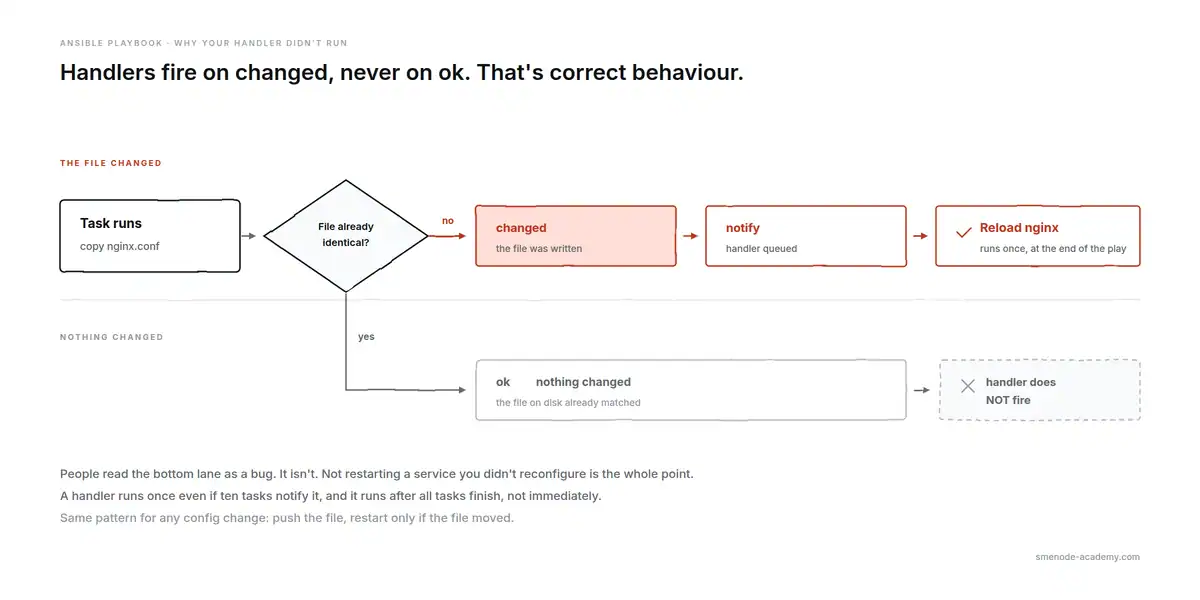
The top lane fires the handler. The bottom lane doesn’t, and that’s correct.
4. Render a config file from a Jinja2 template
Copying a static file stops working the moment two hosts need different values. Templates are the fix.
templates/app.conf.j2:
# Managed by Ansible. Local edits will be overwritten.
server_name {{ inventory_hostname }};
listen {{ app_port }};
worker_processes {{ ansible_processor_vcpus }};
---
- name: Render per-host app config
hosts: webservers
become: true
vars:
app_port: 8080
tasks:
- name: Render app config from template
ansible.builtin.template:
src: templates/app.conf.j2
dest: /etc/app/app.conf
mode: '0644'
validate: 'nginx -t -c %s'
notify: Reload nginx
handlers:
- name: Reload nginx
ansible.builtin.service:
name: nginx
state: reloadedansible-playbook -i inventory.ini app-template.yml --check --diffWhat breaks: ansible_processor_vcpus only exists because facts were gathered. Set gather_facts: false to speed up a play and every fact variable in your template becomes undefined, which fails at render time with a message that doesn’t mention facts at all. The validate line is the underrated part: it runs a syntax check on the rendered file before installing it, so a bad template fails the task instead of taking down the service on reload.
Ansible playbook examples for Linux server management
5. Patch every Ubuntu and RHEL box in one run
Mixed fleets are normal. This handles both without maintaining two Ansible playbooks.
---
- name: Patch all Linux hosts
  hosts: linux
  become: true
  serial: "25%"

  tasks:
    - name: Update apt cache and upgrade Debian family
      ansible.builtin.apt:
        upgrade: dist
        update_cache: true
        cache_valid_time: 3600
      when: ansible_os_family == "Debian"

    - name: Upgrade RedHat family
      ansible.builtin.dnf:
        name: "*"
        state: latest
      when: ansible_os_family == "RedHat"

    - name: Check whether a reboot is required
      ansible.builtin.stat:
        path: /var/run/reboot-required
      register: reboot_file

    - name: Reboot only if the host asked for it
      ansible.builtin.reboot:
        reboot_timeout: 600
      when: reboot_file.stat.exists
ansible-playbook -i inventory.ini patch.yml --limit stagingWhat breaks: serial: "25%" patches a quarter of the fleet at a time, so a bad update doesn’t take everything down at once. Without it, Ansible hits all hosts in parallel and you find out about the broken package everywhere simultaneously. Note that /var/run/reboot-required is Debian-family only, so the reboot task simply never fires on RHEL. Fine here, but don’t read a skipped task as “no reboot needed”.
6. Create users and push SSH keys
Onboarding, in a file. The loop is what makes this scale past three people.
---
- name: Manage engineer accounts
  hosts: all
  become: true
  vars:
    engineers:
      - name: rmartin
        key: files/keys/rmartin.pub
      - name: schen
        key: files/keys/schen.pub

  tasks:
    - name: Create the account
      ansible.builtin.user:
        name: "{{ item.name }}"
        groups: sudo
        append: true
        shell: /bin/bash
        state: present
      loop: "{{ engineers }}"

    - name: Install the public key
      ansible.posix.authorized_key:
        user: "{{ item.name }}"
        key: "{{ lookup('file', item.key) }}"
        state: present
        exclusive: true
      loop: "{{ engineers }}"
ansible-playbook -i inventory.ini users.ymlWhat breaks: authorized_key lives in the ansible.posix collection, not in builtin, so a bare ansible-core install fails with “couldn’t resolve module”. Fix with ansible-galaxy collection install ansible.posix. Watch exclusive: true too. It removes every other key for that user, which is exactly what you want for tight control and exactly how you lock yourself out if the key file is wrong. And the sudo group is Debian naming, so RHEL hosts need wheel.
7. Mount an NFS share that survives a reboot
The failure here is quiet and awful: it works until the box restarts.
---
- name: Mount shared storage persistently
  hosts: appservers
  become: true

  tasks:
    - name: Create the mount point
      ansible.builtin.file:
        path: /mnt/shared
        state: directory
        mode: '0755'

    - name: Mount NFS and write it to fstab
      ansible.posix.mount:
        path: /mnt/shared
        src: "nfs01.internal:/exports/shared"
        fstype: nfs
        opts: "rw,soft,timeo=100"
        state: mounted
ansible-playbook -i inventory.ini nfs.ymlWhat breaks: the states look similar and behave very differently. state: mounted mounts now and writes fstab. state: present only writes fstab. Pick present by accident and nothing is mounted until the next reboot. Also use soft rather than hard in opts unless you want processes hanging unkillably when the NFS server goes away.
8. Schedule a cron job the idempotent way
Never append to crontab with shell. You’ll get eleven copies of the same job.
---
- name: Schedule nightly database backup
  hosts: dbservers
  become: true

  tasks:
    - name: Nightly backup at 02:15
      ansible.builtin.cron:
        name: "nightly db backup"
        minute: "15"
        hour: "2"
        job: "/usr/local/bin/backup.sh >> /var/log/backup.log 2>&1"
        user: root
        state: present
ansible-playbook -i inventory.ini cron.ymlWhat breaks: the name field is the identity of the job. Ansible writes it as a comment and uses it to find the entry next run. Change the name and you get a second cron job instead of an edited one. Keep the name stable and change the schedule freely.
Ansible playbook examples for security and hardening
9. Lock down SSH (no root, no passwords)
The Ansible playbook most likely to lock you out of 200 servers, so it’s written defensively.
---
- name: Harden SSH daemon
  hosts: all
  become: true

  tasks:
    - name: Disable root login and password auth
      ansible.builtin.lineinfile:
        path: /etc/ssh/sshd_config
        regexp: "{{ item.regexp }}"
        line: "{{ item.line }}"
        state: present
        validate: '/usr/sbin/sshd -t -f %s'
      loop:
        - { regexp: '^#?PermitRootLogin', line: 'PermitRootLogin no' }
        - { regexp: '^#?PasswordAuthentication', line: 'PasswordAuthentication no' }
      notify: Restart sshd

  handlers:
    - name: Restart sshd
      ansible.builtin.service:
        name: sshd
        state: restarted
ansible-playbook -i inventory.ini ssh-hardening.yml --limit jumpbox01 --check --diffWhat breaks: run this before your keys are working and you’re locked out with no way back except console access. Test on one host with --limit first, keep that session open, and confirm a new login works in a second terminal before you go wider. The validate line is doing real work: sshd -t refuses a broken config, so the file is never written in a state that would kill the daemon on restart. The ^#? in each regexp matters too, because it matches the setting whether or not it’s currently commented out.
10. Open only the ports you need
Two firewall tools, one playbook, chosen by OS family.
---
- name: Configure host firewall
  hosts: webservers
  become: true
  vars:
    allowed_ports:
      - 22
      - 80
      - 443

  tasks:
    - name: Allow ports with ufw on Debian family
      community.general.ufw:
        rule: allow
        port: "{{ item }}"
        proto: tcp
      loop: "{{ allowed_ports }}"
      when: ansible_os_family == "Debian"

    - name: Turn ufw on with a default deny
      community.general.ufw:
        state: enabled
        policy: deny
      when: ansible_os_family == "Debian"

    - name: Allow ports with firewalld on RedHat family
      ansible.posix.firewalld:
        port: "{{ item }}/tcp"
        permanent: true
        immediate: true
        state: enabled
      loop: "{{ allowed_ports }}"
      when: ansible_os_family == "RedHat"
ansible-playbook -i inventory.ini firewall.yml --checkWhat breaks: task order saves you here. Ports are allowed before the default-deny policy is enabled. Flip those two tasks and you drop your own SSH session mid-run. On the firewalld side, leaving out permanent: true gives you a rule that vanishes on reboot, and leaving out immediate: true gives you a rule that does nothing until reboot. You want both.
11. Store secrets properly with ansible-vault
Plain-text passwords in a repo is the most common Ansible mistake in the wild. It takes one command to fix.
ansible-vault create group_vars/all/vault.ymlInside the encrypted file:
vault_db_password: "the-real-password"
vault_api_token: "the-real-token"
---
- name: Deploy app credentials
hosts: appservers
become: true
tasks:
- name: Write the app environment file
ansible.builtin.template:
src: templates/app.env.j2
dest: /etc/app/app.env
owner: root
mode: '0600'
no_log: trueansible-playbook -i inventory.ini secrets.yml --ask-vault-passWhat breaks: no_log: true is not optional on any task that touches a secret. Without it, a failure prints the whole rendered task, secret included, into your terminal and your CI logs. The other trap is that vault encrypts files, not values in your head: ansible-vault encrypt_string exists for single values, but a whole encrypted vault.yml in group_vars is easier to review and rotate.
Ansible playbook examples for Cisco network automation
This is where Ansible earns its keep, and where most tutorials stop. If you’re coming from the CLI, the mental shift is small: you already know the commands, you’re just sending them to 40 devices at once instead of one.
Network modules don’t use become and shouldn’t gather Linux facts. They connect with network_cli instead of a shell.
Your inventory needs the connection details:
[switches]
sw01 ansible_host=10.10.0.11
sw02 ansible_host=10.10.0.12

[switches:vars]
ansible_network_os=cisco.ios.ios
ansible_connection=ansible.netcommon.network_cli
12. Back up every switch config before you touch anything
Run this first, every time, forever. It’s read-only and it’s the reason you’ll sleep after a bad change.
---
- name: Back up running configs
  hosts: switches
  gather_facts: false

  tasks:
    - name: Pull running-config to the control node
      cisco.ios.ios_config:
        backup: true
        backup_options:
          dir_path: ./backups
          filename: "{{ inventory_hostname }}-{{ ansible_date_time.date | default('manual') }}.cfg"
ansible-playbook -i inventory.ini backup-configs.ymlWhat breaks: backups land on the control node, not on the device, which surprises people looking for them on the switch. If you want the date in the filename you need facts gathered, which is why the default('manual') filter is there as a fallback. Commit the backups/ directory to git and you get a free config-change history with diffs.
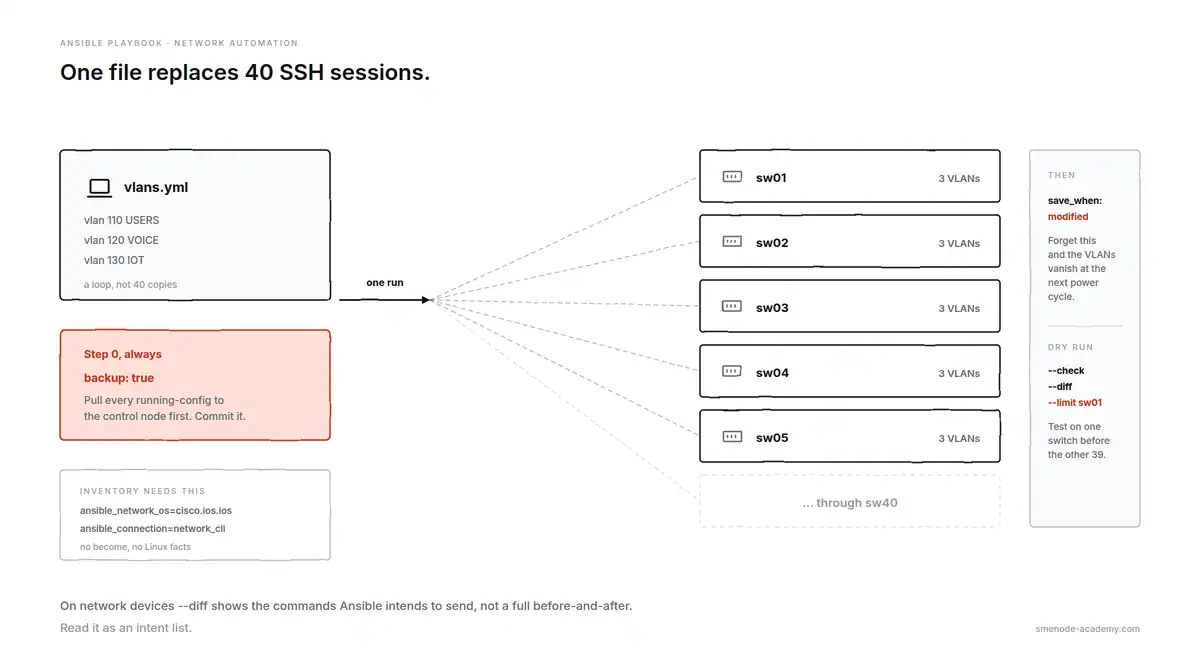
One loop, 40 switches, and a backup before anything moves.
13. Push a VLAN to 40 switches
The example that sells automation to a network team. One file replaces 40 SSH sessions.
---
- name: Standardise access VLANs
  hosts: switches
  gather_facts: false
  vars:
    vlans:
      - { id: 110, name: USERS }
      - { id: 120, name: VOICE }
      - { id: 130, name: IOT }

  tasks:
    - name: Create VLANs
      cisco.ios.ios_config:
        lines:
          - "name {{ item.name }}"
        parents: "vlan {{ item.id }}"
      loop: "{{ vlans }}"
      register: vlan_push

    - name: Save config only where something changed
      cisco.ios.ios_config:
        save_when: modified
      when: vlan_push is changed
ansible-playbook -i inventory.ini vlans.yml --check --diff --limit sw01What breaks: parents is what puts you in the right config context. Drop it and name USERS gets typed at the global prompt, which either errors or does something you didn’t intend. And save_when: modified matters on real gear: forget to save and your VLANs disappear at the next power cycle. Always dry-run against one switch with --limit before the other 39.
14. Standardise SNMP, NTP and syslog across the estate
Config drift is the quiet enemy. This Ansible playbook makes “what should be on every device” a file you can review.
---
- name: Apply baseline management config
  hosts: switches
  gather_facts: false
  vars:
    ntp_servers: ["10.0.0.5", "10.0.0.6"]
    syslog_host: "10.0.0.20"
    snmp_community: "{{ vault_snmp_ro }}"

  tasks:
    - name: Configure NTP
      cisco.ios.ios_config:
        lines: "ntp server {{ item }}"
      loop: "{{ ntp_servers }}"

    - name: Configure syslog and SNMP
      cisco.ios.ios_config:
        lines:
          - "logging host {{ syslog_host }}"
          - "snmp-server community {{ snmp_community }} RO"
      no_log: true
      notify: Save running config

  handlers:
    - name: Save running config
      cisco.ios.ios_config:
        save_when: always
ansible-playbook -i inventory.ini baseline.yml --check --diffWhat breaks: an SNMP community string is a credential. It belongs in vault with no_log: true on the task, same as any password. The awkward part of --diff on network devices is that it shows the commands Ansible intends to send, not a full before-and-after of the config, so read it as an intent list rather than a true diff.
15. Diff running config against your golden config
Compliance checking without changing a thing. Point it at your intended config and it reports the gap.
---
- name: Check config compliance
  hosts: switches
  gather_facts: false

  tasks:
    - name: Compare running config against intended
      cisco.ios.ios_config:
        diff_against: intended
        intended_config: "{{ lookup('file', 'golden/' + inventory_hostname + '.cfg') }}"
      check_mode: true
      register: compliance

    - name: Flag devices that drifted
      ansible.builtin.debug:
        msg: "{{ inventory_hostname }} has drifted from golden config"
      when: compliance is changed
ansible-playbook -i inventory.ini compliance.yml --diffWhat breaks: check_mode: true on the task pins it to read-only no matter how the Ansible playbook gets invoked, which is safer than trusting whoever runs it to remember --check. Expect noise on the first run: timestamps, counters and auto-generated lines will show as differences, so your golden files need those stripped out before the report is useful.
16. Pull hosts straight from NetBox
Hand-maintained inventory files go stale within a week. This makes your source of truth the source of truth.
inventory/netbox.yml:
---
plugin: netbox.netbox.nb_inventory
api_endpoint: https://netbox.internal
token: "{{ lookup('env', 'NETBOX_TOKEN') }}"
validate_certs: true
config_context: false
group_by:
  - device_roles
  - sites
query_filters:
  - status: active
ansible-inventory -i inventory/netbox.yml --graph
ansible-playbook -i inventory/netbox.yml backup-configs.ymlWhat breaks: test with ansible-inventory --graph before you run an Ansible playbook against it. That prints the groups NetBox generated, and the group names are rarely what you assumed, so a playbook targeting hosts: switches matches nothing and reports a successful run against zero hosts. A green run on an empty host list is the most misleading output in Ansible. The full walkthrough is in our guide on building a NetBox dynamic inventory.
Pushing config to real gear is the skill that moves a network engineer up a pay band. Our CCNA Automation course builds exactly these playbooks against live devices, with an instructor in the room when your run fails. If you’re weighing whether it’s worth it, we published what automation engineers actually earn.
Ansible playbook examples for AWS
17. Launch a tagged EC2 instance
Untagged instances are how cloud bills become mysteries. Tag at creation, not later.
---
- name: Provision an application instance
  hosts: localhost
  connection: local
  gather_facts: false

  tasks:
    - name: Launch EC2 instance
      amazon.aws.ec2_instance:
        name: "app-{{ env }}-01"
        instance_type: t3.small
        image_id: ami-0abcdef1234567890
        region: ca-central-1
        vpc_subnet_id: subnet-0123456789abcdef0
        security_group: app-sg
        state: running
        wait: true
        tags:
          Environment: "{{ env }}"
          Owner: platform-team
          CostCentre: engineering
      register: ec2
ansible-playbook launch-ec2.yml -e "env=staging"What breaks: cloud modules run on the control node, not on a remote host, so hosts: localhost with connection: local is required. Point this at a server group and it tries to install boto3 on every one of them. AMI IDs are region-specific, so an ID copied from a us-east-1 tutorial simply doesn’t exist in ca-central-1. And name: here is a tag, not an identity check, so running this twice can give you two instances unless you filter on existing state first.
18. Create an S3 bucket with versioning and encryption
Three parameters that turn a bucket from a liability into a backup target.
---
- name: Create a secured backup bucket
  hosts: localhost
  connection: local
  gather_facts: false

  tasks:
    - name: Create bucket with versioning and encryption
      amazon.aws.s3_bucket:
        name: smenode-backups-ca-central-1
        state: present
        region: ca-central-1
        versioning: true
        encryption: "AES256"
        public_access:
          block_public_acls: true
          block_public_policy: true
          ignore_public_acls: true
          restrict_public_buckets: true
        tags:
          Purpose: backups
ansible-playbook s3-bucket.yml --checkWhat breaks: bucket names are globally unique across all of AWS, so a generic name fails with an error that reads like a permissions problem. Versioning is also a one-way door: you can suspend it but never remove the versions already stored, so it’s worth knowing that it changes your storage bill before you turn it on across every bucket.
Ansible playbook examples for containers
19. Install Docker and run a container with a health check
A container that’s “running” and a container that’s working are different things. The health check is what tells them apart.
---
- name: Deploy containerised app
  hosts: appservers
  become: true

  tasks:
    - name: Install Docker prerequisites
      ansible.builtin.package:
        name:
          - docker.io
          - python3-docker
        state: present

    - name: Make sure Docker is running
      ansible.builtin.service:
        name: docker
        state: started
        enabled: true

    - name: Run the app container
      community.docker.docker_container:
        name: web-app
        image: nginx:1.27
        state: started
        restart_policy: unless-stopped
        published_ports:
          - "8080:80"
        healthcheck:
          test: ["CMD", "curl", "-f", "http://localhost/"]
          interval: 30s
          timeout: 10s
          retries: 3
ansible-playbook -i inventory.ini docker-app.ymlWhat breaks: python3-docker is on the target host, not your laptop, and without it the docker module fails with “Failed to import the required Python library”. Pin the image tag too. Using nginx:latest means the container silently changes version between runs, which quietly destroys the reproducibility you bought Ansible for.
20. Zero-downtime rolling update with serial
The closer. This one updates a fleet behind a load balancer without dropping traffic, and stops the whole rollout if a batch goes bad.
---
- name: Rolling application update
  hosts: appservers
  become: true
  serial: 2
  max_fail_percentage: 0
  vars:
    app_version: "2.4.1"

  tasks:
    - name: Take host out of the load balancer
      ansible.builtin.uri:
        url: "http://lb.internal/api/drain/{{ inventory_hostname }}"
        method: POST
        status_code: 200
      delegate_to: localhost

    - name: Update and verify, roll back on failure
      block:
        - name: Pull the new image and restart
          community.docker.docker_container:
            name: web-app
            image: "myregistry/web-app:{{ app_version }}"
            state: started
            restart: true
            pull: always

        - name: Wait for the app to answer
          ansible.builtin.uri:
            url: "http://{{ inventory_hostname }}:8080/health"
            status_code: 200
          register: health
          retries: 12
          delay: 5
          until: health.status == 200

      rescue:
        - name: Roll back to the previous image
          community.docker.docker_container:
            name: web-app
            image: "myregistry/web-app:{{ previous_version }}"
            state: started
            restart: true

        - name: Fail loudly so the rollout stops
          ansible.builtin.fail:
            msg: "{{ inventory_hostname }} failed health check, rolled back"

    - name: Put host back in the load balancer
      ansible.builtin.uri:
        url: "http://lb.internal/api/enable/{{ inventory_hostname }}"
        method: POST
        status_code: 200
      delegate_to: localhost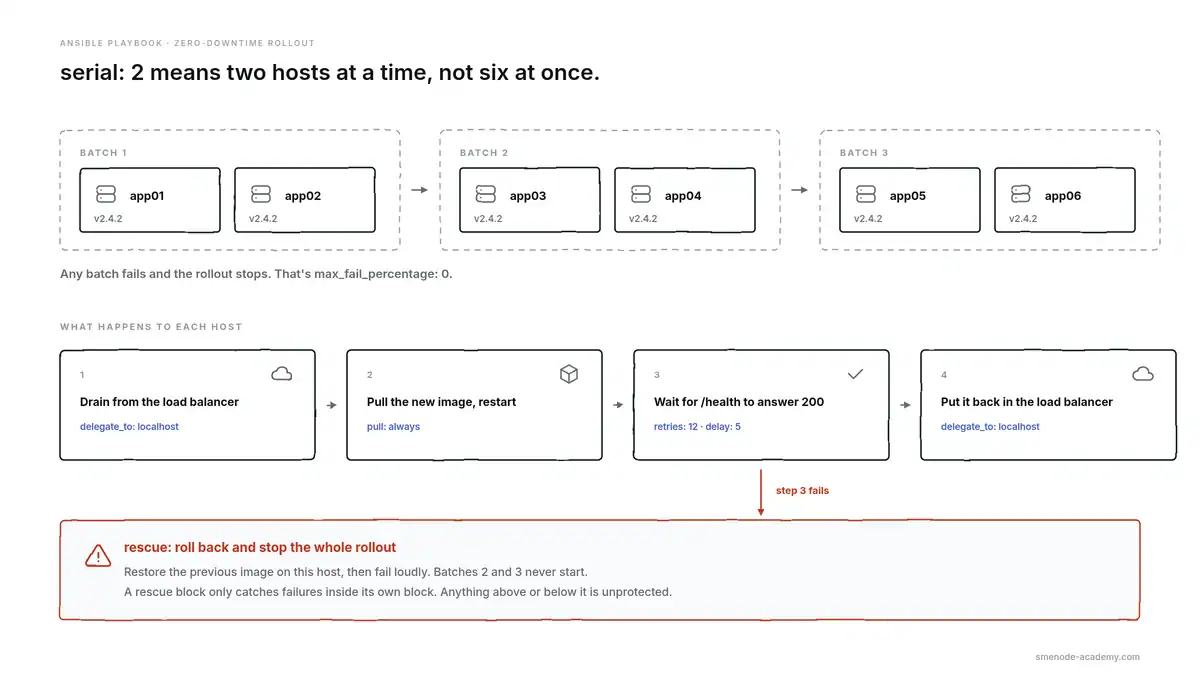
serial: 2 plus max_fail_percentage: 0 is what makes this safe.
ansible-playbook -i inventory.ini rolling-update.yml -e "app_version=2.4.2 previous_version=2.4.1"What breaks: serial: 2 plus max_fail_percentage: 0 is the combination that makes this safe. Two hosts at a time, and any failure halts the run instead of marching through the rest of the fleet. Note delegate_to: localhost on the load-balancer calls, because that request has to come from the control node, not from the host being drained. And a rescue block only catches failures inside its block, so anything above or below it is unprotected.
How do you run an Ansible playbook?
The base command is ansible-playbook, an inventory, and a file:
ansible-playbook -i inventory.ini site.ymlEverything else is flags, and these are the ones you’ll use weekly.
| Flag | What it does | Example |
|---|---|---|
-i | Points at an inventory file or script | -i inventory.ini |
--limit | Restricts the run to some hosts | --limit web01,web02 |
--tags | Runs only tasks with these tags | --tags deploy |
--skip-tags | Runs everything except these tags | --skip-tags slow |
-e | Passes extra variables, highest priority | -e "app_version=2.4.2" |
--start-at-task | Resumes from a named task | --start-at-task "Copy config" |
-C / --check | Dry run, changes nothing | --check --diff |
-b | Become root | -b |
--ask-vault-pass | Prompts for the vault password | |
-f | Parallel forks, default 5 | -f 25 |
To run an Ansible playbook locally against the machine you’re sitting on, no SSH involved:
ansible-playbook -i localhost, -c local local-setup.ymlThe trailing comma in -i localhost, isn’t a typo. It tells Ansible to read that as an inline host list rather than a filename.
One flag worth knowing about: -f 25 raises parallelism from the default 5. On a 200-host patch run that’s the difference between 20 minutes and two hours. Raise it carefully, because your control node’s CPU and your SSH limits are the ceiling.
Ansible roles vs playbooks: when to stop writing one file
An Ansible playbook is a file. A role is a directory with a fixed structure that a playbook calls. Roles exist so you can reuse work instead of copying it.
Here’s the practical threshold: move to roles the second time you copy a task block from one playbook into another, or once a single file passes roughly 100 lines. Before that, roles add ceremony you don’t need.
A role looks like this:
roles/
  webserver/
    tasks/main.yml
    handlers/main.yml
    templates/
    files/
    defaults/main.yml
    vars/main.yml
And the playbook shrinks to almost nothing:
---
- name: Build web servers
  hosts: webservers
  become: true
  roles:
    - webserver
    - monitoring
The one rule people get wrong: defaults/main.yml holds values you expect users to override, and vars/main.yml holds values you don’t. Put a value in vars/ and it beats almost everything else, including your inventory, which produces variable precedence bugs that take hours to find.
7 mistakes that break Ansible playbooks
These are the error messages, in the form you’ll actually see them.
1. ansible-playbook: command not found Installed with sudo pip install ansible and the binary landed somewhere off your PATH, usually ~/.local/bin. Either add that to PATH or install with pipx install ansible instead, which handles it for you.
2. found character '\t' that cannot start any token A tab in your YAML. Set your editor to insert two spaces for YAML files and it never happens again.
3. MODULE FAILURE with no useful detail Almost always a missing Python interpreter or missing library on the target. Re-run with -vvv and read the raw output, which usually names the import that failed.
4. Your Ansible playbook reports changed on every single run You used ansible.builtin.command or shell where a real module exists. Those two can’t detect state, so they always report changed. Either find the proper module or add a creates: or changed_when: condition.
5. couldn't resolve module/action 'community.general.ufw' The collection isn’t installed. ansible-galaxy collection install community.general. Bare ansible-core ships very few modules on purpose.
6. template error while templating string: unexpected '{' Unquoted Jinja2 at the start of a YAML value. port: {{ app_port }} breaks. port: "{{ app_port }}" works. Quote every value that starts with a brace.
7. An Ansible playbook that succeeds against zero hosts --limit typo, or a group name that doesn’t exist. Ansible reports a clean run and does nothing. Confirm with --list-hosts first.
Run ansible-lint over your repo and it catches four of these before you ever execute a task.
Frequently asked questions
What is an Ansible playbook used for?
An Ansible playbook automates repeated work across many machines at once: installing and configuring software, pushing config to network devices, provisioning cloud resources, and orchestrating multi-step deployments. Because it’s a file, it’s also documentation of what your infrastructure is supposed to look like, and you can commit it, review it, and run it again months later with the same result.
How do I write an Ansible playbook?
Create a .yml file starting with ---. Add a play with hosts: naming an inventory group and tasks: listing the work. Each task gets a name and a module, like ansible.builtin.apt. Check it with ansible-playbook file.yml --syntax-check, then dry-run it with --check --diff before running it for real.
How do I run an Ansible playbook without making changes?
Use ansible-playbook site.yml --check --diff. That’s dry-run mode, and --diff prints the file changes it would make. One caveat: tasks using command or shell can’t be predicted, so they’re skipped or report nothing useful, which means a clean dry run on a shell-heavy playbook doesn’t prove much.
Why do I get “ansible-playbook: command not found”?
The binary isn’t on your PATH, which normally happens after a pip install --user. It usually lands in ~/.local/bin. Add that directory to your PATH, or reinstall with pipx install ansible, which sets it up correctly.
What is the difference between an Ansible role and a playbook?
An Ansible playbook is a single YAML file that says which hosts get which tasks. A role is a structured directory of reusable tasks, handlers, templates and defaults that playbooks call by name. Use a playbook until you copy the same tasks into a second file, then convert that shared part into a role.
Is Ansible still worth learning in 2026?
Yes, and it’s still actively developed: ansible-core 2.21.3 shipped on 2026-08-10, with the community package updated on 2026-08-14. In practice it isn’t competing with Terraform so much as sitting next to it. Terraform creates the infrastructure, Ansible configures what runs on it. On the network side it has very little competition for multi-vendor config management.
How long does it take to learn Ansible?
If you already know Linux and have seen YAML, you can write useful playbooks in a week and be productive within a month. Coming in without Linux fundamentals, expect longer, because most Ansible problems are really SSH, permissions, or package-manager problems. The concepts are small. The debugging is what takes time.
Where to go next
Copy the Ansible playbooks above, change the hostnames, and run them with --check first. That’s genuinely the fastest way to learn this. If you don’t have hosts to test against, a Proxmox homelab gives you a fleet to break safely.
Two paths from here, depending on which job you’re going after:
- Network engineers. Examples 12 to 16 are your world. CCIE Automation takes them further, into multi-vendor estates and validated rollouts, with live sessions and an instructor in your class group when a run fails at 11pm.
- Platform and DevOps engineers. Examples 17 to 20 are the starting point. The DevOps Engineer programme covers Ansible alongside Terraform, containers and CI/CD. Prepping for interviews? Our DevOps interview questions guide has 180 of them.
For self-paced practice, the SMEnode Labs DevOps workbook ships lab exercises with an EVE-NG image, so you can run these against real topologies instead of imagining them.
Sources
- ansible-core on PyPI (version 2.21.3, 2026-08-10)
- Ansible community package on PyPI (2026-08-14)
- Ansible playbook guide
- Ansible releases and maintenance
- ansible-lint documentation