
A Python interview for a network role isn’t a software engineering interview. Nobody’s going to ask you to reverse a linked list.
The pattern is far more predictable than that. Twenty minutes of concepts on a call. Then a shared editor, a wall of show ip interface brief output pasted into it, and one sentence that decides the whole thing: “give me the interfaces that are up.”
If you’ve spent five years fixing OSPF adjacencies and you freeze at that prompt, you don’t lose because you’re a bad engineer. You lose because nobody told you which 100 things to practise.
So here they are. These are the Python interview questions that come up in real hiring rounds for network automation and NetDevOps roles, grouped by the round they show up in. Every answer that should be code, is code, and every runnable example on this page was executed before publishing. No gated PDF, no “download the full list.” It’s all here.
How a Python interview for a network role actually runs
Most candidates prepare for the wrong round. They memorise decorator trivia off a generic Python interview questions list, then get handed a config diff task.
Here’s the real shape of the process at most employers hiring network automation engineers in 2026.
| Round | Format | What it grades | Where you lose |
|---|---|---|---|
| 1. Phone screen | 20-40 min, spoken | Can you talk about code without hand-waving? | Naming a library you’ve only read about |
| 2. Live coding or take-home | 45-90 min, shared editor | Can you write working code under pressure? | Freezing on string parsing |
| 3. Design discussion | 45-60 min, whiteboard | Do you understand blast radius? | No dry run, no rollback plan |
| 4. Behavioural | 30-45 min | Will the team trust you with prod? | No quantified example of your own work |
Round 2 is where most people fail, and it’s the round that’s easiest to prepare for. It’s also the one every other question list ignores.
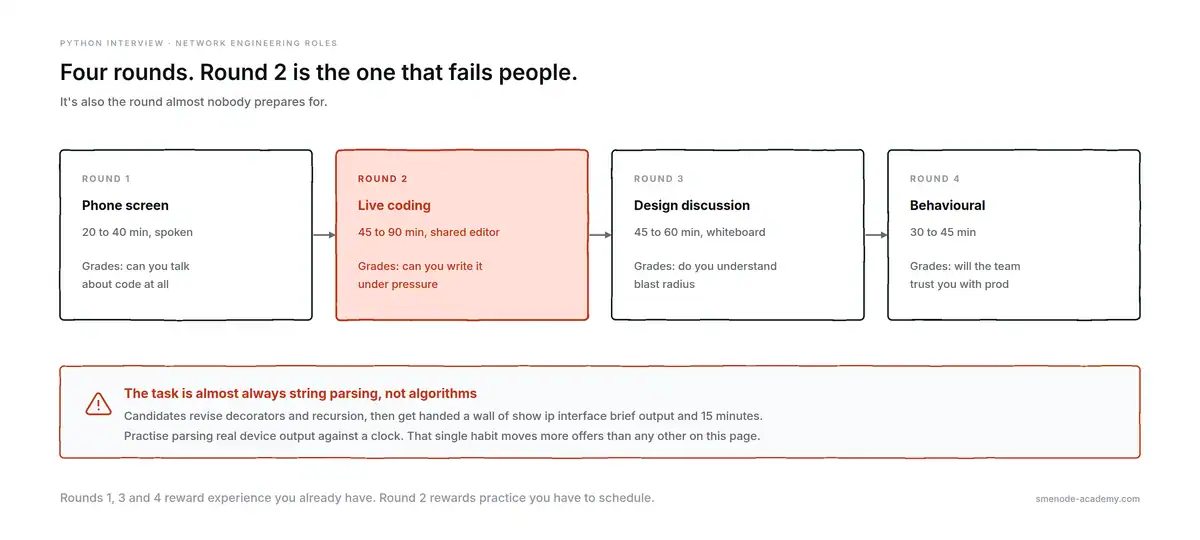
The four rounds, and the one that actually decides it.
What changed now that DevNet is called CCNA Automation
This trips people up in interviews right now, so get it straight before you walk in.
On 3 February 2026, Cisco migrated the DevNet certification track into the Automation track. DevNet Associate, Professional, and Expert became CCNA Automation, CCNP Automation, and CCIE Automation. Anyone holding an active DevNet credential was recognised under the new name automatically, with no extra exam.
The details worth knowing:
- The 200-901 exam still exists. It’s now CCNAAUTO, not DEVASC
- CCNA Automation and CCIE Automation exam topics didn’t change
- CCNP Automation got significant topic updates
If an interviewer says “DevNet” and you say “you mean CCNA Automation now, since February”, that’s a small signal that you follow the field. If you list “DevNet Associate” on your CV without knowing it was renamed, that’s a small signal in the other direction.
Studying for it? The CCNA Automation programme covers the 200-901 topics with a live instructor, and every class has its own group where you can ask questions between sessions.enroll now
Which questions come at L1, L2, L3, and senior level
Interviewers calibrate. A NOC technician and a senior automation engineer get asked Python interview questions from different ends of this list, so don’t waste a week on Nornir if you’re interviewing for L2 support.
| Level | Python expected of you | Your sections |
|---|---|---|
| L1 / NOC | Read someone’s script, change a variable, run it | Q1-15 |
| L2 | Write a loop over devices, parse output into a table | Q16-55 |
| L3 / automation engineer | Build tooling, call APIs, make it idempotent | Q56-95 |
| Senior / architect | Design for blast radius, testing, team standards | Q89-100 |
One honest note on scope. You do not need to be a software engineer. What you need is to be a network engineer who writes reliable, readable Python and knows why a script that worked on one switch will hurt you on two hundred.
Basic Python interview questions every network engineer gets asked (Q1-15)
These are the table-stakes questions. Every Python interview questions list on the internet has them. What those lists don’t do is answer them with network data, which is exactly how an interviewer will frame them.
Q1. What’s the difference between a list and a tuple?
A list is mutable and a tuple isn’t. In network code you use a list when the collection will change, like interfaces you’re still adding to, and a tuple when it must not change, like an immutable (hostname, ip) pair used as a dictionary key. Tuples are hashable, lists aren’t.
interfaces = ["Gi0/1", "Gi0/2"]      # list: you'll append to this
interfaces.append("Gi0/3")           # fine

device = ("core-sw1", "10.10.10.1")  # tuple: identity, must not drift
seen = {device: "reachable"}         # works, because tuples are hashable
# {["core-sw1", "10.10.10.1"]: "x"} would raise TypeError: unhashable type
Follow-up you’ll get: “So why not use lists everywhere?” Because a tuple in a signature tells the next engineer this value is fixed, and it can be a dict key.
Q2. When would you use a dictionary instead of a list of dictionaries?
Use a dictionary keyed by the thing you look up. A MAC table stored as a list forces a scan of every entry on each lookup, which is O(n). Keyed by MAC address, the lookup is O(1) and the code reads better.
With 50 entries nobody notices. With 200,000 it’s the difference between instant and a coffee break.
mac_list = [{"mac": "0050.56b1.1a2c", "port": "Gi0/1"}]     # O(n) to search
mac_dict = {"0050.56b1.1a2c": "Gi0/1"}                      # O(1) to search

port = next((e["port"] for e in mac_list if e["mac"] == "0050.56b1.1a2c"), None)
port = mac_dict.get("0050.56b1.1a2c")   # same answer, no scan
Q3. What’s a set, and where does it help in networking?
A set is an unordered collection of unique items with fast membership tests and maths operators. It’s the cleanest tool for config drift: compare the VLANs you intend against the VLANs on the device and the difference falls out in one line.
intended  = {10, 20, 30, 40}
on_device = {10, 20, 50}

missing = intended - on_device      # {30, 40}  need adding
extra   = on_device - intended      # {50}      shouldn't be there
both    = intended & on_device      # {10, 20}  correct already
That’s the whole drift check. Three operators, no loops.
Q4. Explain the mutable default argument trap.
A default argument is evaluated once when the function is defined, not on every call. So a mutable default like [] is shared across all calls and quietly accumulates state. It’s the single most common bug an interviewer plants to see if you spot it.
def add_vlan(vlan, vlans=[]):      # BROKEN
    vlans.append(vlan)
    return vlans

add_vlan(10)    # [10]
add_vlan(20)    # [10, 20]  <-- the 10 is still there
The fix is None plus a guard:
def add_vlan(vlan, vlans=None):    # CORRECT
    if vlans is None:
        vlans = []
    vlans.append(vlan)
    return vlans

add_vlan(10)    # [10]
add_vlan(20)    # [20]
Q5. What’s the difference between a shallow copy and a deep copy?
A shallow copy duplicates the outer container but shares the nested objects inside it. On a nested config dictionary that means editing the “copy” mutates the original. copy.deepcopy() duplicates the whole tree. This matters the moment you build a candidate config from a running one.
import copy

base = {"hostname": "core-sw1", "interfaces": {"Gi0/1": {"vlan": 10}}}

shallow = base.copy()
shallow["interfaces"]["Gi0/1"]["vlan"] = 99
print(base["interfaces"]["Gi0/1"]["vlan"])    # 99  <-- original changed

base["interfaces"]["Gi0/1"]["vlan"] = 10
deep = copy.deepcopy(base)
deep["interfaces"]["Gi0/1"]["vlan"] = 99
print(base["interfaces"]["Gi0/1"]["vlan"])    # 10  <-- original safe
Q6. What’s the difference between == and is?
== compares values, is compares identity, meaning whether two names point to the same object in memory. Use == for data and is only for singletons: None, True, False. Checking if config is "up" looks fine in testing and then breaks on a string that came off the wire.
a = ["Gi0/1"]
b = ["Gi0/1"]
a == b     # True   same contents
a is b     # False  two different list objects

status = None
status is None      # correct
status == None      # works, but never write it
Q7. What are *args and **kwargs?
*args collects extra positional arguments into a tuple, **kwargs collects extra keyword arguments into a dictionary. In network code the common use is passing connection parameters straight through to a library without restating every one of them.
def connect(host, **kwargs):
    params = {"host": host, "device_type": "cisco_ios"}
    params.update(kwargs)          # caller can override or add anything
    return params

connect("10.10.10.1", username="admin", port=2222)
# {'host': '10.10.10.1', 'device_type': 'cisco_ios',
#  'username': 'admin', 'port': 2222}
Q8. What’s a list comprehension, and when should you not use one?
A comprehension builds a list in one expression and is faster and clearer than an append loop for simple transforms. Stop using it when it needs more than one condition or a nested loop, because at that point a normal for loop is easier to read, and readability is what the interviewer is grading.
# good
up = [i["interface"] for i in interfaces if i["protocol"] == "up"]

# too far: don't do this
result = [f(x) for a in data for x in a if x.get("k") and not x.get("j")]
Q9. What do enumerate and zip do?
enumerate yields index and item together, so you never hand-manage a counter. zip pairs items from two or more iterables and stops at the shortest one. Both show up whenever you’re numbering devices or matching a device list against its results.
for n, device in enumerate(["sw01", "sw02"], start=1):
    print(n, device)          # 1 sw01 / 2 sw02

hosts = ["sw01", "sw02"]
versions = ["17.09.04a", "17.12.01"]
dict(zip(hosts, versions))    # {'sw01': '17.09.04a', 'sw02': '17.12.01'}
Q10. What’s a generator, and why use one on a log file?
A generator produces items one at a time instead of building the whole list in memory. For a 4 GB syslog file that’s the difference between working and an out-of-memory crash. You get it by using yield instead of return, or a parenthesised comprehension.
def link_events(path):
    with open(path) as fh:
        for line in fh:
            if "%LINK-3-UPDOWN" in line:
                yield line.strip()

for event in link_events("switch.log"):   # one line in memory at a time
    print(event)
Follow-up: “What’s the cost?” You can only iterate it once, and you can’t take len() of it.
Q11. What’s a context manager, and why does with matter for connections?
A context manager guarantees cleanup, including when your code raises. with calls __enter__ on entry and __exit__ on exit, so a file gets closed and an SSH session gets torn down even if the config push blows up halfway through. Leaving sessions open is how you exhaust a device’s VTY lines.
class Session:
    def __enter__(self):
        return self
    def __exit__(self, exc_type, exc, tb):
        self.close()
        return False              # don't swallow the exception

with Session() as sess:           # closes even if this block raises
    sess.send("show version")
Netmiko supports this directly, and you should use it:
from netmiko import ConnectHandler

with ConnectHandler(host="10.10.10.1", username="admin",
                    password=PASSWORD, device_type="cisco_ios") as conn:
    print(conn.send_command("show version"))
# disconnected here, guaranteed
Q12. What’s a decorator? Give a networking use for one.
A decorator is a function that wraps another function to add behaviour without editing it. The genuinely useful network example is retry with backoff, because SSH to a busy device fails intermittently and you don’t want that logic copy-pasted into thirty scripts.
import time

def retry(times=3, base_delay=0.5):
    def decorator(fn):
        def wrapper(*args, **kwargs):
            last = None
            for attempt in range(times):
                try:
                    return fn(*args, **kwargs)
                except (TimeoutError, ConnectionError) as exc:
                    last = exc
                    if attempt < times - 1:
                        time.sleep(base_delay * (2 ** attempt))   # 0.5, 1, 2...
            raise last
        return wrapper
    return decorator

@retry(times=3)
def get_version(host):
    ...
Note the two details an interviewer looks for: it catches specific exceptions, and it re-raises after the last attempt instead of returning None.
Q13. What’s a virtual environment and why does it matter?
A virtual environment is an isolated Python install per project, so one project’s pinned Netmiko version can’t break another’s. You create it with python -m venv, activate it, and record dependencies in requirements.txt. Saying “I just pip install globally” tells an interviewer you haven’t worked on a shared codebase.
python3 -m venv .venv
source .venv/bin/activate        # Windows: .venv\Scripts\activate
pip install netmiko
pip freeze > requirements.txt
Q14. What’s the GIL, and does it matter for network automation?
The Global Interpreter Lock lets only one thread run Python bytecode at a time, so threads don’t help CPU-bound work. It barely matters to you, because talking to devices is I/O-bound: your threads spend their time waiting on the network, and the GIL is released during that wait. Threads are the right tool for 200 SSH sessions.
Use threads or asyncio for device I/O. Reach for multiprocessing only if you’re doing heavy parsing across millions of lines.
Q15. What are type hints, and are they worth it?
Type hints annotate what a function takes and returns. Python doesn’t enforce them at runtime, but your editor and mypy do, and they make a shared automation repo far easier to maintain. On a two-line script they’re noise. On a module three people touch, they’re worth it.
def parse_interfaces(output: str) -> list[dict[str, str]]:
    ...
Python for network engineers: parsing device output (Q16-30)
Python for network engineers really means this: turning show output into data. It’s the round that decides most interviews and the one nobody prepares for. Everything below uses the same sample output so you can follow it end to end.
Interface                  IP-Address      OK? Method Status                Protocol
GigabitEthernet0/0         10.10.10.1      YES NVRAM  up                    up
GigabitEthernet0/1         unassigned      YES NVRAM  administratively down down
GigabitEthernet0/2         192.168.20.1    YES NVRAM  up                    down
Loopback0                  10.255.255.1    YES NVRAM  up                    up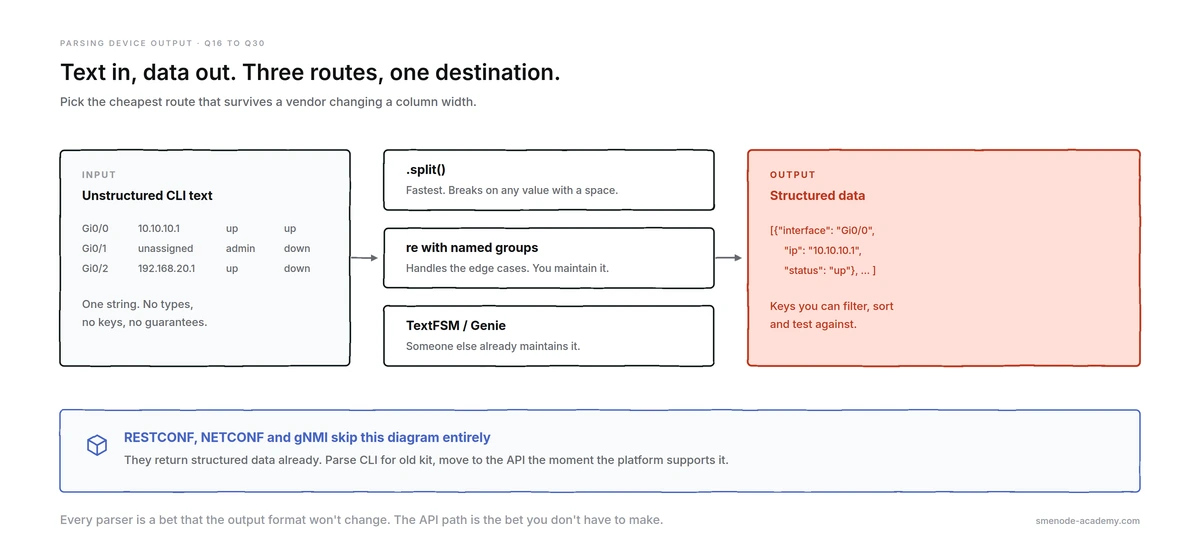
Three routes from CLI text to structured data. The API path skips all of them.
Q16. How do you parse show ip interface brief into a list of dictionaries?
Split on newlines, skip the header and blank lines, then split each row on whitespace. The catch is that administratively down is two words, so indexing forward from the left breaks. Index the status from the end instead, and the parser handles both forms.
def parse_ip_int_brief(output):
    interfaces = []
    for line in output.splitlines():
        if not line.strip() or line.startswith("Interface"):
            continue
        fields = line.split()
        interfaces.append({
            "interface": fields[0],
            "ip": fields[1],
            "status": " ".join(fields[4:-1]),   # handles "administratively down"
            "protocol": fields[-1],
        })
    return interfaces
Output:
{'interface': 'GigabitEthernet0/0', 'ip': '10.10.10.1', 'status': 'up', 'protocol': 'up'}
{'interface': 'GigabitEthernet0/1', 'ip': 'unassigned', 'status': 'administratively down', 'protocol': 'down'}
{'interface': 'GigabitEthernet0/2', 'ip': '192.168.20.1', 'status': 'up', 'protocol': 'down'}
{'interface': 'Loopback0', 'ip': '10.255.255.1', 'status': 'up', 'protocol': 'up'}
Q17. Why does a naive split() break on real device output?
Because split() with no argument splits on any run of whitespace and returns a variable number of fields when a value contains a space. The admin-down row returns 7 fields where the others return 6, so any code using fixed forward indexes silently puts the wrong value in the wrong key.
line = "GigabitEthernet0/1         unassigned      YES NVRAM  administratively down down"
line.split()
# ['GigabitEthernet0/1', 'unassigned', 'YES', 'NVRAM',
#  'administratively', 'down', 'down']     <-- 7 fields, not 6
This is the trap in the question. Interface descriptions are worse, because they can contain any number of spaces.
Q18. Which string methods do you actually use on show output?
Four of them cover most of the work: splitlines() to get rows, split() to get fields, strip() to drop stray whitespace, and startswith() to skip headers and comment lines. in for substring tests rounds it out.
line.strip()                        # trim whitespace both ends
line.startswith("Interface")        # header row?
line.endswith("!")                  # end of a config block?
"up" in line                        # substring test
line.replace("GigabitEthernet", "Gi")
line.lower()                        # normalise before comparing
Q19. Give the difference between re.match, re.search, and re.findall.
re.match only matches at the start of the string. re.search scans the whole string and returns the first match. re.findall returns every match as a list of strings. Using match when you meant search is a classic silent failure, because it returns None and your row just disappears.
import re
line = "GigabitEthernet0/0 is up, line protocol is up"

re.match(r"up", line)      # None   anchored at position 0
re.search(r"up", line)     # match  found at position 20
re.findall(r"up", line)    # ['up', 'up']
Q20. How do named capture groups make a parser readable?
(?P<name>...) labels each group so you get a dictionary out of .groupdict() instead of counting positions. When the pattern has six groups, positional indexes become unmaintainable and any change reshuffles them. Named groups are what an interviewer wants to see.
IFACE_RE = re.compile(
    r"^(?P<interface>\S+)\s+"
    r"(?P<ip>\S+)\s+"
    r"(?:YES|NO)\s+\S+\s+"
    r"(?P<status>.+?)\s+"
    r"(?P<protocol>up|down)\s*$"
)

rows = []
for line in output.splitlines():
    if m := IFACE_RE.match(line):
        rows.append(m.groupdict())
Two things worth pointing at: (?:...) is a non-capturing group, so YES|NO doesn’t pollute the result, and .+? is lazy so the status field stops at the last column instead of eating it.
Q21. What’s the difference between greedy and lazy matching?
.* is greedy and takes as much as it can. .*? is lazy and takes as little as it can while still matching. On a multi-line config block with re.DOTALL, a greedy .* will swallow every line up to the last delimiter in the file.
CFG = """interface Gi0/1
 description UPLINK to core
 ip address 10.1.1.1 255.255.255.0
!"""

re.search(r"description (.*)", CFG).group(1)
# 'UPLINK to core'            fine, . doesn't cross newlines by default

re.search(r"description (.*)!", CFG, re.DOTALL).group(1)
# 'UPLINK to core\n ip address 10.1.1.1 255.255.255.0\n'   <-- 50 chars, swallowed

re.search(r"description (.*?)\n", CFG).group(1)
# 'UPLINK to core'            lazy, stops at the newline
Q22. How do you parse show mac address-table?
Anchor a regex on the row shape rather than trying to split columns, because the header art varies by platform. A VLAN id, a MAC, a type, and a port is a distinctive enough pattern to match rows and ignore everything else.
MAC_RE = re.compile(
    r"^\s*(?P<vlan>\d+)\s+(?P<mac>[0-9a-fA-F.:]{14})\s+(?P<type>\S+)\s+(?P<port>\S+)"
)

def parse_mac_table(output):
    return [m.groupdict() for line in output.splitlines() if (m := MAC_RE.match(line))]
Given a five-entry table this returns five dicts and skips the four lines of header and separator without a single startswith check.
Q23. Find every port learning more than one MAC address.
Group by port with defaultdict(list), then filter for lists longer than one. This is a real diagnostic: multiple MACs on an access port means either a hub, an unauthorised switch, or a virtualisation host you didn’t know about.
from collections import defaultdict

by_port = defaultdict(list)
for entry in parse_mac_table(output):
    by_port[entry["port"]].append(entry["mac"])

multi = {port: macs for port, macs in by_port.items() if len(macs) > 1}
# {'Gi0/2': ['0050.56b1.9f04', '0050.56b1.3d11', '0050.56b1.c0de']}
If you only need counts, Counter is shorter:
from collections import Counter

Counter(e["port"] for e in parse_mac_table(output)).most_common()
# [('Gi0/2', 3), ('Gi0/1', 1), ('Gi0/3', 1)]
Q24. How do you extract IP addresses from text and validate them?
Use a regex to find candidates, then hand each one to the ipaddress module to decide whether it’s real. The regex alone will happily accept 999.1.1.1, because \d{1,3} doesn’t know that octets stop at 255. This two-step pattern is the correct answer.
import ipaddress, re

def valid_ips(text):
    good = []
    for candidate in re.findall(r"\b\d{1,3}(?:\.\d{1,3}){3}\b", text):
        try:
            good.append(ipaddress.ip_address(candidate))
        except ValueError:
            pass
    return good

re.findall(r"\b\d{1,3}(?:\.\d{1,3}){3}\b", "bogus 999.1.1.1 here")
# ['999.1.1.1']       regex says yes
valid_ips("bogus 999.1.1.1 here")
# []                  ipaddress says no
Q25. Why does sorting IP addresses as strings give the wrong answer?
Because string sorting is character by character, so "10.1.1.100" comes before "10.1.1.3" and "9.1.1.1" sorts last. Pass ipaddress.ip_address as the key and Python sorts numerically. This is one of the most common trick questions in the whole round.
ips = ["10.1.1.20", "10.1.1.3", "10.1.1.100", "9.1.1.1"]

sorted(ips)
# ['10.1.1.100', '10.1.1.20', '10.1.1.3', '9.1.1.1']       wrong

sorted(ips, key=ipaddress.ip_address)
# ['9.1.1.1', '10.1.1.3', '10.1.1.20', '10.1.1.100']       right
Q26. How do you check whether an IP falls inside a prefix?
Build an ip_network and use the in operator. It handles the subnet maths for you, including the broadcast and network addresses, and it works identically for IPv6.
net = ipaddress.ip_network("10.1.1.0/24")

ipaddress.ip_address("10.1.1.55") in net     # True
ipaddress.ip_address("10.2.0.1") in net      # False

net.num_addresses          # 256
str(net.netmask)           # '255.255.255.0'
str(net.broadcast_address) # '10.1.1.255'
list(net.hosts())[0]       # IPv4Address('10.1.1.1')
Q27. What’s TextFSM and why use it instead of your own regex?
TextFSM is a template engine that turns unstructured CLI output into rows using a template file, so the parsing rules live in a template rather than scattered through your code. The ntc-templates project ships community-maintained templates for hundreds of commands across many vendors.
The practical value: someone else already handled the platform quirks in show version output for twelve IOS releases.
pip install netmiko ntc-templatesQ28. How do you get structured data straight out of Netmiko?
Pass use_textfsm=True to send_command and Netmiko runs the matching ntc-template for you, returning a list of dictionaries instead of a string. One keyword argument replaces an afternoon of regex work.
from netmiko import ConnectHandler

with ConnectHandler(host="10.10.10.1", username="admin",
                    password=PASSWORD, device_type="cisco_ios") as conn:
    rows = conn.send_command("show ip interface brief", use_textfsm=True)

# rows is now a list of dicts:
# [{'interface': 'GigabitEthernet0/0', 'ipaddr': '10.10.10.1',
#   'status': 'up', 'proto': 'up'}, ...]
Follow-up: “What if no template exists?” You fall back to your own regex, or you write a template and contribute it.
Q29. What is Genie, and how does it compare to TextFSM?
Genie is the parsing library that ships with pyATS, and it returns deeply nested dictionaries modelled on the device’s own data structures rather than flat rows. It covers a wide command set for Cisco platforms and is stricter about output it doesn’t recognise. Netmiko exposes it the same way.
parsed = conn.send_command("show version", use_genie=True)Rough guide: TextFSM for flat tables and multi-vendor work, Genie for rich Cisco output where you want the nested structure.
Q30. When should you stop parsing CLI output altogether?
The moment the platform offers an API. Parsing screen-scraped text is inherently fragile: a software upgrade changes a column width and your parser breaks silently at 2 a.m. RESTCONF, NETCONF, and gNMI return structured data with a schema behind it, so there’s nothing to parse.
The honest position to take in an interview: “I parse CLI when I have to support old kit, and I move to the API the moment the platform supports it.” That answer shows judgement rather than dogma.
Practising this properly needs devices to break. The Automation Engineer programme runs live sessions against real topologies, so you’re parsing output from kit you configured yourself rather than from a text file in a blog post.
Data structures for inventories, configs, and MAC tables (Q31-42)
Q31. How would you model a device inventory in Python?
Start with a list of dictionaries for readability, and switch to a dictionary keyed by hostname as soon as you need lookups. The list keeps order and is easy to load from CSV. The dict gives you O(1) access and stops duplicate hostnames existing at all.
# list of dicts: good for iterating and loading
inventory = [
    {"hostname": "core-sw1", "mgmt_ip": "10.10.10.1", "platform": "cisco_ios"},
    {"hostname": "edge-rt1", "mgmt_ip": "10.10.10.2", "platform": "cisco_xe"},
]

# dict of dicts: good for lookups, enforces unique hostnames
inventory = {
    "core-sw1": {"mgmt_ip": "10.10.10.1", "platform": "cisco_ios"},
    "edge-rt1": {"mgmt_ip": "10.10.10.2", "platform": "cisco_xe"},
}
Q32. How do you safely read a value that might not be there?
Use .get() with a default instead of square brackets, because [] raises KeyError and kills the loop on the one device with an incomplete record. For nested data, chain .get() calls with {} defaults so a missing branch returns the default rather than raising.
device.get("platform", "unknown")
device.get("snmp", {}).get("community", "public")   # safe two levels deep
Q33. What’s a dataclass and why use one for a Device?
A dataclass gives you a typed object with a generated __init__ and __repr__ from a few lines of declaration. It documents the shape of a device, catches typos your editor can see, and prints readably in logs. Use field(default_factory=list) for mutable defaults, for exactly the reason in Q4.
from dataclasses import dataclass, field

@dataclass
class Device:
    hostname: str
    mgmt_ip: str
    platform: str = "cisco_ios"
    tags: list = field(default_factory=list)     # NOT tags: list = []

Device("core-sw1", "10.10.10.1", tags=["core"])
# Device(hostname='core-sw1', mgmt_ip='10.10.10.1',
#        platform='cisco_ios', tags=['core'])
Q34. How do you group records by a field?
defaultdict(list) appends without you checking whether the key exists first. It’s the standard answer for grouping interfaces by device, devices by site, or alarms by severity.
from collections import defaultdict

grouped = defaultdict(list)
for row in rows:
    grouped[row["device"]].append(row["interface"])
# {'core-sw1': ['Gi0/1', 'Gi0/2'], 'edge-rt1': ['Gi0/0']}
Q35. How do you find the noisiest port in a log?
collections.Counter counts occurrences and most_common() returns them ranked. It’s two lines and it’s the right answer for any “which thing appears most” question.
from collections import Counter

Counter(e["port"] for e in entries).most_common(3)
Q36. How do you sort devices by an arbitrary field?
Pass a key function to sorted. Use a lambda for a single field and a tuple for multi-level sorting, which sorts by the first element then the second.
sorted(inventory, key=lambda d: d["hostname"])
sorted(inventory, key=lambda d: (d["site"], d["hostname"]))    # site, then name
sorted(inventory, key=lambda d: ipaddress.ip_address(d["mgmt_ip"]))
Q37. How do you deduplicate a list while keeping order?
dict.fromkeys() is the idiomatic one-liner, because dictionaries preserve insertion order and drop duplicate keys. Converting to a set also dedupes but loses order, which matters when the order is the config order.
list(dict.fromkeys(["Gi0/1", "Gi0/2", "Gi0/1"]))    # ['Gi0/1', 'Gi0/2']
list(set(["Gi0/1", "Gi0/2", "Gi0/1"]))              # order not guaranteed
Q38. How do you flatten a nested API response?
Walk it recursively and join the keys into a path. API payloads nest three or four levels deep and a flat dictionary is far easier to diff, log, and write to CSV.
def flatten(obj, prefix=""):
    flat = {}
    for key, value in obj.items():
        path = f"{prefix}.{key}" if prefix else key
        if isinstance(value, dict):
            flat.update(flatten(value, path))
        else:
            flat[path] = value
    return flat

flatten({"interface": {"Gi0/1": {"vlan": 10}}})
# {'interface.Gi0/1.vlan': 10}
Q39. What’s the difference between append and extend?
append adds one item, even if that item is a list, which gives you a nested list. extend adds every item from an iterable. Mixing them up produces [['Gi0/1']] when you wanted ['Gi0/1'].
a = ["Gi0/1"]
a.append(["Gi0/2", "Gi0/3"])    # ['Gi0/1', ['Gi0/2', 'Gi0/3']]

b = ["Gi0/1"]
b.extend(["Gi0/2", "Gi0/3"])    # ['Gi0/1', 'Gi0/2', 'Gi0/3']
Q40. How do you compare two config sets to find drift?
Convert both to sets of lines and subtract. Order-insensitive comparison is usually what you want for a config audit, because a reordered ACL with identical entries isn’t a change you need to push.
intended = set(intended_config.splitlines())
running  = set(running_config.splitlines())

to_add    = intended - running
to_remove = running - intended
Be careful: for ordered constructs like ACLs and route-maps, order is semantics. Say that out loud in the interview.
Q41. What does slicing do, and what’s a common off-by-one mistake?
Slicing takes [start:stop:step] and the stop index is exclusive. The frequent error is assuming [0:5] gives six items. Negative indexes count from the end, which is how you drop a trailing prompt line.
lines[1:]        # skip the header
lines[:-1]       # drop the last line (the device prompt)
lines[::2]       # every other line
lines[0:5]       # five items, indexes 0 to 4
Q42. What’s the walrus operator and why is it useful in parsers?
:= assigns inside an expression, so you can match and test in one step instead of calling the regex twice or assigning on a separate line. In a parser loop it removes real duplication.
# without walrus
for line in output.splitlines():
    m = IFACE_RE.match(line)
    if m:
        rows.append(m.groupdict())

# with walrus
for line in output.splitlines():
    if m := IFACE_RE.match(line):
        rows.append(m.groupdict())
Files, JSON, YAML, CSV, and Jinja2 templates (Q43-55)
Q43. What’s the difference between json.load and json.loads?
load reads from a file object, loads reads from a string. The s stands for string. The matching pair is dump to a file and dumps to a string. Nearly everyone mixes these up once.
import json

with open("inventory.json") as fh:
    data = json.load(fh)            # from a file

data = json.loads(api_response.text)    # from a string
print(json.dumps(data, indent=2))       # to a string, pretty printed
Q44. Why must you use yaml.safe_load instead of yaml.load?
Plain yaml.load can construct arbitrary Python objects from the file, which means a malicious YAML file can run code. safe_load only builds basic types. In an interview this is a security question dressed as a syntax question, so name the reason.
import yaml

data = yaml.safe_load(text)     # correct
# yaml.load(text)               # unsafe without an explicit Loader
Q45. What does YAML give you that a text file doesn’t?
Real types. Booleans come back as bool, numbers as int, and nested structures as dictionaries and lists, so your template logic can test if intf.shutdown instead of comparing strings.
hostname: core-sw1
interfaces:
  - name: GigabitEthernet0/1
    description: UPLINK to core
    vlan: 10
    ip: 10.1.1.1
    mask: 255.255.255.0
  - name: GigabitEthernet0/2
    description: ACCESS floor 2
    vlan: 20
    shutdown: true
data = yaml.safe_load(text)
type(data["interfaces"][1]["shutdown"]) # <class 'bool'>
type(data["interfaces"][0]["vlan"]) # <class 'int'>Q46. How do you load an inventory from CSV?
csv.DictReader gives you a dictionary per row using the header as keys. Every value arrives as a string, so cast anything numeric yourself.
import csv

with open("inventory.csv", newline="") as fh:
    inventory = list(csv.DictReader(fh))
# [{'hostname': 'core-sw1', 'mgmt_ip': '10.10.10.1', ...}, ...]
Q47. How do you write a report to CSV?
csv.DictWriter with fieldnames and writeheader(). Always pass newline="" when opening the file or Windows gives you a blank line between every row.
with open("report.csv", "w", newline="") as fh:
    writer = csv.DictWriter(fh, fieldnames=["interface", "ip", "status", "protocol"])
    writer.writeheader()
    writer.writerows(rows)
Q48. Why generate configs with Jinja2 instead of string formatting?
Because a template separates the config structure from the data, so a change to the standard is one edit in one file instead of a hunt through f-strings. Templates also give you loops and conditionals, which string concatenation turns into unreadable nests.
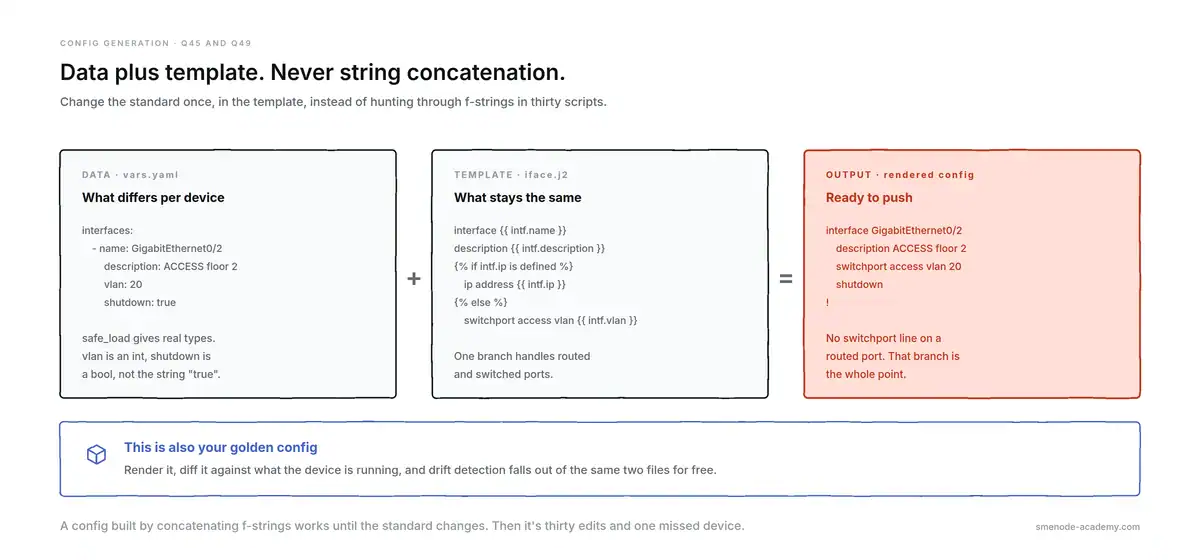
Data plus template. The branch is why this beats an f-string.
Q49. Write a Jinja2 template that renders interface configs.
Loop over the interfaces, branch on whether each one is routed or switched, and handle the shutdown state. Here’s a working template and the config it produces.
hostname {{ hostname }}
!
{% for intf in interfaces -%}
interface {{ intf.name }}
 description {{ intf.description }}
{% if intf.ip is defined %} ip address {{ intf.ip }} {{ intf.mask }}
{% else %} switchport access vlan {{ intf.vlan }}
{% endif %}{% if intf.shutdown | default(false) %} shutdown
{% else %} no shutdown
{% endif %}!
{% endfor %}
from jinja2 import Environment, FileSystemLoader
env = Environment(loader=FileSystemLoader("templates"),
trim_blocks=True, keep_trailing_newline=True)
print(env.get_template("iface.j2").render(**data))Rendered against the YAML in Q45:
hostname core-sw1
!
interface GigabitEthernet0/1
 description UPLINK to core
 ip address 10.1.1.1 255.255.255.0
 no shutdown
!
interface GigabitEthernet0/2
 description ACCESS floor 2
 switchport access vlan 20
 shutdown
!
Note that Gi0/1 got an IP and no switchport line, while Gi0/2 got the opposite. That branch is the point of the template.
Q50. What do trim_blocks and lstrip_blocks do?
They control the whitespace Jinja2 leaves behind. trim_blocks removes the newline after a block tag, lstrip_blocks strips leading whitespace before one. Without them your rendered config is full of blank lines, and a config with stray blank lines fails review.
Q51. What’s the default filter for?
It substitutes a value when a variable is undefined or empty, so one template serves devices with partial data instead of raising. {{ intf.mtu | default(1500) }} is the pattern.
{{ intf.description | default("no description") }}
{% if intf.shutdown | default(false) %} shutdown{% endif %}
Q52. How do you handle credentials in an automation script?
Read them from environment variables or a secrets manager, never from the source file. A hardcoded password in a code sample is the fastest way to fail a technical interview, because it tells the interviewer what your repo looks like.
import os

password = os.environ["NET_PASSWORD"]          # raises if unset, which is good
password = os.getenv("NET_PASSWORD", "")       # silent default, usually worse
export NET_PASSWORD='...' # or use a .env file that is in .gitignoreQ53. What should never be committed to a network automation repo?
Passwords, enable secrets, SNMP communities, API tokens, private keys, and production config backups containing any of those. Add them to .gitignore before the first commit, because a secret in git history stays there after you delete the file.
Q54. How do you write a file safely?
Always use with open(...), which closes the handle even if the write raises. Write to a temporary name and rename it into place when the file must never be seen half-written, which matters for config backups a rollback job might read.
with open("backup.cfg", "w") as fh:
    fh.write(running_config)
Q55. How do you back up configs from a list of devices?
Loop the inventory, pull the running config, and write one timestamped file per device. This is the single most common take-home task for a junior automation role, so be able to write it without hesitating.
from datetime import datetime, timezone
from pathlib import Path

stamp = datetime.now(timezone.utc).strftime("%Y-%m-%d")
Path(f"backups/{stamp}").mkdir(parents=True, exist_ok=True)

for device in inventory:
    with ConnectHandler(**device) as conn:
        config = conn.send_command("show running-config")
    Path(f"backups/{stamp}/{device['host']}.cfg").write_text(config)
Python for network engineers: SSH automation with Netmiko and Paramiko (Q56-68)
Q56. What is Netmiko and what does it add over Paramiko?
Netmiko is a network-device wrapper built on top of Paramiko. Paramiko gives you a raw SSH channel; Netmiko adds the things devices need: prompt detection, paging disabled automatically, enable mode, config mode, and per-vendor handling through device_type.
Q57. Paramiko or Netmiko: which do you pick and why?
Netmiko for network devices, Paramiko for generic SSH to servers or where no vendor driver exists. Netmiko handles the parts of device interaction that are tedious and easy to get wrong.
| Paramiko | Netmiko | |
|---|---|---|
| Layer | Generic SSHv2 client | Device wrapper over Paramiko |
| Prompt detection | You write it | Handled |
| Disables paging | You send the command | Automatic |
| Telnet support | No | Yes |
| Vendor drivers | None | 100+ via device_type |
| Enter enable mode | You script it | .enable() |
| Structured output | No | use_textfsm=True |
| Pick it when | Servers, custom SSH, no driver | Any network device with a CLI |
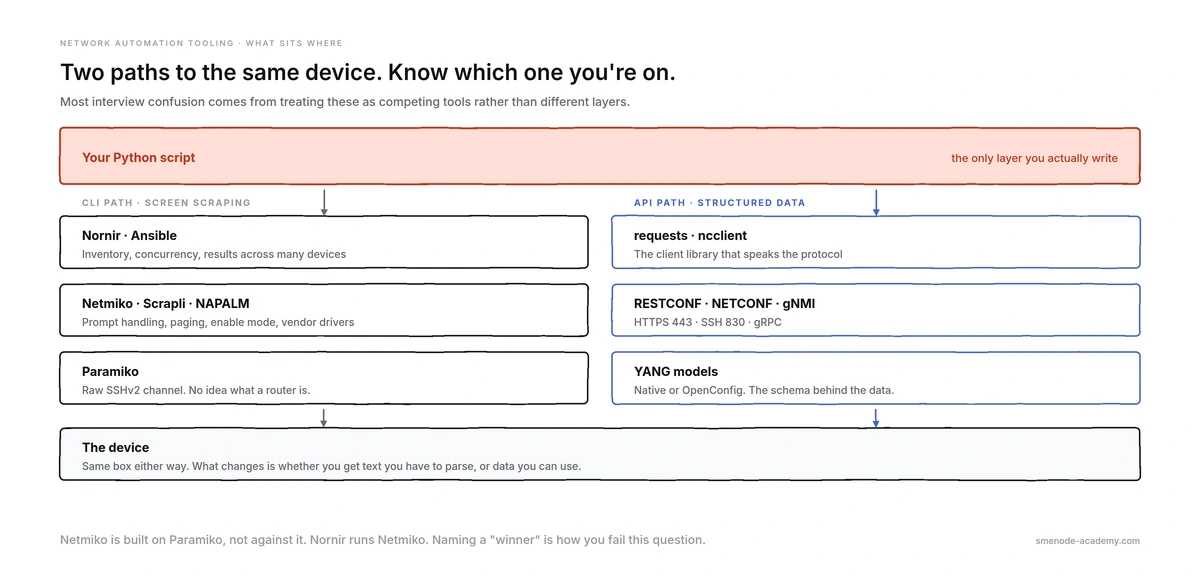
Where each tool sits. They’re layers, not competitors.
Q58. Write a minimal Netmiko script that connects and runs a command.
Use ConnectHandler as a context manager so the session closes even on an exception, and read the password from the environment.
import os
from netmiko import ConnectHandler

device = {
    "device_type": "cisco_ios",
    "host": "10.10.10.1",
    "username": "admin",
    "password": os.environ["NET_PASSWORD"],
    "conn_timeout": 10,
}

with ConnectHandler(**device) as conn:
    conn.enable()
    output = conn.send_command("show ip interface brief", use_textfsm=True)

for row in output:
    print(row)
Q59. What’s the difference between send_command and send_command_timing?
send_command waits for the device prompt to return, which is reliable and the default choice. send_command_timing waits a fixed delay instead, which you need when a command produces an unexpected prompt, like a confirmation question, so there’s no known pattern to wait for.
Q60. What’s send_config_set and how does it differ from send_command?
send_config_set takes a list of commands, enters config mode, sends them, and exits. send_command runs a single command in exec mode. Sending configure terminal through send_command leaves the session in a state Netmiko isn’t tracking.
with ConnectHandler(**device) as conn:
    conn.send_config_set([
        "interface GigabitEthernet0/2",
        "description ACCESS floor 2",
        "switchport access vlan 20",
    ])
    conn.save_config()      # write mem / copy run start
Q61. What does device_type control?
It selects the driver, which sets the prompt patterns, the paging command, config-mode syntax, and the save command. Using cisco_ios against an NX-OS switch mostly works until a command needs different syntax, then fails in a way that’s hard to read.
Q62. What are conn_timeout and read_timeout for?
conn_timeout is a connection parameter and caps how long the TCP and SSH handshake may take, defaulting to 10 seconds. read_timeout is a send_command parameter and caps how long to wait for output, defaulting to 10 seconds. Raise read_timeout for slow commands, not conn_timeout.
conn.send_command("show tech-support", read_timeout=300)Q63. A command returns an unexpected prompt. How do you handle it?
Pass expect_string with a pattern matching what the device will actually show, so Netmiko waits for the right thing instead of timing out on the prompt that never comes.
conn.send_command("reload", expect_string=r"[confirm]")Q64. How do you connect through a jump host?
Either use Netmiko’s SSH config file support and let OpenSSH’s ProxyJump do it, or build a Paramiko transport channel and hand it to Netmiko. The config-file route is the one to mention first because it’s less code and reuses your working SSH setup.
device = {..., "ssh_config_file": "~/.ssh/config"}# ~/.ssh/config
Host 10.10.10.*
ProxyJump bastion.example.comQ65. What’s session logging and why turn it on?
session_log writes everything sent and received to a file, which is how you prove what your script actually did during a change window. Ask for it by name in an interview and you sound like someone who has been on a bridge call.
device = {..., "session_log": "core-sw1.log"}Q66. What is Scrapli and when would you choose it?
Scrapli is a newer screen-scraping library focused on speed and a smaller core, with first-class asyncio support and a NETCONF driver. Choose it when you want async CLI at scale or a lighter dependency; choose Netmiko when you want the widest platform coverage and the biggest community.
Q67. How do you collect from 200 devices without opening 200 sessions?
Use a bounded worker pool. ThreadPoolExecutor(max_workers=N) runs N sessions at a time and queues the rest, which protects both your host and the devices’ VTY limits and AAA servers.
from concurrent.futures import ThreadPoolExecutor

def get_version(device):
    with ConnectHandler(**device) as conn:
        return device["host"], conn.send_command("show version")

with ThreadPoolExecutor(max_workers=10) as pool:
    results = dict(pool.map(get_version, inventory))
Measured on a 50-device run with a 50 ms round trip, 10 workers finished in 0.26 s against roughly 2.5 s serial. The shape of that gain is the point, not the exact numbers.
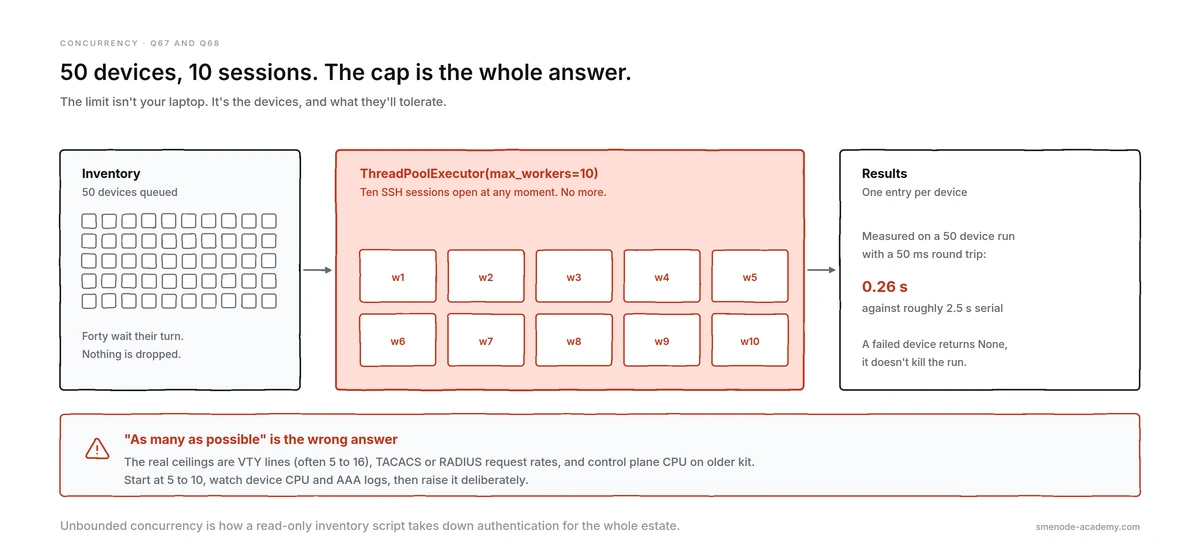
Ten sessions at a time. The cap is the answer they’re grading.
Q68. How many parallel sessions is too many?
It depends on the devices, not your host. The real limits are VTY lines (often 5 to 16), TACACS or RADIUS request rates, and control-plane CPU on older kit. Start at 5 to 10, watch device CPU and AAA logs, and raise it deliberately. “As many as possible” is the wrong answer.
APIs: REST, RESTCONF, NETCONF, and YANG (Q69-80)
Q69. What are the HTTP verbs and which do you use on network devices?
GET reads, POST creates, PUT replaces, PATCH merges, DELETE removes. For config work PATCH is the one you want most often, because it merges your change into the existing config instead of replacing the whole subtree the way PUT does.
Q70. Make a REST call with requests.
Set the headers, pass auth, and check the status before parsing. The detail interviewers watch for is what you do about TLS.
import requests

resp = requests.get(
    "https://10.10.10.1/restconf/data/ietf-interfaces:interfaces",
    headers={"Accept": "application/yang-data+json"},
    auth=("admin", os.environ["NET_PASSWORD"]),
    verify="/etc/ssl/certs/lab-ca.pem",     # not verify=False
    timeout=10,
)
resp.raise_for_status()
data = resp.json()
Q71. Why is verify=False a red flag?
Because it disables certificate validation, which removes the protection TLS exists to give and makes the session vulnerable to interception. It’s everywhere in lab blog posts. Say what you’d do instead: point verify at your internal CA bundle.
Q72. Which HTTP status codes should you know?
200 OK, 201 Created, 204 No Content (a successful config change often returns this), 400 bad request, 401 unauthorised, 403 forbidden, 404 not found, 409 conflict, 500 server error. Use raise_for_status() rather than testing codes by hand.
Q73. What is RESTCONF?
RESTCONF is an HTTP-based protocol for accessing YANG-modelled configuration and state data, defined in RFC 8040. It maps HTTP verbs onto a datastore, runs over HTTPS on port 443, and returns JSON or XML.
Q74. How is a RESTCONF URI structured?
/restconf/data/<module>:<container>/<key>. The module name comes before the colon, the container after it, and list keys go in the path.
GET /restconf/data/ietf-interfaces:interfaces
GET /restconf/data/ietf-interfaces:interfaces/interface=GigabitEthernet0%2f1
The / in an interface name has to be percent-encoded as %2f, which catches everyone once.
Q75. What is NETCONF?
NETCONF is an XML-based configuration protocol over SSH on port 830, defined in RFC 6241. It’s transactional: it supports candidate configs, locking, commit, and rollback, which is why it’s still preferred for large config changes.
Q76. Pull config with ncclient.
Connect, then call get_config against a datastore with a subtree filter so you retrieve one branch instead of the whole config.
from ncclient import manager

FILTER = """
<filter>
  <interfaces xmlns="urn:ietf:params:xml:ns:yang:ietf-interfaces"/>
</filter>
"""

with manager.connect(host="10.10.10.1", port=830,
                     username="admin", password=os.environ["NET_PASSWORD"],
                     hostkey_verify=False,
                     device_params={"name": "iosxe"}) as m:
    reply = m.get_config(source="running", filter=FILTER)
    print(reply.xml)
Q77. RESTCONF or NETCONF: which and when?
NETCONF when the change is large or must be transactional, RESTCONF when you want a quick read or a small change from anything that speaks HTTP.
| NETCONF | RESTCONF | |
|---|---|---|
| RFC | 6241 | 8040 |
| Transport | SSH, port 830 | HTTPS, port 443 |
| Encoding | XML | JSON or XML |
| Datastores | running, candidate, startup | running (and others if supported) |
| Locking | Yes | No |
| Transactions | Yes, commit and rollback | No |
| Subtree filtering | Yes, plus XPath | Path-based only |
| Best for | Large, atomic config changes | Reads and small changes, quick scripting |
Q78. What’s the difference between the running and candidate datastore?
The running datastore is live config, applied the moment it’s written. The candidate is a staging copy you can edit across several operations and then commit atomically, or discard. Candidate plus commit is how you avoid a half-applied change.
Q79. What is YANG, and what’s the difference between native and OpenConfig models?
YANG is the data-modelling language that defines what config and state a device exposes, and it’s what makes NETCONF and RESTCONF structured rather than free text. Native models are vendor-specific and expose everything; OpenConfig models are vendor-neutral and cover a common subset. Use OpenConfig for multi-vendor work, native when you need a feature it doesn’t model.
Q80. What are gNMI and streaming telemetry?
gNMI is a gRPC-based protocol for config and telemetry that supports subscriptions, so the device pushes changes to you instead of you polling. That’s the direction the field is moving, because polling SNMP every five minutes can’t see a microburst. Knowing this exists is enough for most interviews.
Running at scale: Nornir, Ansible, NAPALM, pyATS (Q81-88)
Q81. What is Nornir and how does it differ from Ansible?
Nornir is a Python automation framework that handles inventory, concurrency, and results, while you write the tasks in plain Python. Ansible puts the logic in YAML. Nornir suits teams who’d rather debug Python than a Jinja expression inside YAML. Its stewardship moved to OpsMill in 2026.
from nornir import InitNornir
from nornir_netmiko.tasks import netmiko_send_command

nr = InitNornir(config_file="config.yaml")

def get_version(task):
    task.run(task=netmiko_send_command, command_string="show version")

results = nr.run(task=get_version)      # runs across the inventory in parallel
Q82. When would you choose Ansible over Python?
When the task is declarative config across many devices and the team already knows Ansible, because you get inventory, idempotency, and modules without writing them. Choose Python when the logic branches, calls several APIs, or needs real error handling. The honest answer names both and picks per task.
Q83. What is NAPALM and what does it give you?
NAPALM is a multi-vendor abstraction layer with a common set of getters, so get_interfaces() returns the same structure whether the device is IOS, EOS, or Junos. It also does config merge, compare, commit, and rollback.
from napalm import get_network_driver

driver = get_network_driver("ios")
with driver("10.10.10.1", "admin", os.environ["NET_PASSWORD"]) as device:
    print(device.get_facts())
    print(device.get_interfaces())
Q84. How does NAPALM’s config diff and rollback work?
You load a candidate config with load_merge_candidate or load_replace_candidate, call compare_config() to see the diff the device itself reports, then either commit_config() or discard_config(). That diff is generated by the device, not by your text comparison, which is why it’s trustworthy.
device.load_merge_candidate(filename="new.cfg")
print(device.compare_config())        # review before you commit
device.commit_config()                # or device.discard_config()
Q85. What is pyATS and where does it fit?
pyATS is Cisco’s test framework, with Genie providing parsers and a device-state comparison model. Its distinctive feature is snapshotting the full operational state before and after a change and diffing it, which catches side effects your own checks would miss.
Q86. What is Batfish?
Batfish builds a model of your network from config files and answers questions about it without touching a device, so you can prove a change won’t break reachability before a change window. Naming it in a design round is a strong signal.
Q87. What’s a source of truth and why does it matter?
A source of truth is the system that defines what the network should be, with the devices treated as the output rather than the record. NetBox is the common choice. Without one, “intended config” lives in someone’s head and drift detection has nothing to compare against.
We’ve written up the practical side of this in building a dynamic inventory with NetBox and Ansible.
Q88. How would you onboard 300 devices from three vendors?
Discover and load into a source of truth first, normalise the platform field, then use an abstraction layer so vendor differences live in one place. Start read-only: collect facts for a fortnight, fix the inventory data, and only then push config. Anyone who answers “write a script and loop” has not done it.
Error handling, idempotency, and safe change (Q89-95)
This is the section that separates L3 from senior, and almost no question list covers it.
Q89. What does idempotency mean for a config push?
An idempotent operation produces the same result whether it runs once or fifty times. In practice: check current state, compute what’s missing, push only that. A script that blindly re-sends the same config is not idempotent, and in an ACL or route-map it will duplicate entries.
def vlan_changes_needed(intended, current_ids):
    return [v for v in intended if str(v) not in current_ids]

vlan_changes_needed([10, 20], {"1", "10", "20"})       # []    nothing to do
vlan_changes_needed([10, 20, 30], {"1", "10", "20"})   # [30]  only the new one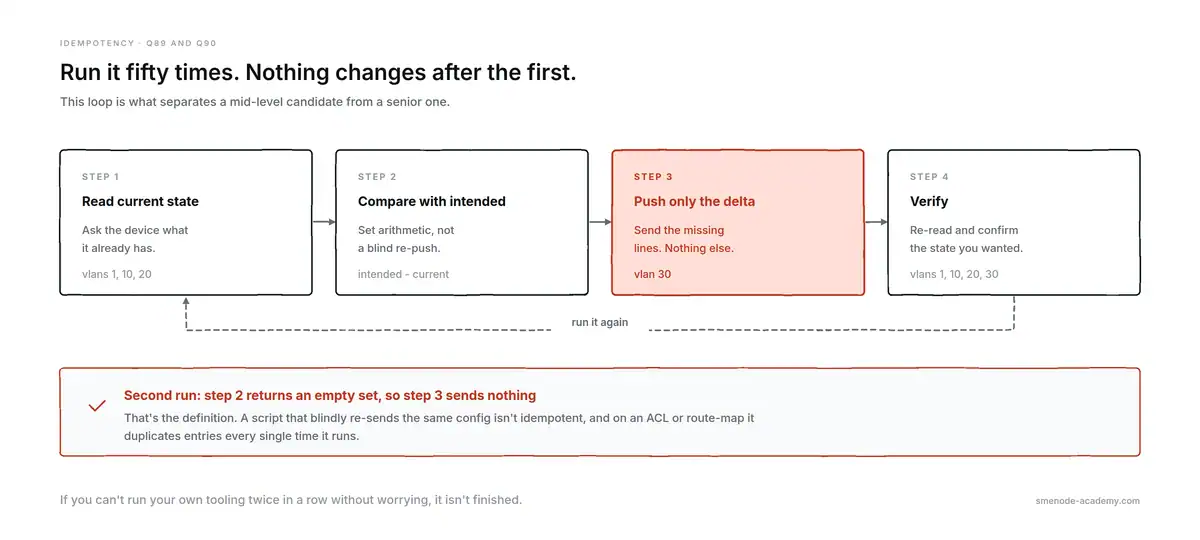
The second run sends nothing. That’s what idempotent means.
Q90. What’s a dry run and how do you build one?
A dry run computes and prints the change without sending it. Make it the default, so the destructive path needs an explicit flag. This is the single feature that most improves how much a team trusts your tooling.
def push_vlans(conn, vlans, dry_run=True):
    cmds = [f"vlan {v}" for v in vlans]
    if dry_run:
        return {"applied": False, "would_send": cmds}
    conn.send_config_set(cmds)
    return {"applied": True, "sent": cmds}

push_vlans(conn, [30])                  # {'applied': False, 'would_send': ['vlan 30']}
push_vlans(conn, [30], dry_run=False)   # actually sends
Q91. Why is except: on its own wrong?
A bare except catches everything, including KeyboardInterrupt and SystemExit, so you can’t stop your own script and a genuine bug gets silently swallowed. Catch the exceptions you can handle and let the rest surface.
# wrong
try:
    conn = ConnectHandler(**device)
except:
    pass

# right
from netmiko import NetmikoTimeoutException, NetmikoAuthenticationException

try:
    conn = ConnectHandler(**device)
except NetmikoTimeoutException:
    log.warning("%s unreachable", device["host"])
except NetmikoAuthenticationException:
    log.error("%s auth failed", device["host"])
Q92. Why use logging instead of print?
Because logging gives you severity levels, timestamps, and a destination you can change without editing code. When an interviewer sees print() in a production script they assume nobody has ever had to debug it at 3 a.m.
import logging

logging.basicConfig(
    level=logging.INFO,
    format="%(asctime)s %(levelname)s %(name)s %(message)s",
)
log = logging.getLogger(__name__)
log.info("connected to %s", host)       # lazy formatting, not an f-string
Q93. How do you unit test a parser with no lab access?
Save real device output as a fixture string, then assert on what your parser returns. No device needed, and the tests catch it the moment a vendor changes the output format.
SHOW_VLAN = """VLAN Name                             Status    Ports
---- -------------------------------- --------- -------
1    default                          active    Gi0/3
10   USERS                            active    Gi0/1
20   VOICE                            active    Gi0/2
"""

def test_parse_vlans_returns_all_rows():
    assert len(parse_vlans(SHOW_VLAN)) == 3

def test_parse_vlans_extracts_names():
    assert {v["vlan_id"]: v["name"] for v in parse_vlans(SHOW_VLAN)} == {
        "1": "default", "10": "USERS", "20": "VOICE"}

def test_parse_vlans_handles_empty_output():
    assert parse_vlans("") == []
That last test matters more than it looks. An empty string is what you get from a timed-out command, and a parser that raises on it takes your whole run down.
Q94. How do you test code that needs a connection?
Mock the connection object. unittest.mock.Mock lets you set the return value and then assert what your code sent, so you test your logic rather than the device.
from unittest.mock import Mock

fake = Mock()
fake.send_command.return_value = SHOW_VLAN

vlans = collect_vlans(fake)

assert len(vlans) == 3
fake.send_command.assert_called_once_with("show vlan brief")
You can prove a dry run really is safe the same way:
conn = Mock()
push_vlans(conn, [30], dry_run=True)
conn.send_config_set.assert_not_called()      # nothing reached the device
Q95. What’s your rollback plan?
Back up the running config before the change, keep the change small enough to reverse, and know which mechanism the platform gives you: configure replace on IOS, candidate plus commit on NETCONF, commit confirmed where it exists. Then validate after the change and reverse automatically if validation fails. “I’d fix it manually” is not a plan for 300 devices.
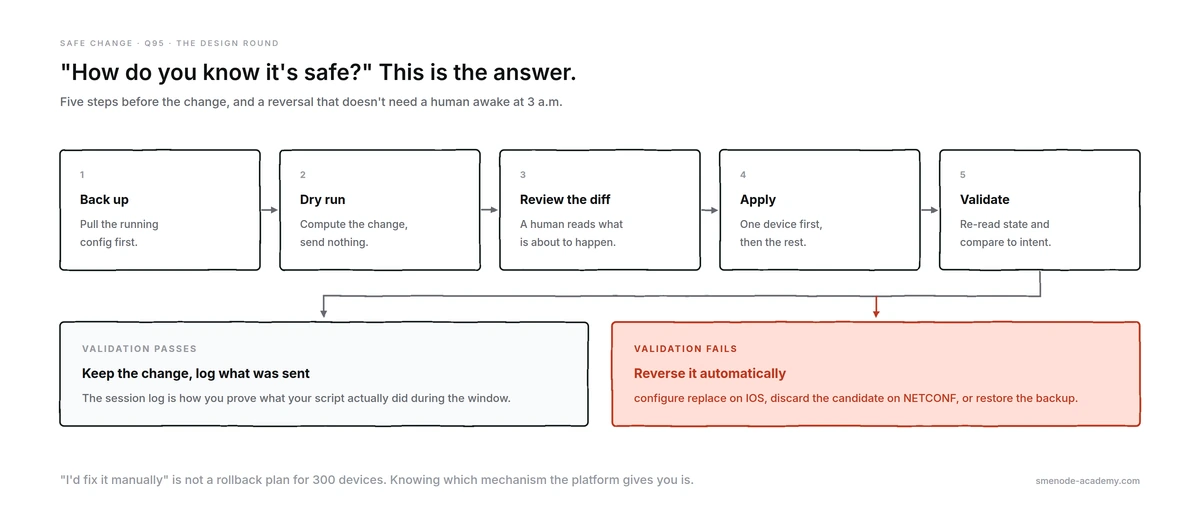
Five steps, then a fork. This is the design-round answer.
Python coding interview questions: 5 live tasks (Q96-100)
These are the Python coding interview questions you’ll be asked to actually write, phrased the way an interviewer says them. Give yourself 15 minutes each and don’t look at the solution first.
Q96. Given raw show ip interface brief output, return the interfaces that are up/up.
Time allowed: 15 minutes. What passes: correct handling of administratively down.
def up_up(output):
    result = []
    for line in output.splitlines():
        if not line.strip() or line.startswith("Interface"):
            continue
        fields = line.split()
        status, protocol = " ".join(fields[4:-1]), fields[-1]
        if status == "up" and protocol == "up":
            result.append(fields[0])
    return result

up_up(SHOW_IP_INT_BRIEF)
# ['GigabitEthernet0/0', 'Loopback0']
Bonus marks: returning dicts instead of names, and skipping the header by pattern rather than by exact string.
Q97. Given two config files, print the lines added and removed.
Time allowed: 20 minutes. The follow-up is the real question: does order matter?
import difflib

def config_diff(old, new):
    added, removed = [], []
    for line in difflib.unified_diff(old.splitlines(), new.splitlines(),
                                     lineterm="", n=0):
        if line.startswith("+") and not line.startswith("+++"):
            added.append(line[1:])
        elif line.startswith("-") and not line.startswith("---"):
            removed.append(line[1:])
    return added, removed
On a description and VLAN change plus one new line, this returns 3 added and 2 removed. Now the follow-up: reorder the file without changing a single line, and a line diff reports 4 added and 4 removed. A set diff reports nothing:
def config_diff_unordered(old, new):
    o, n = set(old.splitlines()), set(new.splitlines())
    return sorted(n - o), sorted(o - n)
The answer they want: use the set version for a config audit, the ordered version for ACLs and route-maps where sequence is semantics. Saying which and why is the whole point of the task.
Q98. Given a list of IPs and a prefix, return the ones inside it.
Time allowed: 15 minutes. Expect to be asked for it without ipaddress first.
# with the standard library, which is what you'd ship
import ipaddress

def in_prefix(ips, prefix):
    net = ipaddress.ip_network(prefix)
    return [ip for ip in ips if ipaddress.ip_address(ip) in net]

in_prefix(["10.1.1.20", "10.1.1.3", "10.2.0.1", "9.1.1.1"], "10.1.1.0/24")
# ['10.1.1.20', '10.1.1.3']
# by hand, to show you understand the maths
def to_int(ip):
a, b, c, d = (int(o) for o in ip.split("."))
return (a << 24) | (b << 16) | (c << 8) | d
def in_prefix_manual(ips, prefix):
network, length = prefix.split("/")
mask = (0xFFFFFFFF << (32 - int(length))) & 0xFFFFFFFF
base = to_int(network) & mask
return [ip for ip in ips if to_int(ip) & mask == base]Bonus marks: mentioning that the ipaddress version works unchanged for IPv6.
Q99. Given a MAC table dump, flag ports with more than one MAC.
Time allowed: 15 minutes.
from collections import defaultdict

def multi_mac_ports(entries):
    by_port = defaultdict(list)
    for entry in entries:
        by_port[entry["port"]].append(entry["mac"])
    return {p: m for p, m in by_port.items() if len(m) > 1}

multi_mac_ports(parse_mac_table(SHOW_MAC))
# {'Gi0/2': ['0050.56b1.9f04', '0050.56b1.3d11', '0050.56b1.c0de']}
Follow-up: “Is this always a problem?” No. It’s expected on a trunk or an uplink to a virtualisation host. The useful version filters to access ports only, and saying so is what separates a network engineer from someone who just writes Python.
Q100. Connect to 50 devices and collect version info, without opening 50 sessions at once.
Time allowed: 20 minutes. What they’re grading: whether you bound the concurrency and handle per-device failure.
from concurrent.futures import ThreadPoolExecutor

def get_version(device):
    try:
        with ConnectHandler(**device) as conn:
            return device["host"], conn.send_command("show version", use_textfsm=True)
    except Exception as exc:                  # one device must not kill the run
        log.warning("%s failed: %s", device["host"], exc)
        return device["host"], None

with ThreadPoolExecutor(max_workers=10) as pool:
    results = dict(pool.map(get_version, inventory))

failed = [host for host, data in results.items() if data is None]
log.info("%d succeeded, %d failed", len(results) - len(failed), len(failed))
Bonus marks: naming VTY line limits and AAA request rates as the reason for the cap, and reporting failures rather than letting them vanish.
Scenario and behavioural questions that decide the offer
No code here. What’s graded is judgement, and whether you can quantify your own work.
- Describe a script you wrote that saved time. Give a number: devices touched, hours saved per week, errors avoided. “It saved a lot of time” is not an answer.
- Tell me about a time automation broke something. Say what broke, how you found out, and what you changed in the process afterwards. Claiming it’s never happened reads as inexperience.
- Your script half-applied a change to 40 switches. What now? Stop the run, establish which devices are in which state, restore from backup, then fix the tooling. Order matters in the answer.
- How would you convince a team that won’t adopt automation? Start read-only. Config backups and drift reports build trust because they can’t break anything.
- How do you keep a source of truth accurate? Reconcile continuously and treat drift as a defect in the source of truth, not just on the device.
- How do you test a change before a window? Lab or virtual topology, dry run, config diff, and pre/post validation captured as data.
- Who reviews your automation code? If the answer is nobody, say what you’d change. Peer review on anything that writes to a device is the expected answer.
- What would you automate first in a network you’ve just joined? Backups and inventory collection. Read-only, immediately useful, zero risk.
The 6 mistakes that end these interviews
1. A hardcoded password in your sample code. The fastest fail on this list. Read it from the environment, every time.
2. Bare except: pass. It tells the interviewer that your scripts fail silently and nobody has ever had to debug one.
3. No dry run. If your answer to “how do you know it’s safe” is “I tested it in the lab”, you’ve lost the design round.
4. Parsing text when an API exists. Reach for RESTCONF or NETCONF first and say why. Parsing is the fallback, not the default.
5. Naming a library you’ve only read about. Interviewers ask one follow-up. “I’ve read about Nornir but haven’t used it in anger” costs you nothing; bluffing costs you the offer.
6. Code that works on one device. No concurrency cap, no per-device error handling, no logging. It works in the demo and takes down a floor in production.
Your 7-day prep plan
One week, assuming you already know networking and are rusty at Python.
| Day | Focus | Questions | Do this |
|---|---|---|---|
| 1 | Fundamentals | Q1-15 | Write each answer as code, don’t just read it |
| 2 | Parsing | Q16-30 | Grab real show output from any device and parse three commands |
| 3 | Data and files | Q31-55 | Build a YAML inventory and render configs with Jinja2 |
| 4 | SSH automation | Q56-68 | Write the config backup script from Q55 against a lab |
| 5 | APIs | Q69-80 | One RESTCONF GET and one NETCONF get_config |
| 6 | Safety | Q81-95 | Add a dry run, logging, and three tests to Day 4’s script |
| 7 | Mock round | Q96-100 | 15 minutes each, timed, no notes |
Day 7 is the one people skip and the one that matters. Writing code with a clock running and someone watching is a different skill from writing it alone.
If you’re earlier than this and still building the networking base, our network engineer roadmap lays out the 18 months before this point. If you’re aiming at the pay bands these skills unlock, the network automation engineer salary guide has the current numbers. Interviewing for a role that straddles both sides, our DevOps interview questions guide covers the CI/CD and container half.
Frequently asked questions
What Python questions are asked in a network engineer interview?
The Python interview questions for these roles fall into four groups: language fundamentals, parsing device output, automating devices over SSH and APIs, and one live coding task. Fundamentals and parsing make up most of the phone screen. The live task is almost always string parsing or looping over an inventory, not algorithms.
How much Python does a network engineer actually need?
Python for network engineers means enough to loop over an inventory, parse command output into structured data, call a REST API, and handle errors without the script dying. You don’t need algorithms or computer-science data structures. An L2 role needs Q16-55 here; an automation engineer needs through Q95.
Is Netmiko or Paramiko better for network automation?
Netmiko for network devices, Paramiko for generic SSH. Netmiko is built on Paramiko and adds prompt detection, automatic paging control, enable and config modes, and over 100 vendor drivers through device_type. Use Paramiko directly only when no driver exists or you’re connecting to servers.
What is the difference between NETCONF and RESTCONF?
NETCONF runs over SSH on port 830, uses XML, and supports datastores, locking, and transactional commit with rollback (RFC 6241). RESTCONF runs over HTTPS, uses JSON or XML, and has no locking or transactions (RFC 8040). Pick NETCONF for large atomic changes, RESTCONF for reads and small edits.
Do I need CCNA Automation to get a network automation job?
No, but it signals you’ve covered the ground systematically. On 3 February 2026 Cisco renamed DevNet Associate to CCNA Automation, so both names refer to the 200-901 exam. Employers care more about code you can show, though a cert plus a public repo is a strong combination.
How do I prepare for a Python coding interview as a network engineer?
Practise parsing real show output rather than solving puzzle problems. Work the seven-day plan above, then do timed 15-minute runs at the five tasks in Q96-100. Most candidates fail the live round on string handling, not on anything advanced.
Where to go next
Three things separate the candidates who get offers from the ones who don’t, and none of them is memorising more Python interview questions.
- They can write a parser under time pressure. Practise on real output, not on tutorials.
- They think about blast radius unprompted. Dry run, logging, per-device error handling, rollback. Bring these up before you’re asked.
- They have something to show. A public repo with a backup script, a drift report, and tests beats any certification on a CV.
Work the seven-day plan, then do the five live tasks against a clock. That’s the whole preparation.
If you’d rather do it with someone who has run these interviews, that’s what our live programmes are for. The CCNA Automation course covers the 200-901 ground with a real instructor and a class group you can ask questions in between sessions. The Automation Engineer programme goes further into Python, Ansible, and API work against live topologies, and CCIE Automation is the expert track if you’re already past this list.
Book a free demo class → Sit in on a live session, ask the instructor whatever you want, and decide afterwards.
Every runnable Python example on this page was executed against Python 3.14 before publishing. Netmiko, NAPALM, and ncclient examples follow the current documented APIs for those libraries and need a device or lab topology to run.