On 2021-10-04, BGP broke Facebook.
For about six hours, Facebook, Instagram and WhatsApp vanished from the internet. Not slow. Not buggy. Gone. Roughly 3.5 billion users lost access at once, and estimates of the lost revenue ran into the tens of millions. The cause was a single BGP misconfiguration that withdrew Facebook’s routes from the global routing table. Employees couldn’t even badge into the buildings to fix it.
That’s the kind of power BGP holds over the internet. So what is BGP, exactly, and how does one protocol get to decide where the world’s traffic goes?
What is BGP? (Quick Answer)
BGP (Border Gateway Protocol) is the standardised exterior gateway protocol that exchanges routing information between Autonomous Systems on the internet. It runs over TCP port 179, uses path-vector logic to prevent loops, and picks the best route by walking a 13-step decision list built on attributes like WEIGHT, LOCAL_PREF, AS_PATH and MED. As of 2026-08-31, BGP carries 1,121,994 IPv4 prefixes and 262,079 IPv6 prefixes worldwide, according to Geoff Huston’s BGP reports. It’s specified in RFC 4271.
In plain English: BGP is how the internet’s networks talk to each other. Every ISP, cloud provider, data centre and multi-homed enterprise runs BGP to decide where your data goes next.
This guide covers the whole protocol. Mechanics, message types, the neighbour state machine, all 13 path-selection steps, working configs you can paste into a lab, and the troubleshooting order that actually finds the fault. If you’re studying for CCNP or CCIE, or you’re about to turn up your first eBGP session with a transit provider, start here.
📥 Free Download: BGP End-to-End Reference (148 Pages)
Built from real CCIE lab notes. Path selection, attributes, peering states, troubleshooting, working configs. The same reference our CCIE Enterprise students use.
Get the Free PDF
Enter your email to download instantly.
Why BGP Runs the Internet
Ask what BGP is in networking terms and you get a routing protocol. Ask what it does and you get something bigger: BGP is the protocol that holds the internet together.
Here’s the scale of it in 2026:
- 1,121,994 IPv4 prefixes and 262,079 IPv6 prefixes in the global table as of 2026-08-31, up from around 814K IPv4 in 2020
- Roughly 80,000 active Autonomous Systems announce routes today, out of about 120,000 ASNs allocated
- Every Tier-1 ISP runs BGP, including AT&T, Lumen, NTT, Telia, GTT and Deutsche Telekom
- AWS, Azure, Google Cloud and Cloudflare use BGP for anycast routing and DDoS scrubbing
- Every internet exchange point, like AMS-IX, DE-CIX and LINX, uses BGP to peer hundreds of networks
When BGP breaks, the internet breaks. Facebook in 2021. Verizon in 2019. Rogers Canada in 2022, which took roughly 12M customers offline. Cloudflare’s 1.1.1.1 resolver in 2024. A stealth hijack of SingNet’s address space in 2025. All routing. All preventable with filtering, validation and monitoring.
If you’re aiming for a network engineer career, BGP isn’t optional. It’s on every CCNP, CCIE, JNCIP and AWS Advanced Networking blueprint, and it’s the protocol senior interviews dig into hardest. Our 18-month network engineer roadmap puts it in the CCNP stage for a reason.
How BGP Works (The Real Mechanics)
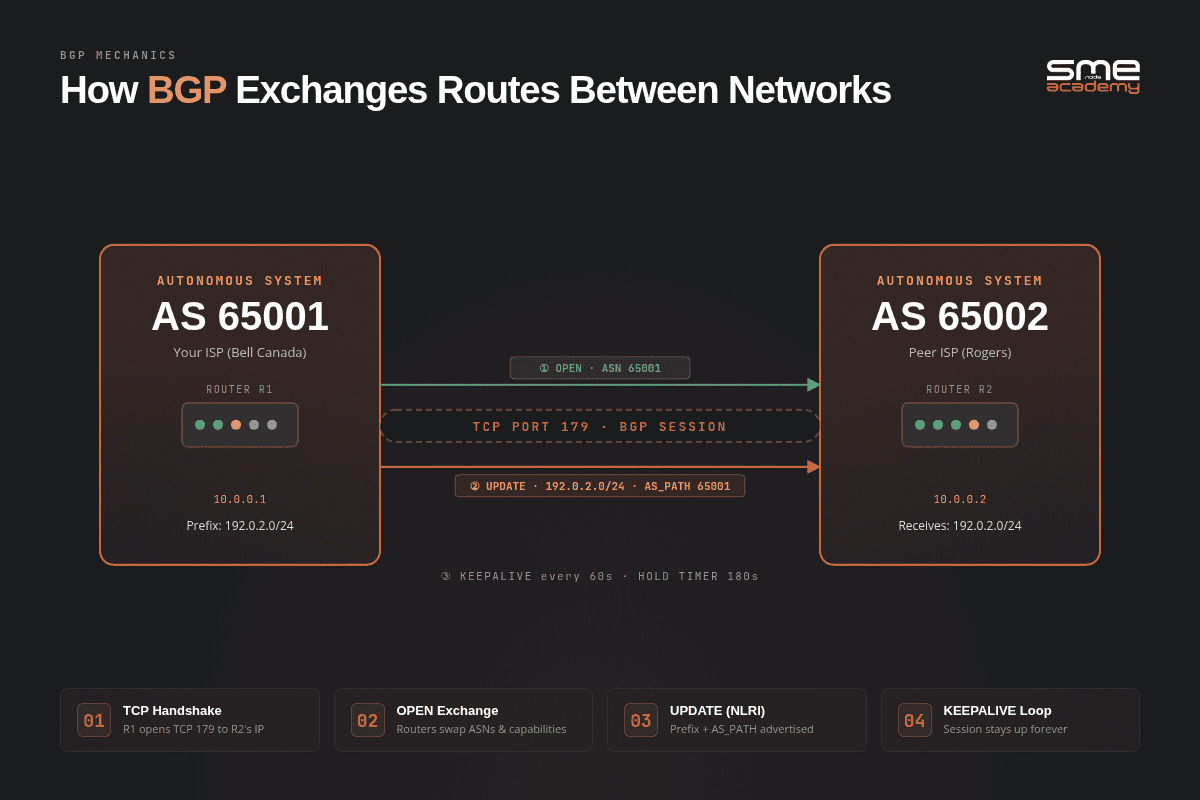
Illustration of BGP route exchange process between two autonomous systems, highlighting key protocols and updates.
BGP isn’t magic. Once you understand five building blocks, the rest clicks into place.
1. Autonomous Systems (AS)
An Autonomous System is a network or group of networks under one administrative control. Your ISP is an AS. Cloudflare is an AS. The University of Toronto is an AS.
Each AS gets a unique number (ASN) from IANA and the Regional Internet Registries:
- AS15169 = Google
- AS32934 = Meta (Facebook)
- AS13335 = Cloudflare
- AS16509 = Amazon AWS
- AS3356 = Lumen
ASNs were originally 2-byte values, capped at 65,536. They ran short, so 4-byte ASNs arrived and pushed the ceiling past 4.2 billion. The block 64,512 through 65,534 is reserved for private use, which is what you’ll configure in labs.
BGP runs between these ASes. That’s why it’s the Border Gateway Protocol. It sits at the border.
2. TCP Port 179 (Not Multicast, Not UDP)
Unlike OSPF or EIGRP, BGP doesn’t auto-discover neighbours. You configure every peer by hand with an IP address and an ASN. Once configured, BGP opens a reliable TCP session on port 179.
That design choice matters more than it looks. Because TCP handles retransmission, ordering and error recovery, BGP doesn’t reinvent any of it. It also means anything that blocks TCP 179 kills your session silently, which is the single most common reason a new peering turns up and never comes alive.
3. NLRI (Network Layer Reachability Information)
NLRI is BGP’s term for the route being advertised. It’s a prefix plus the attributes describing how to reach it.
Example NLRI: prefix 8.8.8.0/24, AS_PATH 65003 65002 65001 15169, NEXT_HOP 192.0.2.5.
That tells the receiving router: to reach 8.8.8.0/24, hand traffic to 192.0.2.5, and it’ll pass through AS 65003, 65002, 65001 and land in Google’s AS15169.
If prefix lengths and CIDR boundaries still slow you down, work through our 50 subnetting practice problems first. BGP filtering is unforgiving about /24 versus le 24.
4. Path-Vector Logic (Loop Prevention)
BGP is a path-vector protocol. Every route carries the full list of ASes it has crossed, the AS_PATH. Before accepting a route, a router checks whether its own ASN already appears in that list. If it does, the route is dropped. Loop prevented.
It’s the same problem spanning tree solves at Layer 2, solved a completely different way. STP blocks ports to break loops. BGP just refuses to believe a path it has already been part of.
This is why BGP scales past a million prefixes while distance-vector protocols like RIP fall over at 15 hops.
5. Address Families (MP-BGP)
Plain BGP-4 only carried IPv4 unicast. Multiprotocol BGP, added in RFC 4760, introduced Address Family Identifiers (AFI) and Sub-Address Family Identifiers (SAFI) so one session can carry IPv4, IPv6, VPNv4, VPNv6, EVPN and multicast routes side by side.
You’ll see it in every modern config as address-family blocks:
router bgp 65001
 no bgp default ipv4-unicast
 neighbor 203.0.113.2 remote-as 65002
 neighbor 2001:db8:0:1::2 remote-as 65002
 !
 address-family ipv4 unicast
  network 198.51.100.0 mask 255.255.255.0
  neighbor 203.0.113.2 activate
 exit-address-family
 !
 address-family ipv6 unicast
  network 2001:db8:100::/48
  neighbor 2001:db8:0:1::2 activate
 exit-address-family
Note no bgp default ipv4-unicast. Turn it on. Without it, every neighbour you define is auto-activated for IPv4 unicast, and you can leak routes to a peer you only meant to configure.
BGP Message Types and Timers
BGP speaks four message types. Five if you count ROUTE-REFRESH from RFC 2918.
| Type | Message | What it does | When you see it |
|---|---|---|---|
| 1 | OPEN | Proposes ASN, router ID, hold time and capabilities | Once, at session setup |
| 2 | UPDATE | Advertises new NLRI or withdraws old routes | Constantly |
| 3 | NOTIFICATION | Reports an error, then tears the session down | On every failure |
| 4 | KEEPALIVE | Proves the peer is alive | Every 60 seconds by default |
| 5 | ROUTE-REFRESH | Asks a peer to resend its routes | After a policy change |
NOTIFICATION is the one to care about. A BGP session never dies quietly. It sends a NOTIFICATION with an error code first, and that code is usually the whole diagnosis. show ip bgp neighbors will replay the last one for you.
The timers that decide when a session dies
| Timer | Cisco default | What it controls |
|---|---|---|
| Keepalive | 60 seconds | How often KEEPALIVE messages go out |
| Hold time | 180 seconds | How long silence is tolerated before the session drops |
| ConnectRetry | 120 seconds | How long to wait before retrying a failed TCP connection |
| MinRouteAdvertisement | 30s eBGP, 5s iBGP | Minimum gap between advertisements for the same prefix |
Two things trip people up here. Hold time is negotiated to the lower of the two peers’ values, not the local one, so a peer configured at 90 seconds wins against your 180. And a hold time of 0 disables keepalives entirely, which some IXP route servers use deliberately.
Hold time is also why BGP converges slowly compared with an IGP. Three minutes of silence before a session drops is fine on a stable transit link and far too slow for a data centre fabric. That’s what BFD is for: sub-second failure detection handed to BGP as a trigger.
BGP Neighbour States: Idle to Established
This is where real BGP troubleshooting lives, and it’s the part most guides skip entirely.
The RFC 4271 finite state machine has six states. A working session sits in Established. Anything else means something’s broken, and which state it’s stuck in tells you exactly what.
| State | What’s happening | Stuck here? The cause is almost always |
|---|---|---|
| Idle | No TCP attempt at all | No route to the neighbour IP, the neighbour is administratively shut, or a damping hold-down after repeated failures |
| Connect | TCP three-way handshake in progress | Nothing. This state is transient, you’ll rarely catch it |
| Active | TCP tried and failed, waiting to retry | Wrong neighbour IP, an ACL or firewall blocking TCP 179, no return route, or a missing update-source on a loopback peering |
| OpenSent | Our OPEN sent, waiting for theirs | Mismatched remote-as, duplicate router IDs, or a capability the peer refuses |
| OpenConfirm | Their OPEN accepted, waiting for KEEPALIVE | Authentication mismatch (the MD5 password), or an unacceptable hold time |
| Established | Session up, UPDATEs flowing | Nothing. You’re done |
Why is my BGP session stuck in Active?
Because Active is the worst-named state in networking. It sounds healthy. It means the opposite: the router tried to open a TCP connection, got nothing back, and is now counting down ConnectRetry before trying again.
Idle flipping to Active and back, over and over, is the classic signature. In that order, check:
- Can you
pingthe neighbour IP, sourced from the interface the session uses? - Does an ACL, zone policy or control-plane policer drop TCP 179?
- Does the neighbour have a route back to your source address?
- If you’re peering on loopbacks, did you set
neighbor x.x.x.x update-source Loopback0on both sides? - For eBGP on loopbacks, did you set
ebgp-multihop? eBGP defaults to a TTL of 1 and loopbacks aren’t directly connected.
Four out of five stuck-in-Active tickets end at step 4 or 5.
An OpenSent or OpenConfirm hang is a different animal. Those mean TCP is fine and the BGP parameters disagree. Wrong ASN, wrong password, wrong hold time. The NOTIFICATION code says which.
iBGP vs eBGP (The First Thing CCIE Students Get Wrong)
BGP has two flavours, and mixing them up will break your network.
| eBGP (External) | iBGP (Internal) | |
|---|---|---|
| Used between | Routers in different ASes | Routers in the same AS |
| TTL default | 1 (directly connected) | 255 |
| NEXT_HOP behaviour | Rewritten on each hop | Unchanged |
| AS_PATH | Local ASN prepended | Left alone |
| Admin distance (Cisco) | 20 | 200 |
| Re-advertises routes learned from a peer of the same type | Yes | No |
That last row is the one that bites. An iBGP router will not re-advertise a route it learned from another iBGP peer. It’s the loop-prevention rule that replaces AS_PATH inside an AS, since the ASN never changes internally.
The consequence: iBGP needs a full mesh. Every iBGP speaker must peer with every other one. Ten routers means 45 sessions. A hundred routers means 4,950. Painful, and it doesn’t scale.
Two fixes exist. Confederations split one large AS into sub-ASes. Route reflectors nominate hubs that are allowed to break the re-advertisement rule.
Route reflectors are what 99% of real networks run:
! RR1 - reflects between all internal clients
router bgp 65001
 address-family ipv4 unicast
  neighbor 10.0.0.2 route-reflector-client
  neighbor 10.0.0.3 route-reflector-client
  neighbor 10.0.0.4 route-reflector-client
 exit-address-family
Three lines, and 45 sessions collapse into 10. The reflector adds ORIGINATOR_ID and CLUSTER_LIST attributes to stop the loops that full mesh used to prevent. Always deploy at least two reflectors per cluster, because a single RR is a single point of failure for your entire internal routing.
We build reflector topologies hands-on in the CCIE Enterprise course.
BGP Path Attributes (Where the Real Power Lives)
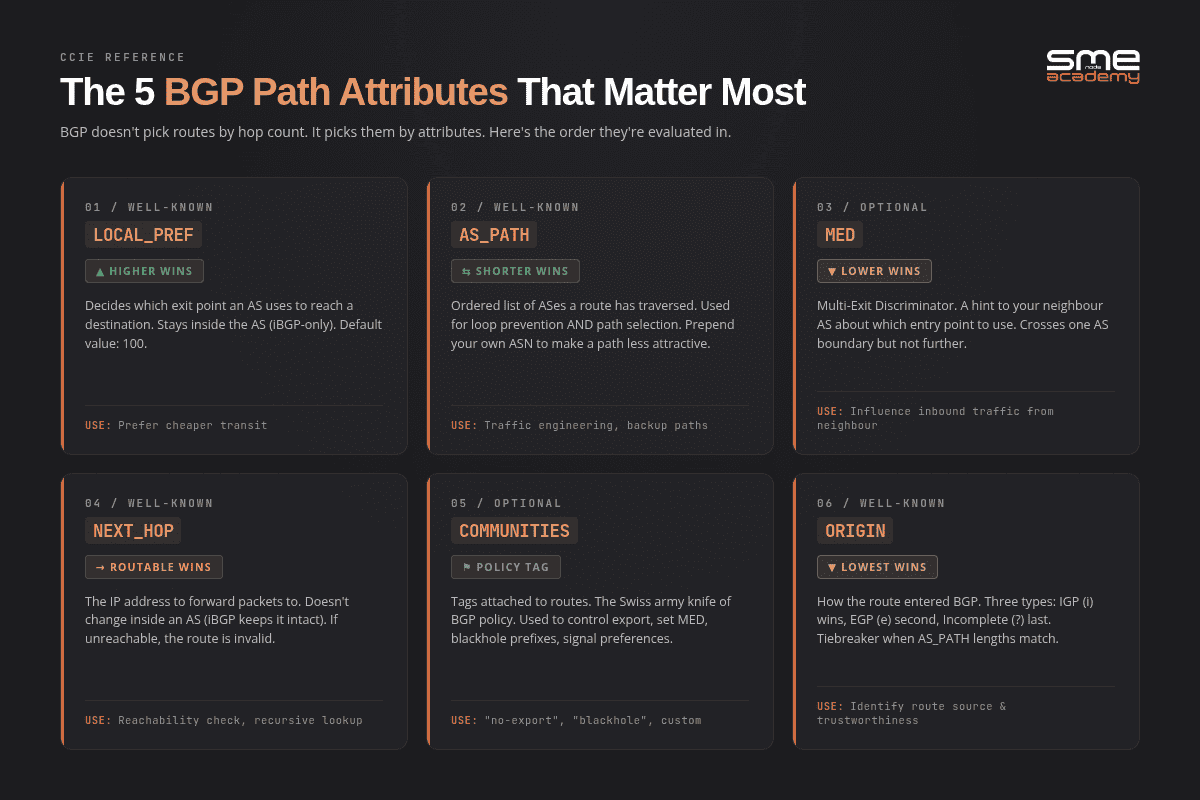
Diagram illustrating the five most important BGP path attributes for efficient routing.
BGP doesn’t pick routes by hop count. It picks them by attributes. There are dozens. These five carry the real weight.
LOCAL_PREF (Local Preference)
- Higher wins
- Decides which exit point your AS uses
- iBGP-only, never crosses an AS boundary
- Default value: 100
- Use case: “prefer the cheaper transit provider”
This is the attribute you’ll reach for most. Applied inbound, it steers your own outbound traffic:
! Prefer ISP-A for everything, fall back to ISP-B automatically
route-map PREFER-ISP-A permit 10
 set local-preference 200
!
router bgp 65001
 address-family ipv4 unicast
  neighbor 203.0.113.2 route-map PREFER-ISP-A in
 exit-address-family
AS_PATH
- Shorter wins
- The ordered list of ASes a route has crossed
- Does loop prevention and path selection
- You can prepend your own ASN to make a path look worse on purpose
- Use case: traffic engineering, primary and backup ISP
Prepending is the standard way to influence inbound traffic, which you otherwise have almost no control over:
! Make ISP-B look three hops worse so inbound traffic prefers ISP-A
route-map MAKE-B-LESS-ATTRACTIVE permit 10
 set as-path prepend 65001 65001 65001
!
router bgp 65001
 address-family ipv4 unicast
  neighbor 198.18.0.2 route-map MAKE-B-LESS-ATTRACTIVE out
 exit-address-family
MED (Multi-Exit Discriminator)
- Lower wins
- A hint to your neighbour about which of your entry points to use
- Crosses one AS boundary, then stops
- Only compared between paths from the same neighbouring AS by default
- Use case: “you have two links to me, come in via link A”
MED is a request, not an instruction. Your neighbour can and often does ignore it, because LOCAL_PREF is evaluated first and it belongs to them.
NEXT_HOP
- The IP address packets get forwarded to
- Rewritten by eBGP, left unchanged by iBGP
- If the next hop isn’t reachable, the route is invalid and never installs
That unchanged-by-iBGP behaviour causes more outages than any other single attribute. An internal router learns a route whose next hop is an external address it has no path to, so it discards a perfectly good route. The fix is neighbor x.x.x.x next-hop-self on the border router, and it belongs in every iBGP config by default.
COMMUNITIES
- Tags attached to routes
- Drive policy: “don’t export this”, “set MED to 50”, “blackhole this prefix”
- Well-known values include NO_EXPORT, NO_ADVERTISE and NO_PEER
- The Swiss army knife of production BGP policy
Every serious transit provider publishes a community list letting you control how they treat your prefixes, including remotely triggered blackholing during a DDoS attack. Learn your provider’s list before you need it at 03:00.
BGP Best Path Selection Algorithm
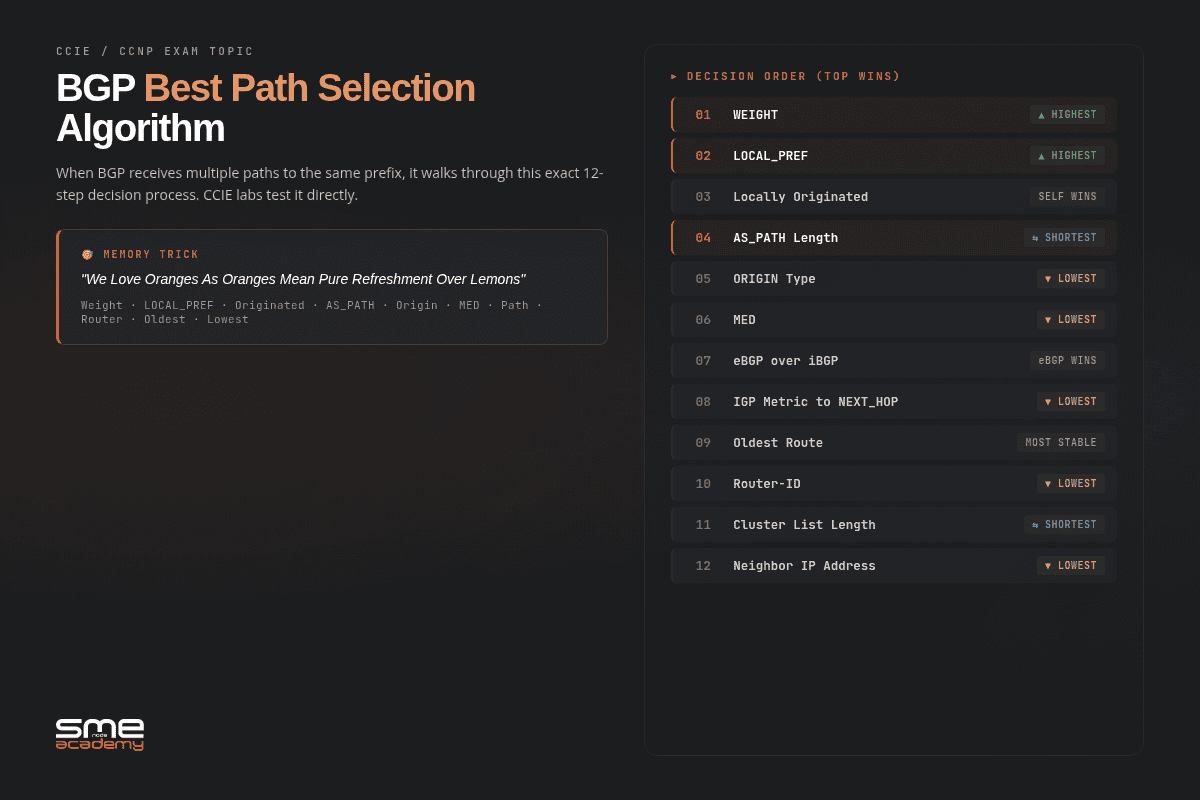
Visual overview of BGP’s path selection criteria, including weight, local preference, and AS path length.
When BGP has multiple paths to the same prefix, it walks a 13-step decision list. Memorise it. CCIE labs test it directly, and Cisco documents the full order in its BGP best path selection reference.
- Highest WEIGHT (Cisco-only, local to the router, never advertised)
- Highest LOCAL_PREF
- Locally originated (a
network,aggregate-addressorredistributestatement wins) - Shortest AS_PATH
- Lowest ORIGIN type (IGP beats EGP beats Incomplete)
- Lowest MED
- eBGP over iBGP
- Lowest IGP metric to the NEXT_HOP
- Multipath check (if BGP multipath is on, install multiple paths and stop here)
- Oldest eBGP route (the most stable one, when both paths are external)
- Lowest BGP router ID
- Shortest CLUSTER_LIST
- Lowest neighbour IP address
Steps 1, 2 and 4 are where nearly all real-world policy happens. Steps 10 through 13 are tie-breakers you’ll only meet in a lab.
Step 9 is the one most articles drop, and dropping it is why you’ll see the algorithm miscounted as 12 steps all over the internet.
Reading it in real output
Here’s the same prefix learned from two providers, and BGP choosing between them:
R1# show ip bgp 198.51.100.0
BGP routing table entry for 198.51.100.0/24, version 12
Paths: (2 available, best #2, table default)
  65002 65010 15169
    203.0.113.2 from 203.0.113.2 (203.0.113.2)
      Origin IGP, metric 0, localpref 100, valid, external
  65003 15169
    198.18.0.2 from 198.18.0.2 (198.18.0.2)
      Origin IGP, metric 0, localpref 100, valid, external, best
Both have default WEIGHT and a LOCAL_PREF of 100, so steps 1 and 2 tie. Neither is locally originated, so step 3 ties. Step 4 decides it: 65003 15169 is two ASes, 65002 65010 15169 is three. Path 2 wins on the shorter AS_PATH, and the word best confirms it.
That single line of output is worth more than any mnemonic.
BGP Troubleshooting: The Order That Works
Five commands, in this order. It works because each one rules out an entire layer before you spend time on the next, the same principle behind our three-command networking troubleshooting order.
1. Is the session even up?
R1# show ip bgp summary
BGP router identifier 10.0.0.1, local AS number 65001
BGP table version is 41, main routing table version 41

Neighbor        V   AS MsgRcvd MsgSent   TblVer  InQ OutQ Up/Down  State/PfxRcd
203.0.113.2     4 65002   14022   13984       41    0    0 6d02h        142310
198.18.0.2      4 65003    9871    9902       41    0    0 3d19h        142298
10.0.0.5        4 65001       0       0        1    0    0 never        Active
Read the last column first. A number means Established, and that number is how many prefixes you received. A word means the session is down, and the word is the state. Here, two transit sessions are healthy and one iBGP peer has never come up, sitting in Active.
MsgRcvd at 0 confirms it. That peer has never exchanged a single message, so this is a reachability or configuration problem, not a routing one.
2. Why did it drop?
R1# show ip bgp neighbors 10.0.0.5Look for Last reset and the NOTIFICATION code beside it. “Peer closed the session”, “hold time expired” and “BGP notification received: administrative shutdown” all point somewhere completely different. The router already knows what went wrong.
3. Is TCP 179 reachable?
R1# ping 10.0.0.5 source Loopback0
R1# show tcp brief | include 179
Source the ping from the interface the session actually uses. A ping that works from the default interface and fails from the loopback is the whole answer.
4. Did the prefix arrive, and is it valid?
R1# show ip bgp 198.51.100.0
R1# show ip bgp neighbors 203.0.113.2 received-routes
received-routes needs soft reconfiguration or route refresh enabled, and it’s worth having. It shows you what the peer sent before your inbound policy touched it, which separates “they never sent it” from “my own filter ate it”.
5. Did it make it into the routing table?
R1# show ip route 198.51.100.0A prefix can sit in the BGP table as best and still never install. Almost always an unreachable NEXT_HOP, which takes you back to next-hop-self.
Want somewhere to practise all of this for free? Spin up VyOS or FRR instances on a Proxmox homelab and build a two-AS topology. Every command above works there.
Route Flapping and Damping
Advertising a route, withdrawing it, then advertising it again is called flapping. It’s contagious. Every withdrawal forces your providers to withdraw too, and theirs after them, until thousands of routers worldwide are recalculating best paths for one unstable link.
That cost enough router CPU in the 1990s that damping was invented. A flapping prefix accumulates a penalty, and once it crosses a threshold the route gets suppressed for up to an hour, even after it stabilises.
Damping has fallen out of favour. RIPE and most large operators now recommend against aggressive damping, because the original parameters punish normal internet churn far harder than they punish genuine instability. Know what it is, know your provider might still run it, and don’t turn it on because a textbook told you to.
Real-World BGP Use Cases
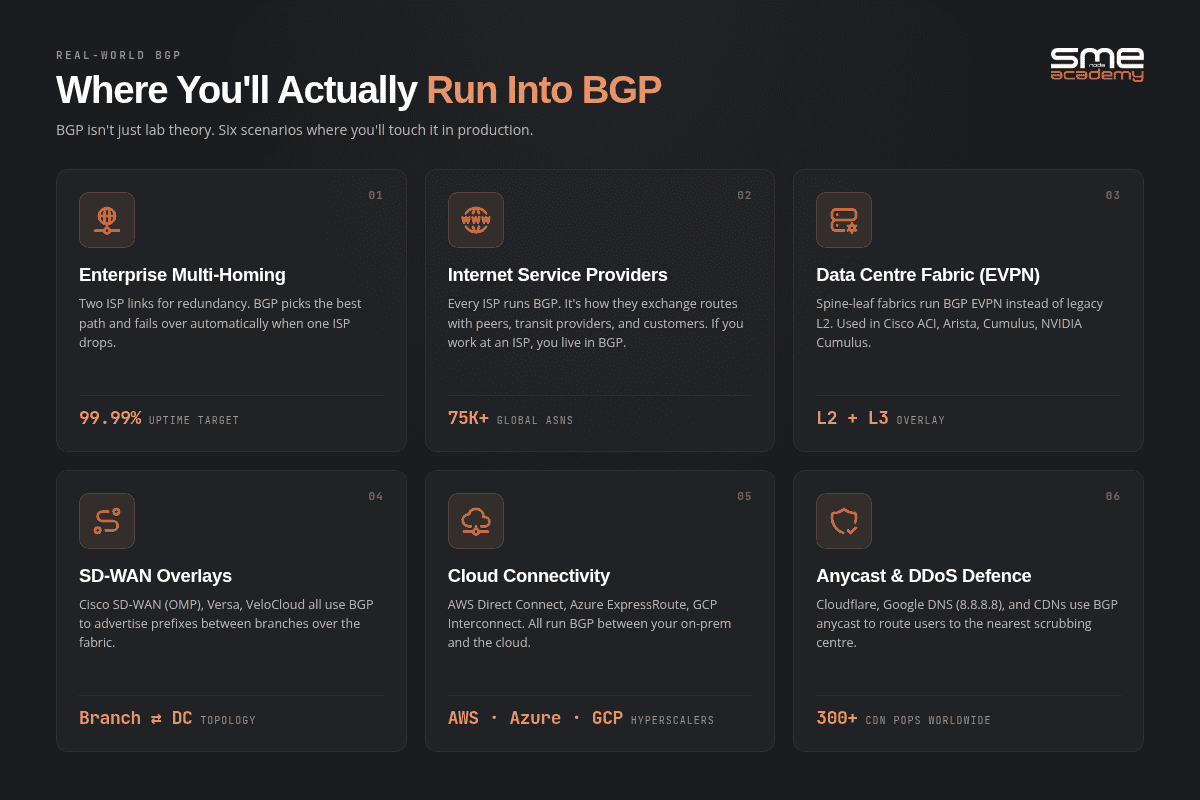
Where BGP shows up in production: transit, peering, data centre fabrics, SD-WAN, cloud interconnect and anycast.
Where do you actually meet BGP outside a lab?
1. Multi-homing to two ISPs
Your business connects to two providers for redundancy. BGP picks the best path and fails over automatically. The most common enterprise BGP deployment by a wide margin.
2. Internet service providers
Every ISP runs BGP. It’s how they exchange routes with peers, transit providers and customers. Work for an ISP and you live in BGP.
3. Data centre fabrics (BGP EVPN)
Modern spine-leaf fabrics run BGP EVPN instead of stretched Layer 2. Heavy use in Cisco ACI, Arista and Nvidia Cumulus deployments. Our Cisco ACI course covers BGP EVPN end to end.
4. SD-WAN overlays
Cisco SD-WAN and similar platforms advertise branch prefixes over BGP or OMP. See how application-aware routing decides which path wins.
5. Cloud connectivity
AWS Direct Connect, Azure ExpressRoute and Google Cloud Interconnect all use BGP for dynamic routing between on-prem and cloud. If you’ve configured a Direct Connect virtual interface, you’ve configured eBGP.
6. Anycast and DDoS mitigation
Cloudflare, Google Public DNS on 8.8.8.8 and every major CDN announce the same prefix from dozens of locations. BGP delivers each user to the nearest one.
BGP Security: The Achilles Heel
BGP was designed in 1989, when trust between networks was a reasonable assumption. That assumption is the root of nearly every BGP incident since.
Route hijacking
Someone announces a prefix they don’t own, and traffic goes to them. In 2018-04, attackers hijacked Amazon Route 53 address space and stole over $100K in cryptocurrency from MyEtherWallet users by serving a fake site.
Hijacks have got quieter since. In 2025-02, a sub-prefix of SingNet’s 203.127.225.0/24 was announced by an unrelated Philippine network, and traffic from major transit providers was silently diverted without the victim ever seeing the bad route on the control plane. You can’t fix what your own routers never show you, which is the argument for external monitoring.
Route leaks
A network advertises routes from one peer to another that shouldn’t receive them. On 2019-06-24, a Pennsylvania ISP, DQE Communications, leaked more than 20,000 prefixes, roughly 2% of the internet, into Verizon. Verizon had no filters in place and passed them on to everybody. Cloudflare lost about 15% of its global traffic. Amazon, Fastly and Linode all suffered.
The trigger was a BGP optimizer generating more-specific routes automatically. The more-specifics won on longest-prefix match, so traffic for thousands of networks piled into a small regional ISP. Cloudflare’s write-up is the definitive account.
A leak on 2025-05-01 sent out 4,651 routes from AS22773. 4,644 of them would have been rejected outright by any router doing RPKI origin validation. That single number is the strongest available argument for switching validation on.
Misconfigurations
Facebook in 2021 was a maintenance script that withdrew the company’s own routes and took its DNS servers unreachable with them.
Rogers Canada on 2022-07-08 is the more instructive one. Staff deleted a routing policy filter at 04:43 EDT while cleaning up distribution router configs. With the filter gone, an excessive number of BGP routes were redistributed into OSPF, and the resulting flood of link-state advertisements crashed core routers that had no overload protection configured. Roughly 12M customers lost service, including 911 calls and Interac payments across the country. The CRTC’s assessment found the risk rating for that change had been automatically downgraded from High to Low because earlier phases went well, so nobody lab-tested it.
Note what actually failed there. Not BGP alone, but the boundary between BGP and the IGP. That redistribution boundary is exactly why you need to understand when to use BGP and when to use OSPF rather than treating them as interchangeable.
Defences you should actually run
- RPKI and Route Origin Validation: cryptographic proof of who’s allowed to originate a prefix. Coverage sits around 43% of IPv4 and 45% of IPv6 prefixes in 2026, and it’s wildly uneven by region. Taiwan is above 97% valid, Korea is near 2%
- Prefix filtering: accept only what you expect from each peer, in both directions
- Maximum-prefix limits: tear the session down before a leak fills your RIB
- BGP authentication: an MD5 or TCP-AO password on every session
- MANRS compliance: the Mutually Agreed Norms for Routing Security baseline
- Route monitoring: watch your own prefixes from outside, because stealth hijacks never appear locally
Here’s a border config with the basics turned on:
router bgp 65001
 bgp router-id 10.0.0.1
 bgp log-neighbor-changes
 no bgp default ipv4-unicast
 neighbor 203.0.113.2 remote-as 65002
 neighbor 203.0.113.2 description Transit-ISP-A
 neighbor 203.0.113.2 password 7 <hashed-secret>
 !
 address-family ipv4 unicast
  network 198.51.100.0 mask 255.255.255.0
  neighbor 203.0.113.2 activate
  neighbor 203.0.113.2 next-hop-self
  neighbor 203.0.113.2 soft-reconfiguration inbound
  neighbor 203.0.113.2 prefix-list OUR-PREFIXES out
  neighbor 203.0.113.2 prefix-list FROM-TRANSIT in
  neighbor 203.0.113.2 maximum-prefix 1300000 90 restart 15
 exit-address-family
!
ip prefix-list OUR-PREFIXES permit 198.51.100.0/24
!
ip prefix-list FROM-TRANSIT deny 198.51.100.0/24 le 32
ip prefix-list FROM-TRANSIT deny 10.0.0.0/8 le 32
ip prefix-list FROM-TRANSIT deny 172.16.0.0/12 le 32
ip prefix-list FROM-TRANSIT deny 192.168.0.0/16 le 32
ip prefix-list FROM-TRANSIT permit 0.0.0.0/0 le 24
Read the outbound prefix-list again. It permits exactly one prefix. That’s the point. An outbound filter that permits your own space and nothing else is what stops you becoming the next case study, and it’s the single line the Rogers and Verizon incidents both came down to.
Hand-maintaining those lists across dozens of routers is where mistakes creep in, so generate them from a source of truth with NetBox and Ansible instead of editing them by hand.
Our CCIE Security course runs RPKI and route-filtering scenarios in lab format.
Frequently Asked Questions About BGP
What is BGP used for?
BGP exchanges routing information between Autonomous Systems on the internet. ISPs use it to peer with each other. Enterprises use it to multi-home across several providers. Cloud providers use it for hybrid connectivity, anycast and DDoS scrubbing. Data centres use BGP EVPN as the control plane for their fabrics.
What port does BGP use?
TCP port 179, for every peer session. It’s reliable, unicast and configured manually between peers. Anything blocking TCP 179 leaves the session stuck in Active.
Is BGP a Layer 7 protocol?
By encapsulation, yes. BGP rides on TCP, so it sits above the transport layer, which makes it an application-layer protocol in the strict OSI sense. Functionally it’s a routing protocol that moves Layer 3 reachability information. Both answers are correct, and interviewers asking this usually want to hear that you understand why.
What’s the difference between BGP and OSPF?
OSPF is an interior gateway protocol that runs inside one Autonomous System, converges in seconds and picks routes by link cost. BGP is an exterior gateway protocol that runs between Autonomous Systems, converges in minutes and picks routes by policy attributes. Most production networks run both: an IGP internally, BGP for anything touching another network. Full comparison in our BGP vs OSPF guide.
What is BGP peering?
A peering session is a TCP connection on port 179 between two BGP routers that have been configured to know about each other. eBGP peering happens between different ASes, iBGP peering inside one. “Peering” also has a commercial meaning: a settlement-free traffic exchange between two networks, as opposed to paid transit.
What is an AS_PATH in BGP?
An ordered list of the Autonomous Systems a route has crossed. It does two jobs: loop prevention, since a router rejects any route already containing its own ASN, and path selection, since a shorter AS_PATH wins at step 4 of the best-path algorithm.
Which is better, BGP or static routing?
Static routing is better if you have one internet connection. It’s simpler, uses no CPU and can’t leak anything. BGP earns its complexity the moment you have two or more providers, your own ASN and address space, or a need to control how traffic reaches you. Single-homed networks running BGP usually get all the cost and none of the benefit.
Is BGP difficult to learn?
The basics aren’t. Peering, attributes and simple policy take about two to four weeks of focused study, and the protocol has fewer moving parts than OSPF. What’s hard is the consequences. One typo in an outbound filter is visible to the entire internet, so BGP demands a level of care that has nothing to do with protocol complexity.
How long does it take to learn BGP?
Two to four weeks for the fundamentals. Six months to a year of hands-on labs for CCIE-level command of route reflection, BGP EVPN, traffic engineering and troubleshooting under pressure. There’s no way around the lab time. Start with the network engineer roadmap for a structured route, and check what the CCIE lab actually costs before you commit.
Can you run BGP on a home router?
On enterprise-grade hardware or VyOS, FRR or pfSense, yes. Against the real internet, no, because you’d need your own ASN and address space from a Regional Internet Registry. For learning, a virtual lab is better anyway. You can break it as often as you like.
What’s Next?
You now know what BGP is, how it works, which state a broken session is in, how it picks paths, and where it goes wrong. That’s the foundation.
Four ways forward:
1.Want the full reference? Grab the free 148-page PDF below. All 13 path-selection steps with real show ip bgp output, and the configs from this article extended into full lab topologies.
Get the Free PDF
Enter your email to download instantly.
2.Want to practise? Work through the CCIE Enterprise Workbook from SMEnode Labs. Every BGP task ships with an EVE-NG topology that boots.
3.Want live instruction? Join our CCIE Enterprise course. Real gear, live sessions, and an instructor in the class group who answers when your session sticks in Active at midnight.
4.Want a career roadmap? Start with the Network Engineer career program, which covers CCNA through CCNP and BGP in one structured path.