Proxmox and Docker don’t compete. They work at different layers of your infrastructure stack.
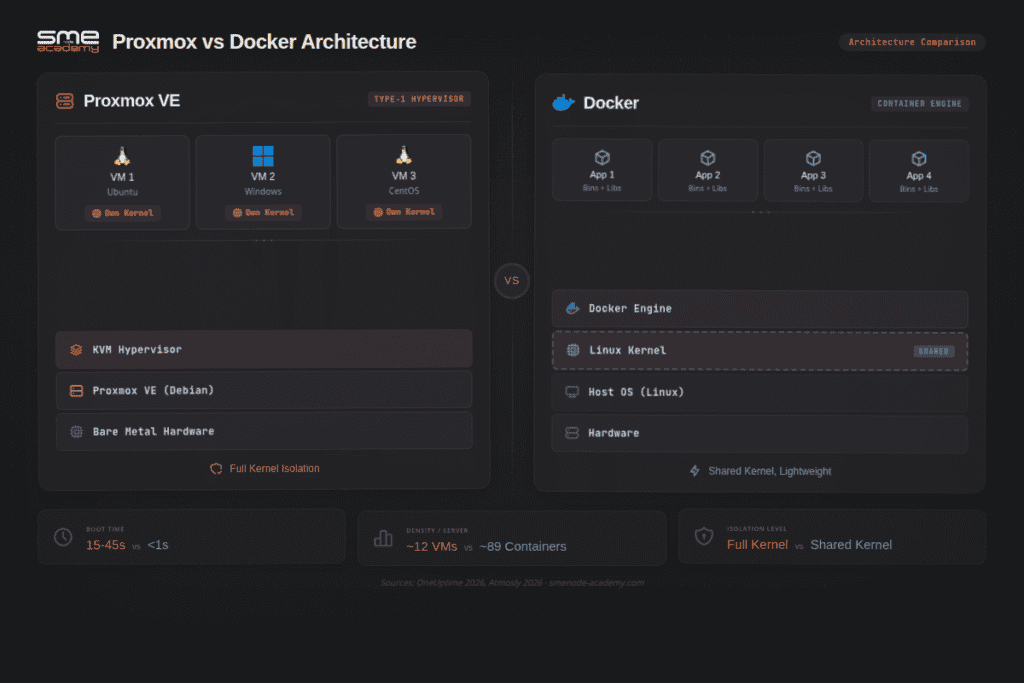
Proxmox VE is a hypervisor. It runs on bare metal and manages virtual machines and LXC containers on your physical hardware. Docker is an application runtime. It packages apps with their dependencies and runs them as containers inside an operating system.
The recommended setup for most engineers: Proxmox on the server, a Linux VM inside Proxmox, Docker installed inside that VM. You get full kernel isolation from the VM and the speed and portability of containers from Docker.
But the right answer depends on your workload, your compliance requirements, and what you’re building. Here’s how to think through it.
Quick answer:
| If you need this | Use this |
|---|---|
| Run full operating systems like Windows, Linux, BSD | Proxmox VM |
| Run Docker Compose apps safely on Proxmox | Docker inside a Proxmox VM |
| Run lightweight Linux services with Proxmox management | Proxmox LXC |
| Run one app per container with fast deployment | Docker |
| Build a homelab with VMs and app containers | Proxmox plus Docker |
| Run production apps with better isolation | Docker inside a Proxmox VM |
| Test simple OCI images in Proxmox 9.1+ | Proxmox LXC from OCI image |
Proxmox vs Docker: Quick Decision Table
| Question | Use Proxmox VM | Use Docker | Use Proxmox LXC |
|---|---|---|---|
| Running Windows alongside Linux? | Yes | No | No |
| Microservices or web apps? | No | Yes | No |
| Need GPU or PCIe passthrough? | Yes | No (needs VM underneath) | No |
| CI/CD pipeline or app testing? | No | Yes | No |
| HIPAA, PCI-DSS, SOC 2 compliance? | Yes – VMs required | No – shared kernel fails isolation | No |
| Homelab self-hosting (Plex, Home Assistant)? | Yes – as host | Yes – inside a VM | Optional |
| Fast deployment and portability? | No | Yes | No |
| Multi-tenant server isolation? | Yes | No | Limited |
| Simple Linux daemon (Nginx, Redis)? | Overkill | Yes | Yes |
| Full OS with custom kernel? | Yes | No | No |
What Proxmox Actually Does
Proxmox Virtual Environment (currently VE 9.1.x) is an open-source hypervisor platform built on Debian Linux. It gives you a single web interface to manage two types of workloads on a physical server: KVM virtual machines with full kernel isolation, and LXC system containers that share the host kernel.
Think of Proxmox as the management layer between your hardware and everything running on it. You don’t touch the bare metal directly after installation. Proxmox handles VM creation, snapshots, backups, live migration, storage management (ZFS, Ceph, LVM, NFS), and clustering across multiple nodes.
Proxmox VE 9 runs on Debian 13 “Trixie” with Linux kernel 7.0, QEMU 11, and LXC 7. That’s a meaningful update from the VE 8.x series. Kernel 7.0 brings better hardware support for modern CPUs, high-speed NICs, and NVMe controllers. If you’re still on VE 8.x, you need a plan – Proxmox VE 8 reaches end of life in August 2026 when its Debian 12 base exits support.
VE 9.1 added some features that matter in real deployments:
- Automatic HA workload rebalancing. After a node fails and VMs restart on surviving nodes, VE 9.1 now redistributes those workloads automatically when the failed node comes back. You don’t have to log in and manually migrate VMs.
- SDN Fabrics. Complex routed networks are now manageable from the Proxmox web UI, with automatic failover across NICs. Useful for multi-homed servers.
- LVM snapshots on SAN storage. A long-requested feature for teams running Fibre Channel or iSCSI SANs. Now you can snapshot thick-provisioned LVM volumes.
- ZFS RAIDZ expansion. You can add new devices to an existing RAIDZ pool without rebuilding from scratch.
- OCI image support in LXC. Pull standard Docker-format images and run them as LXC containers directly.
- Rebuilt mobile UI. The web interface now works properly on phones, rewritten using a Rust-based widget toolkit.
More than 1.5 million Proxmox VE hosts are deployed worldwide. The software is free to download. The enterprise subscription adds access to the stable update repository and paid support – useful for production environments but not required for homelabs or dev use.
What Docker Actually Does
Docker is an application container engine. It packages your app along with its dependencies – libraries, config files, runtimes, environment variables – into a portable image. That image runs identically whether it’s on your development laptop, a CI server, or a cloud VM.
Containers share the host OS kernel. They don’t boot a separate operating system. A Docker container starts in 0.5-1.3 seconds. A KVM VM takes 15-45 seconds. That speed difference matters in CI/CD pipelines where you’re spinning containers up and down hundreds of times a day.
The Docker container market hit $7.41 billion in 2026 and is projected to reach $19.26 billion by 2031, growing at a 21.05% CAGR (Mordor Intelligence, 2026). 92% of developers reported using Docker in the 2026 Stack Overflow Developer Survey. This isn’t a niche tool for homelab enthusiasts – it’s the default application packaging format for professional software delivery.
Docker doesn’t manage hardware. It doesn’t run VMs. It runs processes inside container isolation. The containers share the host kernel – one reason containers are faster than VMs, and also one reason they provide weaker isolation than VMs.
That distinction drives most of the Proxmox vs Docker confusion. People hear “Proxmox runs containers” and wonder if they need both. You usually do. Proxmox manages the infrastructure; Docker manages the applications.
What Docker gives you in practice:
- Consistent environments from development through production
- Fast iteration cycles – rebuild a container image in seconds
- Easy rollback to a previous image tag
- A huge ecosystem on Docker Hub (1M+ public images)
- Compose files to define multi-container apps declaratively
- Portability across any Linux host or cloud provider
How Do VMs and Containers Actually Compare on Performance?
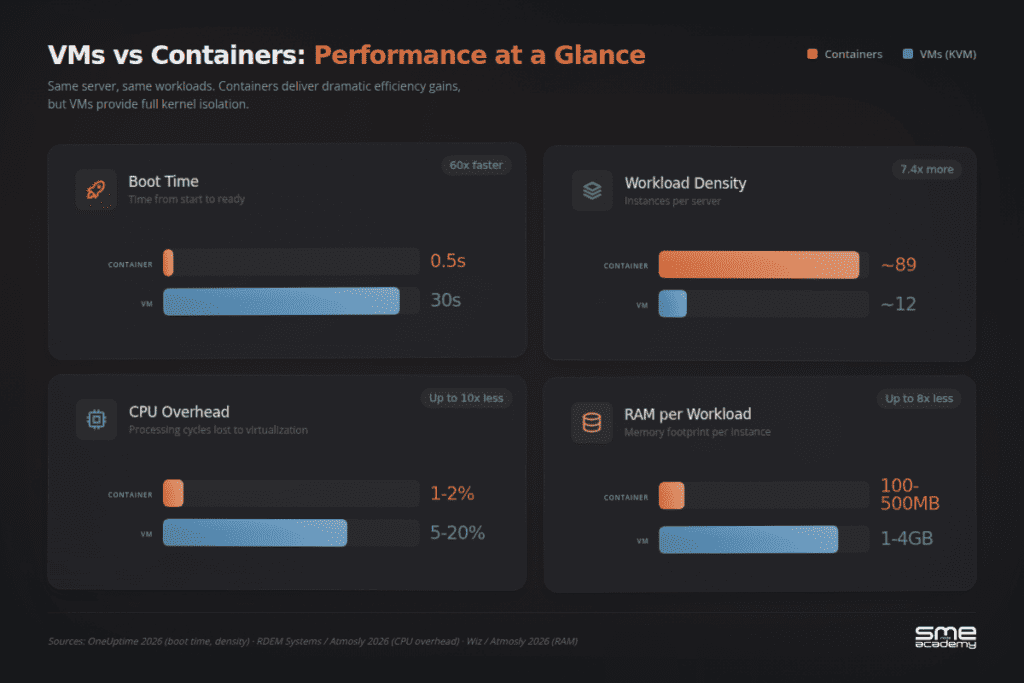
This is where most articles get vague. Here are real benchmarks from 2025-2026 testing data.
| Metric | Docker Containers | Proxmox VMs (KVM) | Source |
|---|---|---|---|
| Boot time | 0.5 to 1.3 seconds | 15 to 45 seconds | OneUptime, 2026 |
| CPU overhead | 1-2% | 5-20% | RDEM Systems / Atmosly, 2026 |
| Density (same server) | ~89 containers | ~12 VMs | OneUptime, 2026 |
| Throughput | 28% higher than VMs | Baseline | Atmosly, 2026 |
| Latency | 37% lower than VMs | Baseline | Atmosly, 2026 |
| RAM per workload | 100-500 MB | 1-4 GB | Wiz / Atmosly, 2026 |
| AI/ML perf (vGPU) | 99% of bare-metal | Near-native with passthrough | MLPerf, 2025 |
Look at that density number. One server can handle about 89 Docker containers or about 12 KVM VMs running similar workloads. That’s a 7x difference.
But density isn’t everything. VMs give you something containers can’t: full kernel isolation. If a container gets compromised, it shares a kernel with every other container on that host. A VM breach stays contained within that VM’s own kernel.
So what matters more, efficiency or isolation? Depends on what you’re running.
Three Ways to Run Containers on Proxmox
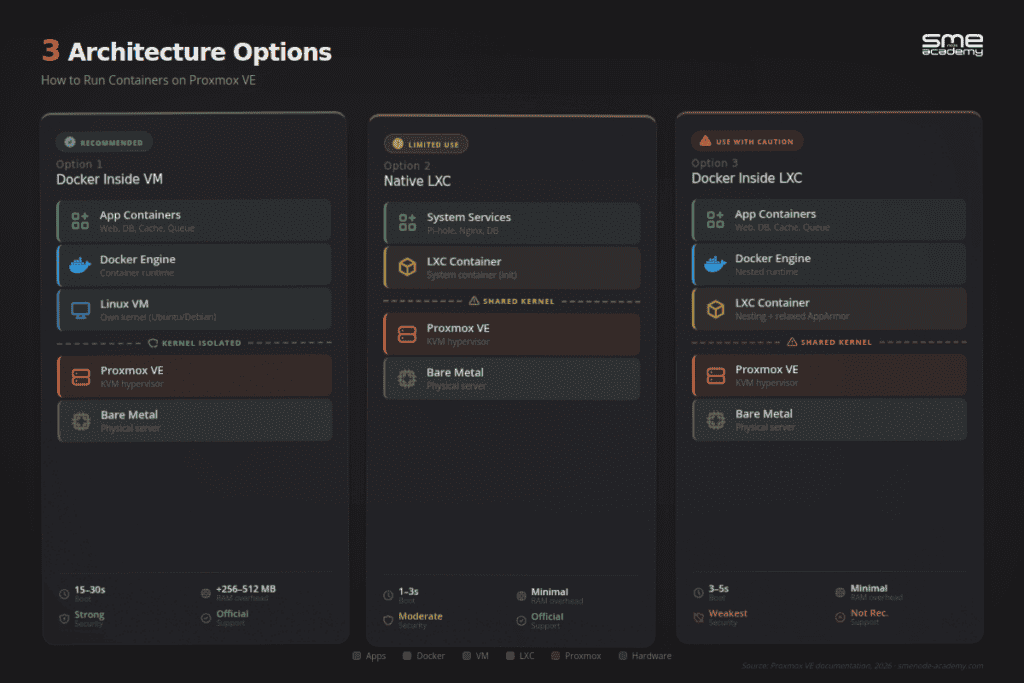
Here’s where it gets interesting. You don’t have to pick Proxmox OR Docker. Most people run Docker inside Proxmox. The question is how.
Want to build this exact stack yourself?
Reading about the Proxmox host → VM → Docker layout is one thing. Setting it up is another. Our live Proxmox VE course walks you through clusters, LXC, backups and HA in real labs, with an instructor watching when something breaks.
See the Proxmox VE course →
Option 1: Docker Inside a Proxmox VM (Recommended)
This is the production-safe approach. You create a lightweight Linux VM (Ubuntu Server or Debian), install Docker inside it, and run your containers there.
Why this works best:
- Full kernel isolation between Docker and your host
- GPU passthrough works properly for AI/ML workloads
- You can live-migrate the entire VM (Docker containers and all) to another node
- Snapshots and backups work at the VM level
- No weird kernel conflicts or AppArmor issues
The tradeoff? You lose 256 to 512 MB of RAM for the guest kernel, and boot takes 15 to 30 seconds instead of 1 to 3.
Worth it? For production, absolutely. For a homelab with 64GB+ of RAM, the overhead barely registers.
Option 2: Native LXC Containers (Lightweight but Limited)
Proxmox has its own container technology built in: LXC (Linux Containers). These are system containers, not application containers like Docker. Think of them as lightweight VMs that share the host kernel.
LXC containers boot in 1 to 3 seconds, use less RAM than VMs, and integrate directly with Proxmox’s web interface. Great for running simple services like Pi-hole, Nginx, or a database.
New in Proxmox 8.3: You can now create LXC containers from OCI images. That means you can pull Docker-format images and run them as LXC containers directly. This blurs the line between the two approaches significantly.
But LXC has limits. No GPU passthrough (or very hacky workarounds). No live migration. Shared kernel means shared risk.
Option 3: Docker Inside LXC (Experts Debate This One)
You can technically run Docker inside a Proxmox LXC container. It works. People have done it for years with no issues.
But here’s why many engineers avoid it in production: Docker inside LXC means nested containerization. You need to enable nesting and relax AppArmor security profiles. That’s two layers of containers sharing one kernel, and kernel updates can break the whole stack.
The Proxmox team doesn’t officially recommend it either.
| Factor | Docker in VM | Native LXC | Docker in LXC |
|---|---|---|---|
| Kernel isolation | Full (separate kernel) | Shared with host | Shared with host |
| GPU passthrough | Yes (PCI passthrough) | Limited/hacky | Limited/hacky |
| Live migration | Yes | No | No |
| Boot time | 15-30 seconds | 1-3 seconds | 3-5 seconds |
| RAM overhead | 256-512 MB extra | Minimal | Minimal |
| Security | Strong | Moderate | Weakest |
| Proxmox officially supports | Yes | Yes | Not recommended |
Best Proxmox vs Docker Setup for a Homelab
For a homelab, use Proxmox as the base platform and Docker inside one Linux VM for most apps. This gives you one clean place for Docker Compose, Portainer, monitoring, media apps, and self-hosted services.
Use Proxmox VMs for services that need stronger isolation, such as pfSense, OPNsense, TrueNAS, Windows, Kubernetes nodes, or GPU workloads. Use Proxmox LXC for simple Linux services where low overhead matters more than portability.
A good homelab layout looks like this:
| Workload | Recommended setup |
|---|---|
| Home Assistant, Jellyfin, Uptime Kuma, Nginx Proxy Manager | Docker inside Debian or Ubuntu VM |
| pfSense or OPNsense | Proxmox VM |
| Pi-hole or small Nginx service | Proxmox LXC |
| Kubernetes practice lab | 3 Proxmox VMs |
| Windows testing | Proxmox VM |
Best Proxmox vs Docker Setup for Production
Production adds two requirements that homelabs often skip: compliance and high availability.
Compliance first. If you’re handling PHI under HIPAA, cardholder data under PCI-DSS, CUI under CMMC, or regulated data under SOC 2, you need to answer a direct question: does your architecture provide kernel-level isolation between tenants and workloads? Containers sharing a host kernel don’t satisfy most interpretations of these standards. VMs do. This isn’t negotiable.
For regulated workloads, the architecture is: Proxmox cluster, VMs for tenant isolation, Docker inside those VMs if needed for application packaging.
High availability second. A single Proxmox node is a single point of failure. Production should mean a 3-node cluster minimum:
- 3 Proxmox nodes with Corosync quorum
- Shared storage: Ceph (built into Proxmox), an external SAN, or NFS
- Proxmox HA groups for automatic VM restart on node failure
- VE 9.1 automatic HA rebalancing so workloads redistribute after a failover event without manual intervention
For application workloads inside the VMs, the pattern is Docker Compose for smaller deployments or k3s/Kubernetes for anything that needs autoscaling, rolling updates, or self-healing.
One practical note: don’t over-architect too early. A well-configured 3-node Proxmox cluster running Docker Compose inside VMs handles the workload of most mid-sized companies. You don’t need Kubernetes until you actually need Kubernetes.
This is the DevOps stack employers pay for.
Docker, Kubernetes, CI/CD pipelines, cloud – the DevOps Engineer program covers the full toolchain, live. 16 weeks, real projects, direct instructor access, 24/7 labs.
Explore the DevOps Engineer course →
Best Proxmox vs Docker Setup for DevOps
Docker is native to DevOps pipelines. GitHub Actions, GitLab CI, Jenkins, CircleCI – all of them use Docker containers as the default build and test environment. Your Dockerfile is version-controlled. Your CI pipeline builds the image, runs tests inside a container, and pushes to a registry. Your staging environment runs the same image your CI tested.
Proxmox enters the DevOps picture when teams need:
Isolated dev environments. Each developer gets a VM with a full Linux environment, pre-provisioned with their tools. Clean slate for every project. No “works on my machine” issues between teammates.
Kubernetes test clusters. Spin up a 3-node k3s cluster inside Proxmox VMs to test Kubernetes manifests before pushing to cloud. Proxmox VM templates make this fast – clone from a template and your cluster is up in under 5 minutes.
Build agents with hardware access. ML pipelines that need GPU access, hardware-in-the-loop testing, or workloads that need specific PCIe devices all benefit from VMs with passthrough.
Safe infrastructure experiments. Snapshot a VM before testing a new Terraform module or Ansible playbook. If it breaks, restore. This alone has saved plenty of late nights.
The most common DevOps setup on Proxmox: developers get their own Proxmox VMs for local dev, a shared VM runs the CI/CD tooling, and app containers run inside those VMs. Proxmox manages the VMs; Docker and Kubernetes manage the containers.
Best Proxmox vs Docker Setup for SMB Servers
For small businesses, Proxmox is usually the safer base platform. It lets you separate workloads into VMs, back them up cleanly, and recover services without rebuilding the whole server.
Use Docker inside a dedicated VM for apps like internal dashboards, web apps, monitoring, password managers, and lightweight business tools. Keep critical infrastructure like firewalls, domain services, storage, and accounting systems in separate VMs.
When Should You Use Proxmox, Docker, or LXC?
Use Proxmox when you need infrastructure control. Use Docker when you need fast application deployment. Use Proxmox LXC when you want lightweight Linux services managed directly from the Proxmox UI. Use Docker inside a Proxmox VM when you want the best balance of isolation, backups, and container workflow.
Here’s a quick decision framework.
Use Proxmox VMs when you need:
- Full operating system isolation (Windows, different Linux distros)
- Hardware passthrough (GPUs, network cards, USB devices)
- Compliance requirements (HIPAA, PCI-DSS, SOC 2 all favour VM-level isolation)
- Live migration and high availability
- Running Docker itself (Docker-in-VM is the recommended approach)
- Data centre infrastructure (our CCIE Data Center training covers this in depth)
Use Docker containers when you need:
- Fast application deployment (spin up in under a second)
- Microservices architecture (one service per container)
- CI/CD pipelines (reproducible build environments)
- Portability (same container runs in dev, staging, and production)
- Resource efficiency (run 7x more workloads per server)
Use Proxmox LXC when you need:
- Simple Linux services with Proxmox management
- Lower overhead than full VMs
- Quick web interface for container lifecycle
- OCI image compatibility (new in Proxmox 8.3)
Use both together when:
- You manage infrastructure AND run applications (most real environments)
- Your homelab needs VMs for some things and containers for others
- You want enterprise-grade isolation with container efficiency
Sound like most real-world setups? That’s because it is.
Is Docker Still Relevant in 2026?
This question shows up in every “People Also Ask” box. The short answer: more relevant than ever.
Some confusion comes from Docker Desktop’s licensing changes (paid for enterprises since 2021) and the rise of alternatives like Podman, containerd, and nerdctl. But Docker Engine itself is open-source and free. And the numbers speak for themselves:
- 92% of IT professionals use Docker (Stack Overflow Survey, 2026)
- The container market is growing at 21% CAGR
- Kubernetes (which runs Docker-format containers) has 92% market share in orchestration
Docker isn’t being replaced. The ecosystem around it is growing. Podman can run Docker-format containers. Kubernetes uses containerd (a Docker project) under the hood. The format won.
What About Kubernetes?

Quick note since “proxmox vs docker vs kubernetes” is a common search. Kubernetes isn’t a replacement for either Proxmox or Docker. It’s an orchestration layer.
Think of it this way:
- Proxmox manages your physical and virtual infrastructure
- Docker packages your apps into containers
- Kubernetes orchestrates those containers at scale
In a typical production setup, Proxmox runs the VMs, those VMs run Kubernetes, and Kubernetes manages your Docker containers. They’re layers in a stack, not competitors.
For homelab setups, many people run a Kubernetes cluster (using K3s or Talos Linux) on top of Proxmox VMs.
Why IT Professionals Need Both Skills
Here’s the career angle most comparisons miss.
If you’re in IT infrastructure, networking, or DevOps, you’ll work with both VMs and containers. That’s not a prediction, it’s the current reality. The industry has settled on a hybrid model where VMs handle infrastructure isolation and containers handle application deployment.
Knowing Proxmox means you understand:
- Linux, KVM, and open-source infrastructure
- Storage (ZFS, Ceph, NFS, iSCSI)
- Networking (bridges, VLANs, SDN)
- High availability and clustering
- Migration strategies (especially from VMware)
Knowing Docker means you understand:
- Application packaging and deployment
- Microservices and cloud-native architecture
- CI/CD pipelines and DevOps workflows
- Container networking and orchestration
- The foundation for Kubernetes
Together, these skills open doors to Cloud Engineer, DevOps Engineer, SRE, and Infrastructure Architect roles, positions that typically pay $120K to $180K+ depending on experience.
We cover both VM and container management in our Proxmox VE training with live instructor-led classes and hands-on labs. You’ll build clusters, deploy containers, and manage real infrastructure, not just watch videos. And if you’re figuring out how to become a network engineer, these are must-have skills on your resume.
Frequently Asked Questions
Can you run Docker inside Proxmox?
Yes, and it’s the recommended approach for most setups. Create a lightweight Linux VM in Proxmox, install Docker Engine inside it, and run your containers from there. This gives you full kernel isolation plus all the benefits of Docker’s container ecosystem. Proxmox also supports native LXC containers if you need something lighter.
What’s the difference between LXC and Docker containers?
LXC containers are system containers, they act like lightweight virtual machines running a full Linux init system. Docker containers are application containers, they run a single process or app with just the dependencies it needs. LXC integrates natively with Proxmox’s web UI. Docker gives you portability and a massive ecosystem of pre-built images.
Is Proxmox good for production environments?
Yes. Over 1.5 million Proxmox VE hosts are deployed worldwide across commercial, government, and education environments. Proxmox offers enterprise support subscriptions, high-availability clustering, and Ceph distributed storage. Many companies migrated from VMware to Proxmox after VMware’s licensing changes in 2024.
Should I use VMs or containers for my homelab?
Both. Use Proxmox VMs for services that need isolation or hardware passthrough (like a NAS, firewall, or Windows VM). Use Docker containers inside one of those VMs for application services (Plex, Home Assistant, Pi-hole, monitoring stacks). This is the most common homelab architecture in 2026.
Is Docker becoming obsolete?
No. Docker adoption hit 92% among IT professionals in 2026. While alternatives like Podman exist, they use the same OCI container format that Docker created. The Docker ecosystem (Docker Hub, Docker Compose, Dockerfile format) remains the industry standard. What’s changing isn’t Docker itself but the tools built around it.
What is better for security, VMs or containers?
VMs provide stronger isolation because each VM runs its own kernel. A compromised VM can’t access other VMs or the host. Containers share the host kernel, so a kernel vulnerability affects all containers. For compliance-sensitive workloads (healthcare, finance, government), VMs are generally required. For general application deployment, containers with proper security policies are fine for most use cases.
Bottom Line
Proxmox and Docker aren’t competing. They work at different layers of your infrastructure stack.
Use Proxmox when you need to manage VMs, clusters, and infrastructure. Use Docker when you need to deploy applications fast. Use both when you’re building anything serious, which is most of the time.
The IT industry has moved past the “VMs vs containers” debate. The answer is both, and the professionals who understand both technologies are the ones getting hired.
Ready to get hands-on with both? Explore our Proxmox VE course and learn VM and container management through live classes with real labs.
Sources:
- Docker Docs, What is a container: https://docs.docker.com/get-started/docker-concepts/the-basics/what-is-a-container/
- Proxmox VE Linux Container documentation: https://pve.proxmox.com/wiki/Linux_Container
- Proxmox VE 9.1 release, OCI image support for LXC: https://www.proxmox.com/en/about/company-details/press-releases/proxmox-virtual-environment-9-1
- Docker Engine v29 release notes: https://www.docker.com/blog/docker-engine-version-29/