50% OFF on All Courses!
- All Courses
get started
start your journey today
free demo class
upcoming batches
career paths
success stories
Popular:


Most people who search for a CompTIA Tech+ practice test have already decided to sit the exam. Smart move.
But here’s the thing: if you’re grinding random free dumps from sketchy websites, you’re studying the wrong way. A lot of those questions are outdated, pulled from the old ITF+ exam (FC0-U61), or just flat-out wrong. The Tech+ exam (FC0-U71) has its own format and its own question style, and those differences matter.
You’ve probably heard IT certification exams are mostly memorization. That’s not quite right. Tech+ tests your ability to apply concepts, not just define them. So practice questions that only ask you to regurgitate definitions won’t prepare you for the real thing.
This guide gives you 20+ real-format practice questions across all six exam domains, detailed explanations for each answer, and study tips that actually move the needle. By the end, you’ll know exactly what to expect on exam day and how to prepare for it.
Already know Tech+ is your starting point and want to see what comes next? Our CompTIA and Networking courses at SMEnode Academy lay out the full path, from fundamentals through to CCNA level and beyond.
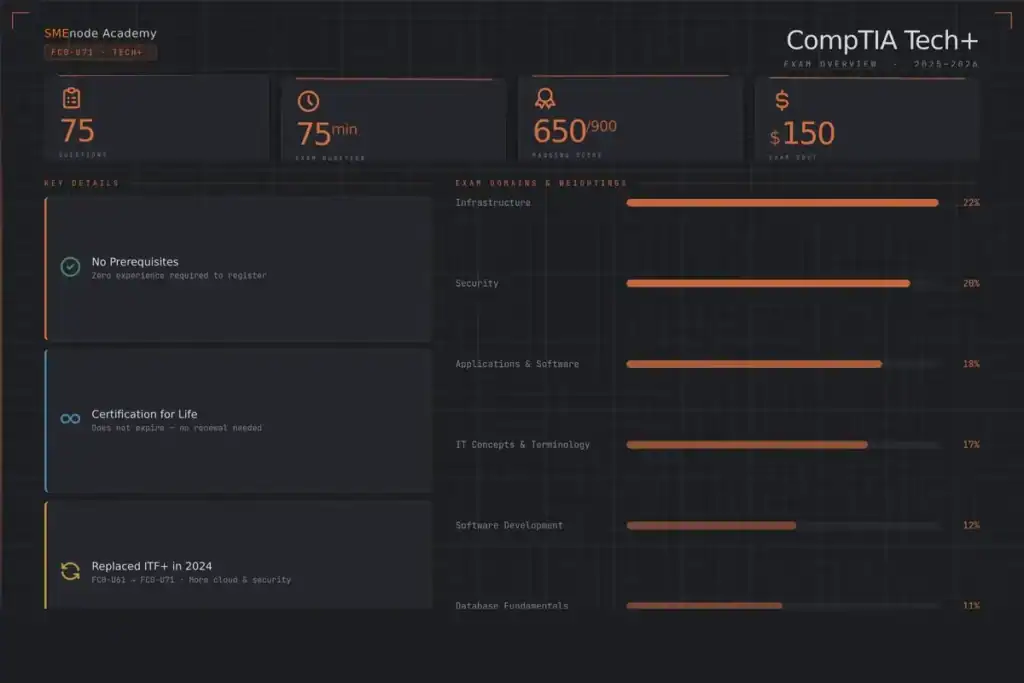
Quick answer: it’s CompTIA’s entry-level IT certification, designed for people who are new to the field or transitioning from a non-technical role.
The exam code is FC0-U71. It replaced the IT Fundamentals+ (ITF+) in 2024. CompTIA updated the content to reflect what modern IT environments actually look like, so there’s more cloud, more cybersecurity, and more software development basics than the older version.
Key details:
No prerequisites is the big draw. You don’t need a CCNA or A+ before sitting Tech+. It’s a clean starting point.
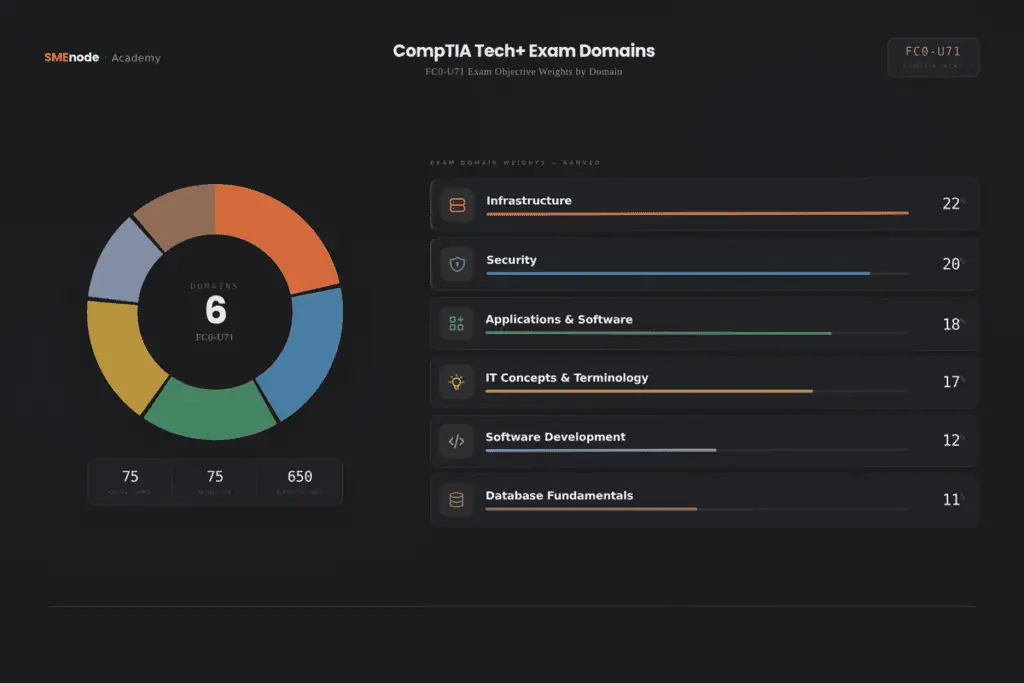
Six domains. Here’s the breakdown:
| Domain | Weight |
|---|---|
| IT Concepts and Terminology | 17% |
| Infrastructure | 22% |
| Applications and Software | 18% |
| Software Development | 12% |
| Database Fundamentals | 11% |
| Security | 20% |
Infrastructure and Security together make up 42% of the exam. If you’re short on time, those two are where you put the work in first. And if the Infrastructure domain sparks an interest in networking, our Network+ course picks up right where Tech+ leaves off.
These questions follow the style and difficulty level of the actual FC0-U71 exam. Read the explanations. They’re doing most of the teaching here.
Question 1 What does the term “cloud computing” best describe?
Answer: B Cloud computing means accessing computing resources, like storage, processing power, and software, over the internet instead of on a local machine. Think Google Drive, Microsoft 365, or AWS.
Question 2 A technician is explaining the difference between hardware and software. Which of the following is the best example of hardware?
Answer: C Hardware is anything physical you can touch. An SSD is a physical storage device. Software (Word, antivirus, browsers) are programmes that run on hardware.
Question 3 Which of the following best describes the function of RAM?
Answer: B RAM (Random Access Memory) is short-term memory. Your computer uses it to hold data it’s actively working with. Close the programme and that data is gone. That’s different from a hard drive, which stores data permanently.
Question 4 Which port does HTTPS traffic use by default?
Answer: C Port 443 is for HTTPS. Port 80 is plain HTTP. Port 21 is FTP. Port 3389 is Remote Desktop Protocol (RDP). These port numbers come up on the exam multiple times.
Question 5 A user cannot connect to the company’s internal file server, but can still browse the internet. What is the most likely cause?
Answer: C If the internet is working, the modem and ISP are fine. The user can reach external sites, so DNS is working. The problem is specific to internal access, which points to a permissions or firewall issue.
Question 6 What is the main function of a network switch?
Answer: C A switch operates at Layer 2 of the OSI model and uses MAC addresses to send traffic to the right device on a local network. Routers connect networks. DHCP servers assign IP addresses. Firewalls and VPNs handle encryption.
Question 7 Which of the following best describes the difference between a public IP address and a private IP address?
Answer: B Public IPs are internet-facing addresses assigned by your ISP. Private IPs (ranges like 192.168.x.x or 10.x.x.x) are used inside a local network and aren’t directly reachable from the internet.
Question 8 What is the primary purpose of an operating system?
Answer: C The OS is the bridge between hardware and software. It manages memory, processes, file systems, and input/output devices. Without it, programmes have nothing to run on.
Question 9 A user installs a programme and later realises it was secretly recording keystrokes and sending data to an unknown server. What type of software is this?
Answer: B Spyware collects data without the user’s knowledge or consent. Freeware is free software (not necessarily harmful). Shareware is software you can try before buying. Firmware is software embedded in hardware devices.
Question 10 Which type of software licence allows a user to view, modify, and distribute the source code?
Answer: B Open-source software gives users access to the source code with permission to modify and distribute it. Linux is the most well-known example. Proprietary licences restrict what you can do with the software.
Question 11 Which data type would you use to store the value “true” or “false”?
Answer: D Boolean values represent two states: true or false. This comes up in logic, conditions, and flags throughout programming. Integers are whole numbers. Floats are decimals. Strings are text.
Question 12 What does an algorithm describe?
Answer: B An algorithm is a set of ordered steps to solve a problem or complete a task. Every programme is built on algorithms. You don’t need to write code for the Tech+ exam, but you need to understand this concept.
Question 13 In software development, what does “version control” allow a team to do?
Answer: B Version control (tools like Git) lets developers track every change to a codebase, see who made changes, and roll back to earlier versions if something breaks. It’s how modern development teams collaborate without overwriting each other’s work.
Question 14 What does SQL stand for?
Answer: B SQL is the standard language for managing and querying relational databases. You’ll see this question or a variation of it on the actual exam.
Question 15 What is a primary key in a database table?
Answer: C A primary key uniquely identifies each row in a table. No two rows can have the same primary key value. This is how databases avoid duplicate records and how records get linked across tables.
Question 16 A company stores all customer information in a single spreadsheet that is starting to cause data errors and duplication. What would best solve this problem?
Answer: B Relational databases are built to handle large, structured data sets with relationships between tables, validation rules, and no duplication. Spreadsheets break down at scale. This is a common performance-based scenario type on Tech+.
Question 17 Which of the following is the best example of multi-factor authentication?
Answer: B Multi-factor authentication requires two or more different types of factors: something you know (PIN), something you have (smart card), or something you are (biometric like fingerprint). A password and a security question are both “something you know,” so they count as one factor.
Question 18 What is phishing?
Answer: C Phishing uses deceptive emails, messages, or websites to trick people into handing over credentials or personal data. It’s one of the most common attack vectors in real-world security incidents and a favourite topic on CompTIA exams.
Question 19 A company wants to protect its network from unauthorised external access. Which of the following should they deploy first?
Answer: B A firewall controls incoming and outgoing network traffic based on security rules. It’s the first line of defence against external threats. Antivirus handles malware on local devices. VPNs encrypt traffic. Password managers improve credential hygiene. But none of them replace a firewall for perimeter protection.
Question 20 Which of the following describes the principle of least privilege?
Answer: B Least privilege means granting the minimum level of access required to perform a job. If an employee only needs to read files, they shouldn’t have write or delete access. It’s a foundational security principle and shows up regularly on certification exams.
Practice Tip: How’d you do? If you missed more than three from any single domain, that domain needs more time. Don’t just move on. Go back to the explanations, find a gap in your knowledge, and fix it.
Want more practice questions and a guided study path? The SMEnode Tech+ Workbook from SMEnode Labs covers all six domains with hundreds of practice questions and detailed breakdowns.
This article has 20 questions. The complete pack has 100+ questions across all six domains, a printable answer sheet, and a domain-by-domain score tracker so you know exactly where to focus.
Drop your email below and we’ll send it to you right away. No spam. Just the PDF.
Get the Free PDF
Enter your email to download instantly.
Take Chen’s situation. He was working at a retail electronics store and kept getting passed over for the IT technician role at his company because he had no formal credentials. He bought a CompTIA Tech+ study guide and spent three weeks reading it cover to cover. He failed the exam by 40 points.
What went wrong? He read. He didn’t practise.
Here’s the study approach that actually works:
Download the CompTIA Tech+ exam objectives directly from CompTIA’s website. This document tells you exactly what topics are on the exam, weighted by percentage. It’s your study blueprint. Everything else flows from it.
Most study books are organised by chapter, not by domain weight. But you need to spend more time on Infrastructure (22%) and Security (20%) than on Software Development (12%). Restructure your study plan around domain percentages.
A simple breakdown:
| Domain | Study Time Allocation |
|---|---|
| Infrastructure | 22% |
| Security | 20% |
| Applications and Software | 18% |
| IT Concepts and Terminology | 17% |
| Software Development | 12% |
| Database Fundamentals | 11% |
This sounds backwards. It isn’t.
Start a new domain by answering 10-15 practice questions cold. You’ll get most of them wrong. That’s fine. Now you know exactly where your gaps are. Study those gaps specifically instead of reading material you already understand. You’ll cover the same content in half the time.
For the Infrastructure domain, you need to know your ports cold. Not kind of know them. Cold.
The ones that come up most often:
| Port | Protocol |
|---|---|
| 20/21 | FTP |
| 22 | SSH |
| 23 | Telnet |
| 25 | SMTP |
| 53 | DNS |
| 80 | HTTP |
| 110 | POP3 |
| 143 | IMAP |
| 443 | HTTPS |
| 3389 | RDP |
Make flashcards. Drill them daily. This is probably 8-10 guaranteed correct answers on the exam.
Performance-based questions (PBQs) aren’t multiple choice. They ask you to complete a task, like configure a setting, match terms, or analyse a scenario. They show up at the start of the exam and they’re worth more points.
Most people skip them during practice. Don’t. They’re actually not harder than multiple choice if you’ve studied the scenarios.
Forty-five minutes of focused study beats three hours of unfocused reading. Set a timer. Close other tabs. Put your phone across the room.
Aim for two 45-minute sessions per day for four to six weeks. That’s enough time to cover everything and run through practice tests twice.
Honestly, it depends on your background. If you use computers regularly and have a basic understanding of how networks work, four to six weeks is realistic. If you’re completely new to IT, give yourself eight to ten weeks.
The exam isn’t designed to be brutal. CompTIA positions Tech+ as an entry-level cert. But “entry-level” doesn’t mean easy. You’ll still need to put in the hours.
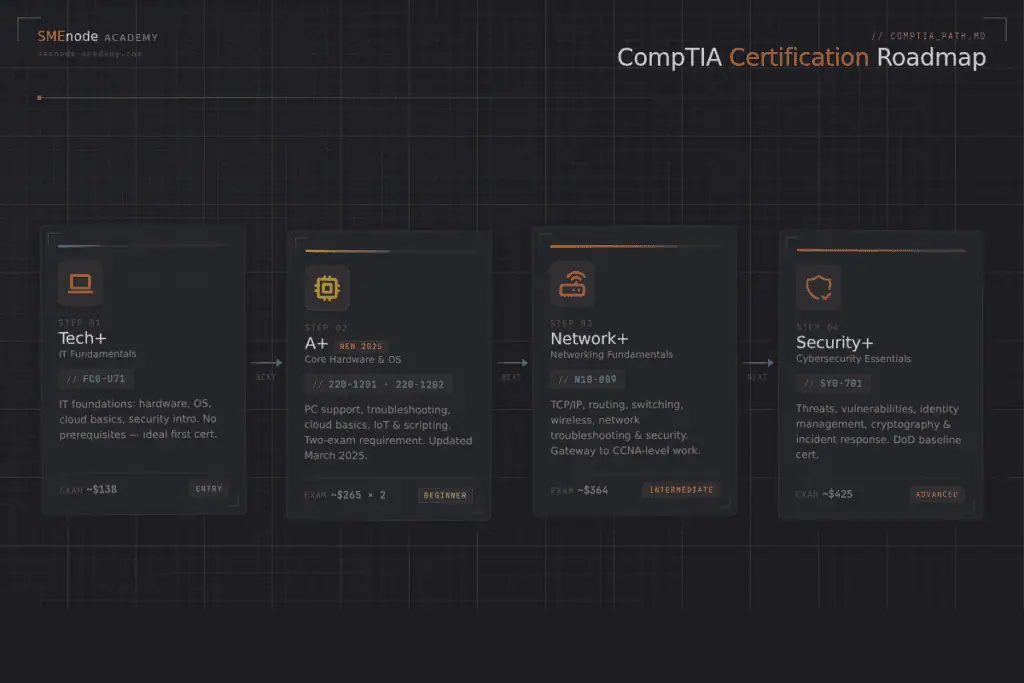
Tech+ is a starting point, not a destination.
Most people use it to get into a help desk or IT support role. From there, the typical path looks like this:
Networking track: Tech+ > CompTIA A+ > Network+ > CCNA
Security track: Tech+ > CompTIA A+ > Security+ > CompTIA CySA+
Cloud track: Tech+ > AWS Cloud Practitioner > AWS Solutions Architect
The salaries get significantly better as you move up. A junior help desk role might pay $45K-$55K. Pass your CCNA and that jumps to $80K+. Get to CCNP level and you’re looking at $120K+ in most markets.
That’s the bigger picture. Tech+ gets you in the door.
If you’re serious about moving into IT, the CompTIA Tech+ is a solid first cert. But passing it is one thing. Building a career in IT requires a structured path, hands-on practice, and mentorship from people who’ve done it.
At SMEnode Academy, our CompTIA courses are taught live by instructors with real-world experience, not pre-recorded videos from three years ago. You get live Q&A, hands-on labs, and free 1-on-1 mentorship through the whole programme.
Explore our CompTIA Training Courses at SMEnode Academy and find out which certification track is the right fit for where you want to go.
The CompTIA Tech+ (FC0-U71) is a solid entry point into IT. It covers six domains: IT Concepts, Infrastructure, Applications, Software Development, Databases, and Security. Infrastructure and Security together make up nearly half the exam.
To pass it:
The practice questions in this guide are a starting point. Work through every single answer explanation, not just the ones you got wrong. Understanding why a wrong answer is wrong is just as useful as knowing the right one.
You’ve got this. Study smart, not just hard.
We put together a printable Tech+ practice pack with 100+ questions, full answer explanations, and a score tracker by domain. It’s free.
Enter your email and we’ll send it straight to your inbox.
Get the Free PDF
Enter your email to download instantly.
No credit card. No course pitch. Just the study material.
It’s designed to be manageable for people new to IT, but you still need to study. Most people who fail underestimate the Security and Infrastructure domains. Plan four to eight weeks of consistent preparation.
Maximum 75 questions. The time limit is 75 minutes. That gives you about a minute per question, which is plenty as long as you’re not second-guessing yourself on every answer.
Yes. CompTIA offers online proctored exams through Pearson VUE. You can sit it from home as long as your setup meets the testing requirements.
Yes, especially if you have no other IT credentials. Employers use it as a baseline filter for entry-level roles. It’s also a requirement for some government and defence contractor positions in North America.
Tech+ (FC0-U71) is a single exam covering IT fundamentals broadly. A+ (Core 1 and Core 2) is two exams with much more depth in hardware, operating systems, and troubleshooting. A+ is the better choice if you’re targeting a help desk or technician role. Tech+ is better if you’re just starting out and want to confirm IT is the right path.