
Cat6e isn’t a real standard. Most Cat7 cable you’ll find online isn’t compliant Cat7 either.
That’s not a hot take. It’s what the test data shows when a Fluke field certifier gets plugged in. And it’s why so many network students, homeowners, and small business owners end up confused when they try to research this properly and keep hitting contradictory marketing claims.
Here’s what’s actually true: the official cable sequence is Cat5e → Cat6 → Cat6A → Cat8. Cat6e sits nowhere in that chain. Cat7, while it exists as an ISO standard, requires connectors you won’t find in a retail shop and is rarely specified in North America.
By the end of this guide, you’ll know exactly what each category delivers in real-world numbers, why Cat6e and consumer Cat7 are mostly marketing noise, and which cable professional installers actually spec for new builds in 2025.
What Is Cat6 Cable?
Cat6 is the most common ethernet cable in active use today, and for good reason. It’s been the baseline for commercial structured cabling for over 20 years and still earns its place in plenty of installations.
Officially defined in ANSI/TIA-568.2-E (revised October 2024) and ISO/IEC 11801, Cat6 delivers:
- 250 MHz bandwidth
- 1 Gbps at 100 metres (the full horizontal channel)
- 10 Gbps at up to 55 metres under ideal conditions
That last number is where most people get tripped up. Cat6 can do 10 Gigabit Ethernet, but only over shorter runs. Past 55 metres, alien crosstalk, interference from cables bundled alongside yours in the same cable tray, starts degrading performance. In a real-world tray with 20 or 30 cables, that ceiling can drop even lower. Not a hard failure. Just degradation that grows worse as you push the distance.
Cat6 typically ships as UTP (unshielded twisted pair): no foil, no braid, just the twisted pairs inside a PVC jacket. That’s fine for most offices and homes where there’s no significant electrical interference nearby.
Bulk material cost runs roughly $0.15-0.20 per foot. It’s cheap. That’s a big part of the appeal.
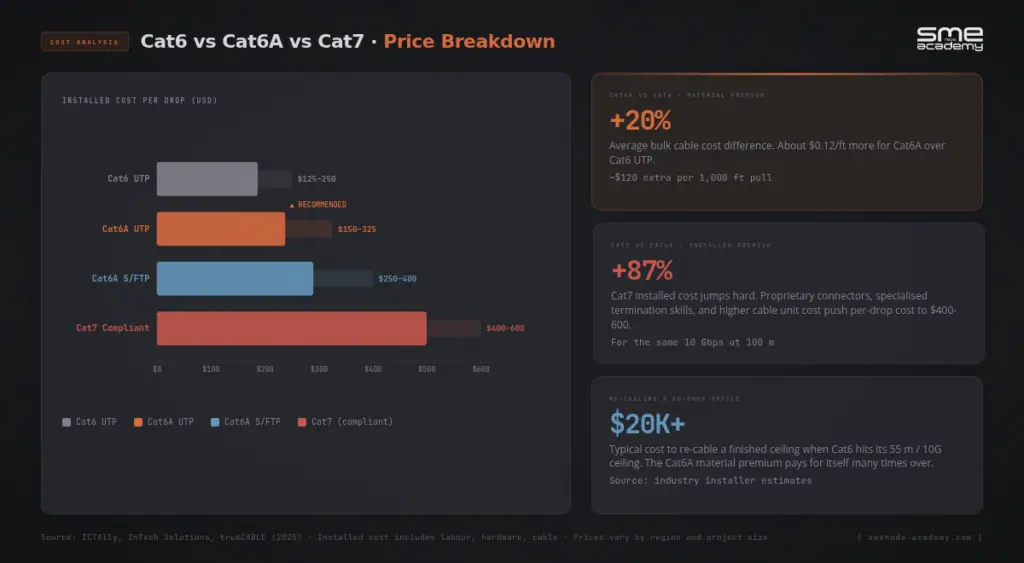
Cat6 makes sense for home installs where your internet plan tops out at 1 Gbps, for small office retrofits where every run stays under 40 metres, or anywhere cost matters more than future-proofing. It’s a real, tested standard. It works well in the right context.
Cat6 cabling standards are tested content in the CCNA 200-301 exam, specifically in the physical layer and infrastructure modules. If you’re working through the cert path, our CCNA certification guide covers what the full exam expects.
Ready to learn how physical layer design affects your entire network stack? Our live CCNA Networking course covers structured cabling, cable standards, and real-world deployment from the ground up, with a real instructor and hands-on labs. Check the schedule here.
Cat6e: The Standard That Doesn’t Exist
Let’s clear this up quickly.
There is no “Cat6e” in ANSI/TIA-568.2-E. There’s no Cat6e in ISO/IEC 11801. It doesn’t appear in any officially recognised cabling standard anywhere in the world.
Cat6e is a marketing label. Some cable manufacturers invented it to imply their product performs somewhere between Cat6 and Cat6A. The problem is that every manufacturer defines their own “Cat6e” numbers. Buy Cat6e from Brand A and you get something different from Brand B’s Cat6e. No shared spec, no test criteria, no certification path.
Here’s the real tell: run a Fluke DTX or similar field certifier on an installed Cat6e channel. The tool will report either a Cat6 or Cat6A result, because those are the only categories in the firmware. There is no Cat6e result. Whatever you paid extra for, it won’t appear on any certification report.
David, a cabling contractor in Ottawa, ran into this on a hotel renovation project. The spec sheet from his distributor described Cat6e as a meaningful upgrade over standard Cat6, enough that the hotel’s project manager asked for it specifically. David pulled and terminated 80 drops of Cat6e throughout the building. When he field-tested the installed runs, every single one came back as standard Cat6. The hotel paid a 15% premium on cable that performed identically to the cheaper option. When David pushed back, the distributor said: “Cat6e exceeds Cat6 spec internally.” That’s technically true of any cable built to tighter tolerances, and it still certifies as Cat6. The label means nothing.
What should you actually buy? Cat6 (a real, tested standard) or Cat6A (also real, and significantly more capable). Anything marketed as “Cat6e” deserves the same scepticism you’d give any product with a trademarked name instead of a standards body number.
Cat6A: The Real Upgrade
Cat6A is the cable professional installers actually recommend for almost every new install in 2025. The “A” stands for Augmented, and that name reflects a real performance improvement.
Cat6A was designed specifically to support 10GBASE-T (IEEE 802.3an), 10 Gigabit Ethernet over twisted copper at full distance. It achieves that with:
- 500 MHz bandwidth (double Cat6)
- 10 Gbps at the full 100 metres (no distance penalty)
- PoE++ support up to 90W without thermal buildup in bundled trays
That full-distance 10 Gbps is the practical difference from Cat6. Cat6 maxes out at 55 metres for 10 Gbps. Cat6A delivers the same speed across the complete horizontal channel, which means it fits standard commercial runs without any distance guesswork.
Here’s where the decision gets easy. Say you’re a network engineer designing the structured cabling for a new 60-seat office in Vancouver. Budget is tight, so the project manager wants to use Cat6 to save on materials. The material cost difference across 60 drops is maybe $400. But the building is also specifying Wi-Fi 7 access points, the kind that push over 5 Gbps of aggregate backhaul per AP when Multi-Link Operation is active. Cat6’s 55-metre ceiling for 10 Gbps means several AP runs, the ones from the IDF to ceiling-mounted APs, fall right in the problem zone. Eighteen months later, the IT manager is calling about slow wireless performance. Re-cabling a finished ceiling costs $15,000-25,000. The $400 in material savings didn’t hold up.
Cat6A bulk cable runs $0.20-0.35 per foot for UTP. Over a 60-drop project, the extra cost over Cat6 is roughly $400-600 in materials, with identical labour. For a cabling infrastructure designed to last 15-20 years, that’s a straightforward calculation. It’s also the kind of decision that separates engineers who get called back from those who don’t, which is exactly why infrastructure judgment like this is a core skill for network engineers.
ANSI/TIA-568.2-E, updated in October 2024, formalises PoE power delivery specifications and recognises Cat6A as the minimum recommended baseline for new commercial installations supporting Wi-Fi 7 APs and PoE++ devices. If you’re pulling cable for anything that’ll stay in the walls for more than a decade, Cat6A is the answer.
Cat7: Fast in Theory, Complicated in Practice
Cat7 looks impressive on a spec sheet:
- 600 MHz bandwidth
- 10 Gbps at 100 metres
- Mandatory S/FTP shielding (per-pair foil plus overall braided jacket)
But Cat7 has a fundamental problem that stops most North American projects before they start.
TIA and EIA don’t recognise Cat7. The standard exists only in ISO/IEC 11801 as “Class F,” a European specification. TIA never adopted it because the RJ-45 connector, the plug that’s been universal since the 1980s, physically cannot support 600 MHz. Cat7 requires a different connector entirely:
- GG45 (GigaGate 45): backward-compatible with RJ-45 at lower frequencies, adds four extra contacts to reach 600 MHz
- TERA: a proprietary format found mostly in manufacturing plants and specialised European infrastructure
This is where the consumer market gets messy.
Search for Cat7 on Amazon or in a retail electronics shop and you’ll find pages of results, all with standard RJ-45 plugs pre-crimped on both ends, priced at $0.50-0.90 per foot. Every single one of those is non-compliant. A cable with RJ-45 connectors cannot be Cat7 by specification. The connector doesn’t meet spec. Full stop.
Marcus, a small business owner in Calgary, bought 50 metres of “Cat7” patch cable from Amazon to connect his NAS to his 10G switch. He paid about $40, expecting a meaningful upgrade over his existing Cat6A runs. When a technician doing a later site visit tested the channel, it certified as standard Cat6A at best. Marcus paid a Cat7 premium for Cat6A performance, on a cable that can never be certified as Cat7, and that didn’t outperform the Cat6A he already had. That’s the consumer Cat7 market in one example.
Fluke Networks, the company behind the field testers used to certify professional installations, has documented this directly. They call it the “Cat7 conundrum”: the spec exists, compliant components are available, but the connector reality means almost nothing sold as Cat7 in the consumer or light commercial market is actually Cat7.
Where does Cat7 make sense? Heavy industrial environments with significant EMI, facilities near MRI machines, or European infrastructure where GG45 or TERA systems already exist. For a standard North American office, data centre, or home, Cat6A covers everything Cat7 promises on paper and uses connectors that every keystone jack, patch panel, and patch cord in the industry already supports.
Properly terminated Cat7 with GG45 connectors, the compliant kind, runs $400-600 per installed drop versus $150-325 for Cat6A. You get the same 10 Gbps over the same 100 metres. The case for Cat7 in a standard environment just doesn’t hold together.
Side-by-Side Comparison: Cat6 vs Cat6e vs Cat6A vs Cat7
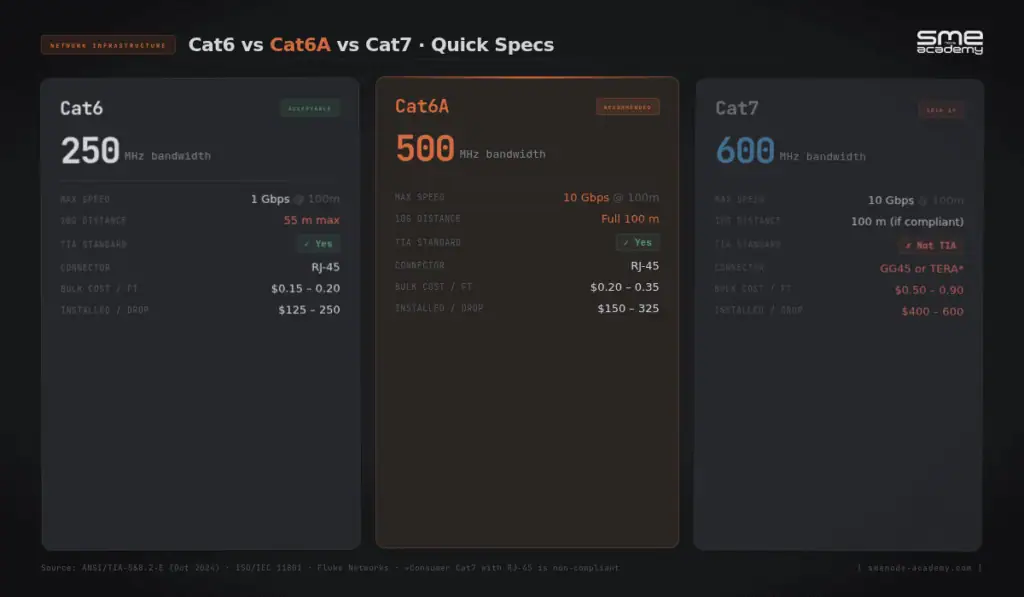
| Spec | Cat6 | Cat6e | Cat6A | Cat7 |
|---|---|---|---|---|
| Bandwidth | 250 MHz | Not applicable | 500 MHz | 600 MHz |
| Max speed | 10 Gbps (55 m) / 1 Gbps (100 m) | Certifies as Cat6 | 10 Gbps (100 m) | 10 Gbps (100 m) |
| TIA/EIA standard | Yes | No | Yes | No |
| ISO/IEC standard | Yes | No | Yes | Yes (Class F) |
| Standard connector | RJ-45 | RJ-45 | RJ-45 | GG45 or TERA |
| Default shielding | UTP | UTP | UTP or shielded | S/FTP mandatory |
| Bulk cost (USD/ft) | $0.15-0.20 | ~$0.20-0.30 | $0.20-0.35 | $0.50-0.90 |
| Installed cost per drop | $125-250 | ~$130-260 | $150-325 | $400-600 |
| Recommended for new builds | Acceptable | Skip it | Yes | Rarely |
UTP, FTP, STP, S/FTP: What the Shielding Codes Mean
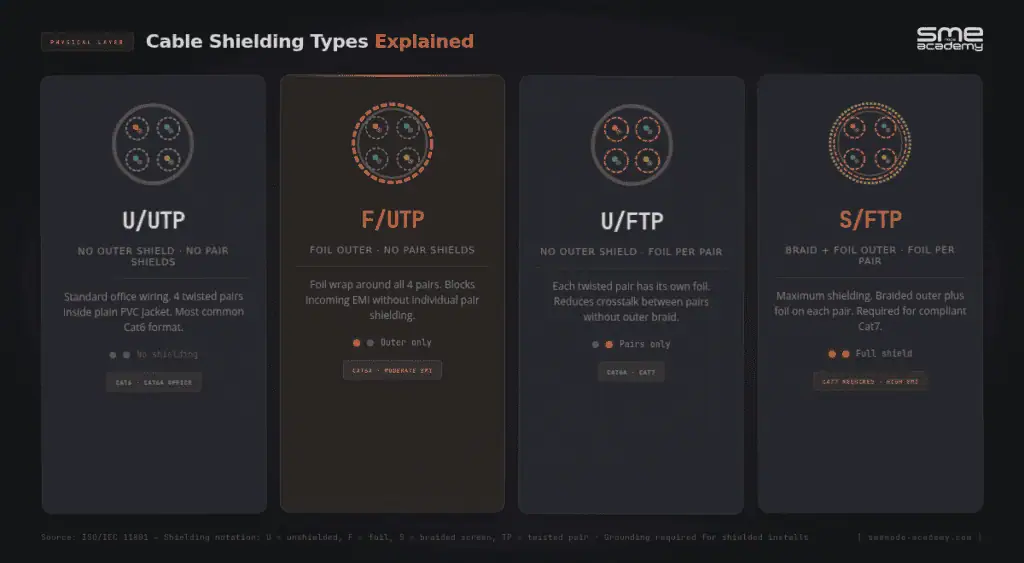
If you’ve seen these codes on cable packaging and skipped past them, here’s a quick decoder.
ISO/IEC 11801 names cables using a two-part code: outer jacket shield / inner per-pair shield.
- U/UTP: No outer shield, no pair shields. Standard Cat6 and Cat6A for most office environments.
- F/UTP: Foil outer jacket, unshielded pairs. Cat6A for moderate-EMI areas.
- U/FTP: No outer shield, foil on each individual pair. Common for Cat6A and Cat7.
- S/FTP: Braided outer jacket plus foil on each pair. Required for compliant Cat7. Used in high-EMI installations.
Does shielding help in a typical office? Honestly, not really. In a standard environment with normal electrical infrastructure, UTP and shielded cable deliver identical data performance. The interference shielding is designed to block simply isn’t present in most commercial buildings.
Shielding earns its cost when there’s actual interference: factory floors near large motors, rooms with dense fluorescent lighting, healthcare facilities near imaging equipment, or high-density cable trays in large data centres.
One catch worth knowing: a poorly grounded shielded installation can actually perform worse than UTP. Adding shielding means you also need shielded keystone jacks, shielded patch panels, and solid grounding at both ends of every run. Don’t add shielding without the rest of the system to back it up.
Which Cable Should You Use?
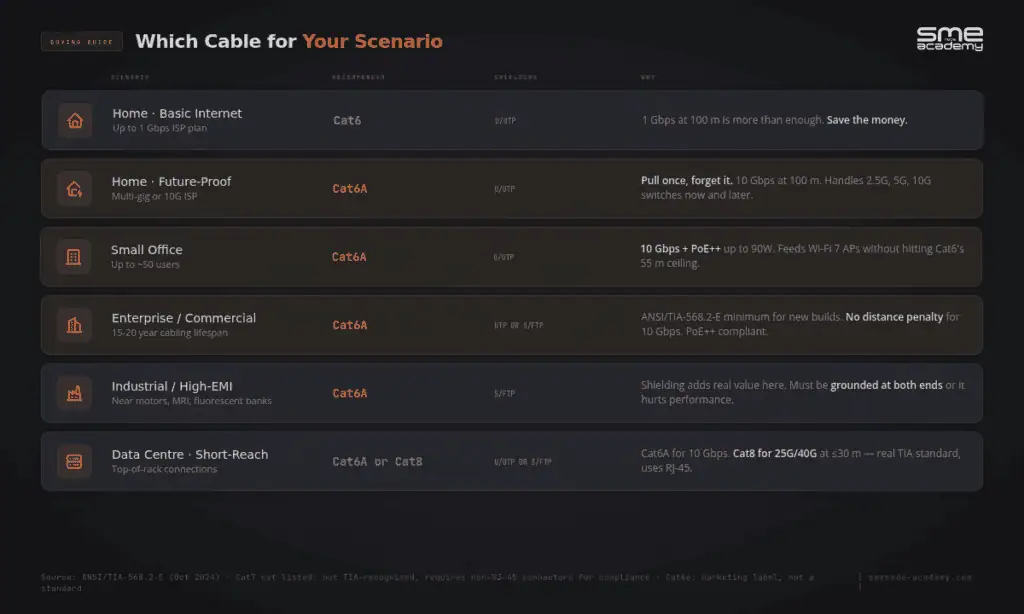
Here’s a straightforward breakdown by situation.
Home install, basic internet:
Cat6 UTP. Your internet plan is almost certainly under 1 Gbps. Cat6 handles that at the full 100-metre run length. No reason to spend more.
Home with multi-gig service or future-proofing:
Cat6A UTP. If you’re on a 2.5G or 10G ISP plan now, or think you might be in the next few years, pull Cat6A while you have access to the walls. It’s a one-time job.
Small office, up to ~50 users:
Cat6A UTP. Full 100-metre 10 Gbps runs, PoE++ support for access points and cameras, ANSI/TIA-568.2-E compliant. This is the standard professional recommendation.
Enterprise or commercial builds:
Cat6A (UTP or shielded depending on EMI environment). Designed for a 15-20 year structured cabling lifespan, full-distance 10 Gbps, no thermal issues under PoE++ loads. ANSI/TIA-568.2-E makes Cat6A the minimum baseline for new commercial infrastructure. Physical layer and infrastructure design like this sits in both CCNA and CCNP Enterprise exam objectives if you’re on the cert path.
Industrial or high-EMI environments:
Cat6A S/FTP. If there’s a specific reason to spec Cat7 (existing GG45 infrastructure, mandatory EMI requirements), budget for compliant connectors and installers who know the system. Don’t spec Cat7 without both.
Data centre short-reach:
Cat6A for 10 Gbps top-of-rack connections. Cat8 for 25G or 40G at distances under 30 metres. Cat8 is a real TIA standard, it uses RJ-45, and it avoids the connector problem Cat7 carries.
What Changed in ANSI/TIA-568.2-E (October 2024)
The latest revision of the North American structured cabling standard was published in October 2024, and a few items from it are worth knowing.
The update added DC resistance unbalance (DCRU) specifications for Cat5e, Cat6, and Cat6A. This directly affects how cleanly power is delivered over PoE. If you’re deploying PoE++ cameras, access points, or displays, your cable plant now needs to meet these specs to be considered fully compliant.
It also brought PoE power delivery requirements into Annex H, formalising Cat6A as the baseline for new commercial builds supporting modern PoE++ devices.
Cat6e and Cat7 received no recognition in this revision. Both remain outside TIA’s scope.
The Wi-Fi 7 context matters here. Wi-Fi 7 access points using Multi-Link Operation aggregate across 2.4 GHz, 5 GHz, and 6 GHz simultaneously. Real-world AP backhaul in a busy deployment can exceed 5 Gbps. Cat6A at 10 Gbps full-distance handles that without issue. Cat6’s 55-metre cap for 10 Gbps creates a real risk when typical office cable runs fall in the 40-80 metre range.
Source: ANSI/TIA-568.2-E Publication – TIA Online
Frequently Asked Questions
Is Cat6e a real cable standard?
No. Cat6e is a marketing term used by some cable manufacturers. There’s no Cat6e category in ANSI/TIA-568.2-E or ISO/IEC 11801. A professional field tester will certify a Cat6e cable as either Cat6 or Cat6A. Nothing in between exists in any certification standard.
Can Cat7 use RJ-45 connectors?
By specification, no. Compliant Cat7 requires GG45 or TERA connectors. Most consumer “Cat7” cables sold with RJ-45 plugs can’t meet the Cat7 spec. They behave as Cat6A at best and can’t be certified as Cat7. Fluke Networks has documented this directly.
Is Cat6A worth the extra cost over Cat6?
For most new installations, yes. The material cost difference is roughly $0.10-0.15 per foot. Across a typical project, that’s a small number against the cost of re-cabling in five to eight years. Cat6A supports 10 Gbps at the full 100-metre channel and meets the current ANSI/TIA-568.2-E commercial baseline.
What cable do I need for Wi-Fi 7 access points?
Cat6A. Wi-Fi 7 APs using Multi-Link Operation can push aggregate backhaul above 5 Gbps. Cat6A’s 10 Gbps full-distance ceiling handles that without issue. Cat6 risks being a bottleneck on longer office runs.
Do I need shielded cable for my office?
Not in most environments. Standard UTP Cat6A performs identically to shielded cable in a typical commercial space. Shielding adds real value near industrial equipment, imaging machines, or dense cable trays with high EMI. If you do add shielding, you need to ground it properly, otherwise it can hurt performance rather than help it.
Bottom Line
Cat6e is a marketing label. Skip it.
Cat7 with a standard RJ-45 plug isn’t compliant Cat7. That’s most of what’s sold as “Cat7” in retail and on Amazon.
Cat6 is a solid, well-defined standard that works well for home installs and shorter office runs at 1 Gbps. It’s cheap and reliable in the right context.
Cat6A is what professional installers spec for new builds. It delivers 10 Gbps over full 100-metre runs, handles Wi-Fi 7 backhaul, supports PoE++ without thermal issues, and meets the updated ANSI/TIA-568.2-E requirements. The material cost premium over Cat6 is minor against the cabling lifespan.
If you want to understand why these physical-layer decisions affect every other layer of your network, from PoE power budgets to wireless performance to data centre topology, that’s exactly what our live CCNA course covers. Real configurations, real equipment, with an instructor who answers your questions in real time.
Looking to go further? Our Network Engineer programme builds on these fundamentals into full enterprise network design, including physical infrastructure planning and the decision-making that matters on the job. You can also pair your studies with the SMEnode Labs networking workbook for hands-on lab exercises that reinforce the physical and logical layer concepts covered in this guide.
Sources: ANSI/TIA-568.2-E (October 2024); Fluke Networks, “What Ever Happened to Category 7”; ICC, “Difference Between Cat6 and Cat6e”; trueCABLE, “Cat6 vs Cat6A”; FS.com, “Running 10GBaseT over Cat6 vs Cat6A vs Cat7”; Cables and Kits, “Cat7 vs Cat6A.”