You’ve probably heard you can manage hundreds of network devices with a simple hosts.ini file. And technically? You can. Until someone swaps an IP address and nobody updates the file.
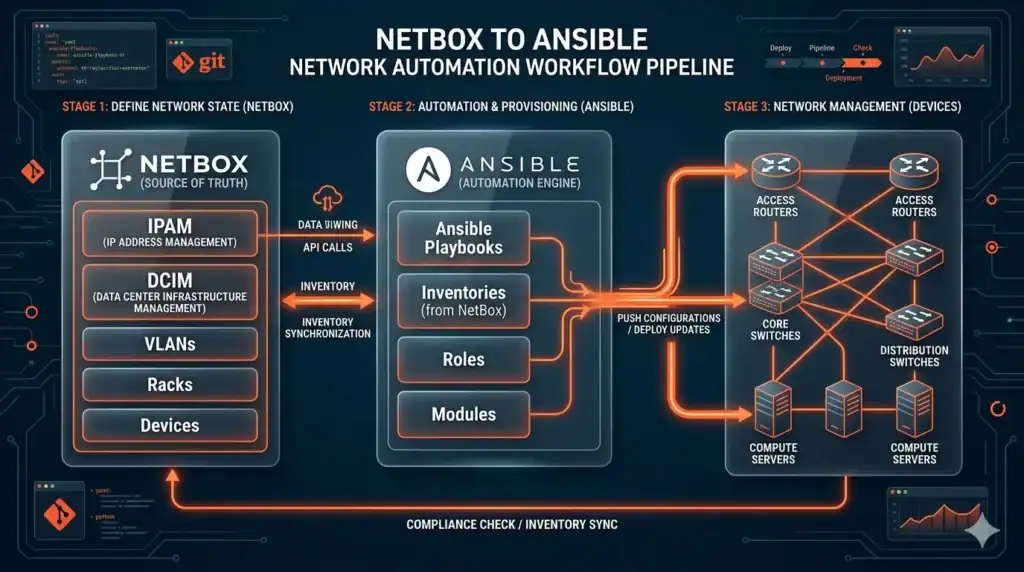
That’s where NetBox Ansible comes in. By connecting Ansible’s automation engine to NetBox as a dynamic inventory source, your playbooks always pull fresh, accurate device data. No stale entries. No missing switches. No guessing.
Here’s the short version. NetBox Ansible gives you a single source of truth for your inventory, pulled live from NetBox’s API every time you run a playbook. If you’re managing more than 50 devices, this setup isn’t optional anymore. It’s how modern network teams actually work.
In this guide, we’ll break down exactly how this integration works, how to set it up step by step, and why it matters for your team. Plus, we’ve got a free slide deck with production-ready config files you can copy-paste into your project today.
What Is the NetBox Ansible Dynamic Inventory?
NetBox Ansible is the pairing of two tools. NetBox, an open-source infrastructure resource modeling platform, and Ansible, the most popular automation engine for IT infrastructure. When you connect them, you use the nb_inventory plugin to pull device data directly from NetBox’s API instead of maintaining static inventory files.
Think of it this way. NetBox holds the truth about your network – every device, IP address, interface, and VLAN. The inventory plugin lets your playbooks tap into that truth automatically, without anyone touching a flat file.
Pretty simple concept. But the impact is huge.
NetBox as Your Single Source of Truth

NetBox was originally built by DigitalOcean’s engineering team. It’s now maintained by NetBox Labs and sits at version 4.x. The platform handles DCIM (racks, devices, cables), IPAM (IPs, VLANs, VRFs), and even multi-tenant configurations for MSP environments.
So why does this matter for this setup? Because NetBox stores everything your playbooks need – hostname, primary IP, platform type, device role, site location. And it stores device-specific variables through config contexts. That means your dynamic inventory doesn’t just pull the structure. It pulls the variables too.
No more scattered data across files, spreadsheets, and documentation. One place. One truth.
If you’re new to how Ansible inventories work in general, we’ve got a detailed breakdown in our Ansible inventory basics guide that covers static vs dynamic from the ground up.
Why the NetBox Ansible Plugin Beats Static Files
Most engineers start with a hosts.ini file. Makes sense when you’ve got 10 or 20 devices. But here’s the thing – networks grow. And static files don’t grow with them.
We see this all the time in our live automation classes. Someone’s managing 200+ devices with a flat file that was “last updated” three months ago. Half the IPs are wrong. A dozen decommissioned devices are still listed. And 15 new switches added last quarter? Nowhere in the file.
That’s inventory drift. And it breaks your automation before you even run a playbook.
The dynamic inventory solves this by querying NetBox at runtime. Every single run gets fresh data. Here’s how static and dynamic compare:
| Criteria | Static Inventory | Dynamic (NetBox Ansible) |
| Data Source | Manual INI/YAML file | NetBox API (auto-generated) |
| Update Method | Human edits the file | Pulled at runtime from API |
| Accuracy | Degrades over time | Always reflects current state |
| Scalability | Practical for <50 devices | Scales to thousands |
| Audit Trail | Depends on version control | Inherited from NetBox |
| CI/CD Fit | Requires manual sync | Native fit for GitOps |
The decision rule is straightforward. If you’ve got 50+ devices, multiple engineers, or a CI/CD pipeline, moving to a dynamic inventory isn’t a nice-to-have. It’s a requirement.
And if you’re building network automation skills from scratch, our CCNA automation training covers Ansible fundamentals with hands-on labs where you’ll actually build and test dynamic inventories yourself.
How to Set Up NetBox Ansible Step by Step
Setting up the integration takes about 15 minutes if you already have NetBox running. Three steps. That’s it.
Step 1: Install the NetBox Ansible Collection
First, install the official netbox.netbox collection from Ansible Galaxy. This gives you the nb_inventory plugin along with a bunch of useful modules for interacting with NetBox.
ansible-galaxy collection install netbox.netbox
Pin the version in your requirements.yml file – version 3.22 or newer is recommended. This collection has Red Hat certification for Ansible Automation Platform, so you know it’s production-grade.
Step 2: Configure API Access
Your NetBox Ansible setup needs an API token to talk to NetBox. Set two environment variables:
NETBOX_API – your NetBox instance URL, and NETBOX_TOKEN – a read-only API token. Always use read-only tokens for inventory queries. There’s no reason your automation needs write access just to pull device lists.
Quick security tip? Store these in your shell profile or, better yet, in Ansible Vault. Never hardcode tokens in your inventory config files.
Step 3: Build Your NetBox Ansible Inventory Config
This is where things get interesting. Create a file ending in nb_inventory.yaml – and yes, the filename matters. Ansible won’t recognize it as a NetBox inventory source without that naming convention.
Your config file tells the nb_inventory plugin how to query NetBox, how to group devices, and what variables to map. The key parameters include group_by (organize hosts by device role, site, platform), compose (map NetBox data to Ansible variables like ansible_network_os), and query_filters (only pull devices that have a primary IP assigned).
Sound complicated? It’s really not. The config file is usually 15-20 lines. But those 15 lines replace hundreds of lines of static inventory that someone has to maintain by hand.
If you’re working toward expert-level automation, our CCIE automation program goes deep into advanced inventory patterns, keyed_groups, and multi-site configurations.
FREE DOWNLOAD: Production-Ready NetBox Ansible Configs
This article covers the concepts. But if you want the actual config files you can drop into your project today, grab our free slide deck. 15 slides with production-ready code, architecture diagrams, caching configs, and a parameter cheat sheet.
Get the Free PDF
Enter your email to download instantly.
Real-World Network Automation Example with NetBox Ansible
Concepts are great. But what does this actually look like in production?
Here’s a common use case. You want to back up running configs from every router tagged “backup_enabled” in NetBox. Without dynamic inventory, you’d maintain a separate list of backup targets in a flat file. With the dynamic inventory, you just add a tag in NetBox and the device automatically shows up in your backup playbook.
The workflow is simple. Your nb_inventory config uses a query_filter that only pulls devices with the “backup_enabled” tag. Your playbook runs against all those devices. Need to add a new router to the backup job? Tag it in NetBox. Done.
No file edits. No pull requests to update the inventory. No chance of forgetting.
And here’s something most people miss – you can use –limit flags to narrow execution even further. Run backups for just routers, just a specific site, or just devices matching a regex pattern. The dynamic inventory gives you the full picture, and –limit lets you slice it however you need.
Want to build these kinds of automation workflows as a career? The automation engineer career track at SMEnode Academy covers real-world projects like this with live instruction and unlimited lab access.
Is NetBox Ansible Worth the Setup?
Short answer? If you’re past the hobby-project stage, yes.
This setup pays for itself the first time it prevents a failed automation run caused by stale inventory data. And honestly? That happens faster than most people expect.
Consider the math. Without caching, generating inventory for 1,000+ devices takes 10 to 30 seconds per playbook run. With inventory caching enabled (a simple config change), that drops to near-instant. AWX and Ansible Automation Platform users should set cache timeout to around 900 seconds for a good balance between freshness and performance.
The real value isn’t speed though. It’s trust. When every engineer on your team knows the inventory is accurate because it comes from one source of truth, you stop second-guessing your automation. You stop debugging phantom devices. You stop wasting hours on inventory drift.
That’s a big deal.
NetBox Ansible Best Practices for Production
After running this integration in production environments, here’s what actually matters:
Security first. Always use read-only API tokens. Always set validate_certs to true. Store tokens in environment variables or Ansible Vault, never in config files.
Filter aggressively. Use query_filters to scope your inventory. The most common filter? has_primary_ip: true. Devices without a primary IP in NetBox will break your playbooks. Filter them out before they cause problems.
Standardize your data. Your setup is only as good as your NetBox data. Standardize platform slugs (ios, nxos, eos), require primary IPs on all managed devices, and use config contexts consistently.
Verify before you run. Always check your inventory with ansible-inventory –graph before running playbooks against production. Missing hosts? The #1 cause is query_filters that are too restrictive. The #2 cause is devices without primary IPs in NetBox.
In our live network automation classes at SMEnode Academy, this is the #1 config mistake students make – they set up NetBox Ansible correctly but forget to assign primary IPs in NetBox. The plugin silently skips those devices, and suddenly half your network is invisible to Ansible.
Frequently Asked Questions
What is NetBox Ansible?
NetBox Ansible refers to the integration between NetBox (an open-source infrastructure modeling platform) and Ansible (an automation engine). The nb_inventory plugin queries NetBox’s API at runtime to build an accurate, current inventory with all device data and variables – replacing static hosts files entirely.
Do I need NetBox Ansible for small networks?
For networks under 50 devices with a single engineer, static inventory files work fine. But once you add more engineers, CI/CD pipelines, or cross 50+ devices, NetBox Ansible becomes the smarter choice. Inventory drift is inevitable with flat files, regardless of network size.
Which NetBox version works with the Ansible collection?
The netbox.netbox collection version 3.22+ supports NetBox 3.x and 4.x. For the best NetBox Ansible experience, use the latest NetBox 4.x release. Check the Ansible Galaxy page for the most current compatibility matrix.
How do I cache NetBox Ansible inventory queries?
Add cache settings to your nb_inventory.yaml file. Set cache to true, use the jsonfile cache plugin, and set a timeout between 300 and 3600 seconds depending on how often your network changes. For AWX and AAP environments, 900 seconds (15 minutes) is the recommended sweet spot.
Can I use NetBox Ansible with AWX or Ansible Automation Platform?
Yes. NetBox Ansible works with both AWX and Ansible Automation Platform. The netbox.netbox collection has Red Hat certification, so it’s fully supported. Just make sure to enable caching to reduce API load from frequent polling.
Bottom Line
Static inventory files had their time. But if you’re managing any real-world network with Ansible, NetBox Ansible is how you keep your automation accurate and your team sane.
The setup takes 15 minutes. The impact lasts as long as your network does. And once you see NetBox Ansible in action – pulling fresh, accurate device data from a single source of truth, every single run – you won’t go back to flat files. Ever.
Ready to level up your infrastructure automation skills? SMEnode Academy offers live, instructor-led courses covering everything from Ansible basics to advanced network automation patterns. Unlike pre-recorded courses, our live sessions let you ask questions in real-time, and every student gets free 1-on-1 mentorship throughout the program.
Don’t Start from Scratch
Get all the configs and architecture diagrams from this article in one slide deck – free download.
Get the Free PDF
Enter your email to download instantly.